
Local File Server Chrome 插件, crx 扩展下载
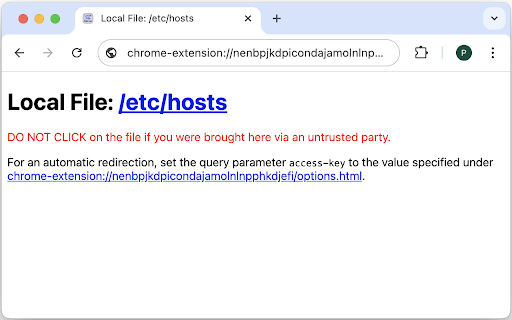
Serve local files via "http://localhost/" URLs.
The Local File Server extension enables web sites to link to local files via "http://localhost/" URLs. For security reasons, Chrome disables links to local files (i.e., "file://" links) in remote web pages. Some web services, like for instance Gmail, don't even render such links. Though, there are circumstances where such links are secure and desirable. For example, a process may want to send execution logs via email that contain links to local files. Thanks to this extension these links can be replaced with "http://localhost/" links that will be rendered by all web services, that won't be blocked by Chrome, and that the extension will redirect to the desired local file.
The syntax for local file links is "http://localhost/file.html?path=<file-path>[&access-key=<access-key>]", where <file-path> is the absolute path to the desired local file and <access-key> an optional confidential access key that enables the extension to automatically redirect to the local file. If the access key isn't provided or the one provided doesn't match the extension's access key, the extension renders a page with a "file://<file-path>" link and a warning to only click on the link if one was brought there via a trusted party.
When the extension is installed, a cryptographically secure access key is generated and stored in the extension. It can be viewed and changed on the extension's options page. The key must be kept confidential to prevent malicious actors from being able to craft valid links to local files. The key should only be shared with trusted parties that need to create links to local files.
| 分类 | 🛠️工具 |
| 插件标识 | nenbpjkdpicondajamolnlnpphkdjefi |
| 平台 | Chrome |
| 评分 |
★★★★☆
4
|
| 评分人数 | 62 |
| 插件主页 | https://chromewebstore.google.com/detail/local-file-server/nenbpjkdpicondajamolnlnpphkdjefi |
| 版本号 | 1.0.2 |
| 大小 | 14.3KiB |
| 官网下载次数 | 93 |
| 下载地址 | |
| 更新时间 | 2024-07-18 00:00:00 |
CRX扩展文件安装方法
第1步: 打开Chrome浏览器的扩展程序
第2步:
在地址栏输入: chrome://extensions/
第3步: 开启右上角的【开发者模式】
第4步: 重启Chrome浏览器 (重要操作)
第5步: 重新打开扩展程序管理界面
第6步: 将下载的crx文件直接拖入页面完成安装
注意:请确保使用最新版本的Chrome浏览器
同类插件推荐

Localhost Automate
Converts file URLs to http://localhost for develop

Content Server Browser Web Extension
Content Server Browser Web Extension for ChromeThe
Local File Server
Serve local files via "http://localhost/"
直链下载
使用 直链下载 来实现 本地文件直接共享 和 局域网文件传输 之间的高效传输。探索我们的谷歌Chro

File Links Opener
Open links to local files and folders (file:///) i
在 Google Chrome™ 中打开本地文件
chrome 禁止打开本地文件的链接,但这个扩展允许你打开它们。使用此扩展程序,您将能够直接在 Go

Enable local file links
Make it possible to open by click a link to a loca

Open local folder by explorer
Open local folder in explorer from Chrome[function

Open local file links
Since opening local file links is disabled in Chro

Live Server Web Extension
Makes your existing server live. This is a browser

Server Spy
all info about the serverThis extension provides H

点击链接直接打开本地文件
点击网页内的超链接,并可以使用 Native Messaging 直接打开本地文件。此扩展程序允许您

Local Explorer - Open File Links in Chrome
直接在公司网站或本地主机站点中打开指向硬盘、公司共享文件夹、映射网络驱动器的本地文件链接。Enabl