
sGTM - add X-Gtm-Server-Preview Header Chrome 插件, crx 扩展下载
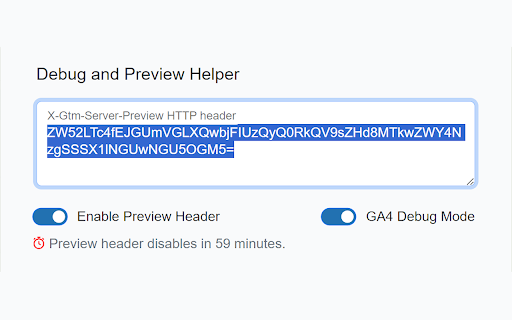
GA4 & Server-Side Tag Manager debugging helper. This tool helps debug your tracking setup with two key features:
1. It adds the…
GA4 & Server-Side Tag Manager debugging helper. This tool helps debug your tracking setup with two key features:
1. It adds the X-Gtm-Server-Preview header to all requests. While there are other "add header value" plugins available, they can cause issues if left enabled, leading to unpredictable behavior when working on another sGTM. This extension includes an auto-deactivation feature: it automatically disables itself after one hour, ensuring a seamless and hassle-free debugging experience.
2. It adds a _dbg=1 parameter to all GA4 requests to enable debug mode for all GA4 requests, making it very simple to debug GA4.
TL;DR:
Add a sGTM preview header value to all requests or enable debug mode for GA4.
| 分类 | 💻开发者工具 |
| 插件标识 | noalljmmmkeagbllkcnpklbogbogmdka |
| 平台 | Chrome |
| 评分 |
★★★★☆
4.9
|
| 评分人数 | 18 |
| 插件主页 | https://chromewebstore.google.com/detail/sgtm-add-x-gtm-server-pre/noalljmmmkeagbllkcnpklbogbogmdka |
| 版本号 | 1.1.0 |
| 大小 | 680KiB |
| 官网下载次数 | 185 |
| 下载地址 | |
| 更新时间 | 2024-09-27 00:00:00 |
CRX扩展文件安装方法
第1步: 打开Chrome浏览器的扩展程序
第2步:
在地址栏输入: chrome://extensions/
第3步: 开启右上角的【开发者模式】
第4步: 重启Chrome浏览器 (重要操作)
第5步: 重新打开扩展程序管理界面
第6步: 将下载的crx文件直接拖入页面完成安装
注意:请确保使用最新版本的Chrome浏览器
同类插件推荐
sGTM - add X-Gtm-Server-Preview Header
GA4 & Server-Side Tag Manager debugging helper

Consent Mode Inspector by InfoTrust
Check the status of Consent Mode, display gcs &

GTM Plus
GTM Plus enables hotkeys and the utility features

BigQuery Plus
Enhances the BigQuery development and data explora

dlPusher
Built with GA4 testing and debugging in mind, dlPu

GTM Variable Builder
From Chrome Developer Console, highlight elements

ObservePoint Debugger
Troubleshoot analytics tags, variables, events, co

GA4 Fixer
Patch holes in GA4 for better reporting. Adds '

Datalayer Checker
The easiest way to debug and check the dataLayer i

dataslayer
Debug and test tag management (Google Tag Manager,

GTM Sonar
Debug your page template to see if it works with G

UET Tag Helper (by Microsoft Advertising)
This extension helps to identify issues in Microso

Adswerve - dataLayer Inspector+
DataLayer Tools for Digital AnalystsThe Adswerve d