
Readsy Chrome 插件, crx 扩展下载

A tool to help users read text more easily by highlighting key parts of speech
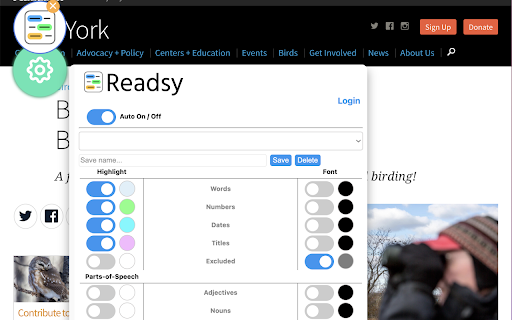
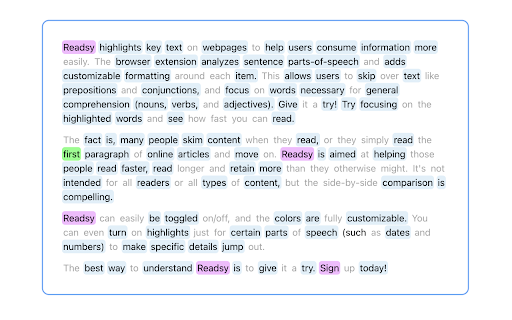
Readsy parses text on webpages to determine each text item's part-of-speech and then adds user directed background highlighting or font color shading around each word based on its classification type. The aim is to allow users to skim through material faster than normal by emphasizing parts-of-speech such as nouns, verbs, and adjectives, while de-emphasizing parts-of-speech such as prepositions and conjuctions.
Users can change which parts-of-speech are highlighted, change the color of the highlights, and save their own color templates.
Readsy does not run automatically. Instead, a floating button is added to the browser window in the top left corner which a user can click on to execute the part-of-speech parsing. This takes all the text on the page and sends it to an API which parses through all of the text and sends back a data-object containing each word and its classification. Readsy then takes this data-object, parses through the page HTML and encapsulates each text-item with the appropriate classification.
| 分类 | 📝工作流程与规划 |
| 插件标识 | nopgbkabhipfhbciolfjhmkflphjfkca |
| 平台 | Chrome |
| 评分 |
★★★★☆
4.2
|
| 评分人数 | 20 |
| 插件主页 | https://chromewebstore.google.com/detail/readsy/nopgbkabhipfhbciolfjhmkflphjfkca |
| 版本号 | 1.0.5 |
| 大小 | 146KiB |
| 官网下载次数 | 866 |
| 下载地址 | |
| 更新时间 | 2022-10-17 00:00:00 |
CRX扩展文件安装方法
第1步: 打开Chrome浏览器的扩展程序
第2步:
在地址栏输入: chrome://extensions/
第3步: 开启右上角的【开发者模式】
第4步: 重启Chrome浏览器 (重要操作)
第5步: 重新打开扩展程序管理界面
第6步: 将下载的crx文件直接拖入页面完成安装
注意:请确保使用最新版本的Chrome浏览器
同类插件推荐

Readima
Readima simulates many reading techniques such as

Friday Go
The best 1st search resultFriday is your personal

BeeLine Reader PDF Viewer
Make PDFs easier to read using BeeLine Reader'

Testing Reading Speed
Read at double or triple your normal speed.Read at

jetzt
Speed Readingjetzt is a speed-reader extension for

Sprint Reader - Speed Reading Extension
Speed reading made easy, train yourself to read 18
Readsy
A tool to help users read text more easily by high

BeanShot: Capture Stunning Screenshots Effortlessly
Taking Beautiful Screenshots Has Never Bean That E

BeeLine Reader
BeeLine helps you read more quickly and easily. Tr

Suggesty
Get human-like answers powered by GPT-3 to your Go

Gimme Summary - Get summary using ChatGPT AI
Summarize articles on the web using ChatGPT AIGene

Reeader - Minimal reader with speed reading
A simple and minimal way to read articles faster.R

eesel: ChatGPT document search
ChatGPT powered new tab search for Google Docs, No