
Github Active Forks Chrome 插件, crx 扩展下载
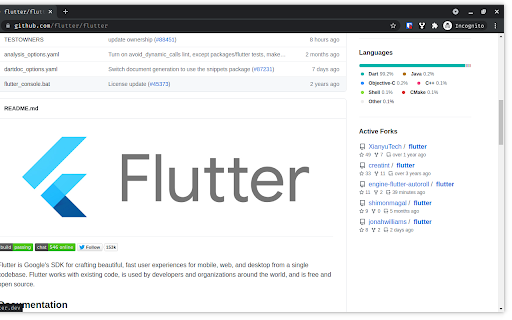
Adds an active forks section on a Github Page
Open Source Chrome Extension that adds an active forks section on a Github Repository Page
Repo: https://github.com/yashx/github-active-forks
Features
1. Select the number of forks you want to see. (Min 1 and Max 100)
2. Sort forks of the repository by most stared, last commit or most sub forks.
3. No additional Github API calls are made when the above mentioned options are changed so you can modify them without worrying about rate limits.
| 分类 | 💻开发者工具 |
| 插件标识 | oflkkabfokadmncdbhdggeedngllccak |
| 平台 | Chrome |
| 评分 |
★★★★★
5
|
| 评分人数 | 1 |
| 插件主页 | https://chromewebstore.google.com/detail/github-active-forks/oflkkabfokadmncdbhdggeedngllccak |
| 版本号 | 0.0.3 |
| 大小 | 170KiB |
| 官网下载次数 | 215 |
| 下载地址 | |
| 更新时间 | 2022-03-19 00:00:00 |
CRX扩展文件安装方法
第1步: 打开Chrome浏览器的扩展程序
第2步:
在地址栏输入: chrome://extensions/
第3步: 开启右上角的【开发者模式】
第4步: 重启Chrome浏览器 (重要操作)
第5步: 重新打开扩展程序管理界面
第6步: 将下载的crx文件直接拖入页面完成安装
注意:请确保使用最新版本的Chrome浏览器
同类插件推荐

Active Forks
Show Active Forks for any GitHub project.This exte

Forks Diff Counter for GitHub
This extension will show commits behind and ahead

GitHub Browser Extension
Make GitHub more usable for project managementBrow

Github BFF: Better Fork Finder
Alerts you when there is a more active fork of the

Git flow (for Github)
Adds functionality to Github for working with the

Github Sidebar
Make shortcuts to repositories you frequently use

GitHub Repository Explorer
Access the github repositories you've visited

Repositree
Browser Extension that helps to explore Github rep

Github-Editors
Adds useful buttons on repos' homepage like VS
Github Active Forks
Adds an active forks section on a Github PageOpen

Github to vscode
Quickly open github repos with vscode.dev or clone

Lovely forks
Show notable forks of GitHub projects.An extension

GitRec
A recommender system for GitHub repositories based