
SMB Dark Mode Chrome 插件, crx 扩展下载
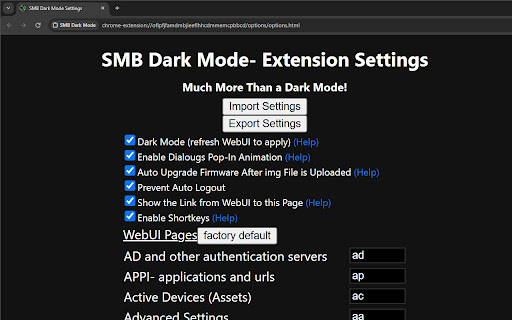
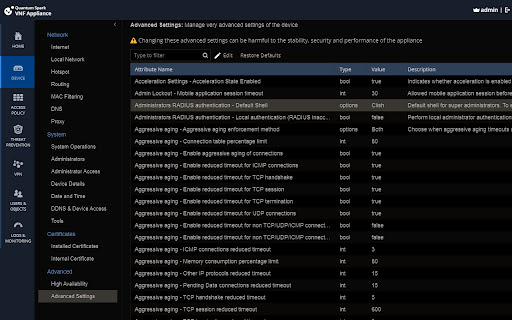
This extension enables dark mode for the Check Point SMB WebUI and includes various other WebUI hacks
DISCLAIMER: This is not an official extension by Check Point Software
Full list of features (customizable in the extension's Options page):
- Dark mode (of course!) and other minor style enhancements (e.g. dialogs pop-in animation)
- Shortkeys for navigating between the WebUI pages
- Prevent auto-logout from WebUI
- Automatic version upgrade after the img file is uploaded
====== Change Log ======
* 3.1.*- css enhancements for R81.10.15
* 3.0.5-3.0.8- more css enhancements
* 3.0.4- more css enhancements, fix the issue of shortkeys being applied while the main search box is in focus
* 3.0.3- some css enhancements
* 3.0.2- change default key for IA to "ia", move the WebUI Options page link a little so that it does not overlap the SMP connections indicator
* 3.0.1:
- add shortkeys for TP settings page, a shortkey per section (default shortkey for IPS Protections List was changed from "ip" to "iP". "ip" is now used for IPS settings).
- prevent the extension db from being unnecessarily loaded in non-WebUI pages
* 3.0.0:
- Introducing an Option Page with support for importing/exporting settings (a new "storage" permission is now required by the extension)
- option to disable dark mode without having to disable the extension altogether
- option to avoid auto log-out
- shortkeys support (hotstrings) for navigating between WebUI pages
- option to enable/disable the pop-in dialogues animation introduced in previous version
- option to auto install an image after its upload
- option to hide the link from WebUI to the Options page
---------------
* 2.0.4: pop-in animation for dialogues, css enchantments for R81.10.10 (login page image, svg images/icons, top bar and more)
* 2.0.3: darken and blur background when dialogues are open
* 2.0.2: support dark mode also when the Chrome flag "#enable-force-dark" is enabled
---------------
| 分类 | ⚙️功能性 |
| 插件标识 | oflpfjfamdmbjieeflhhcdmmemcpbbcd |
| 平台 | Chrome |
| 评分 |
☆☆☆☆☆
0
|
| 评分人数 | 3 |
| 插件主页 | https://chromewebstore.google.com/detail/smb-dark-mode/oflpfjfamdmbjieeflhhcdmmemcpbbcd |
| 版本号 | 3.1.1 |
| 大小 | 29.33KiB |
| 官网下载次数 | 47 |
| 下载地址 | |
| 更新时间 | 2025-01-25 00:00:00 |
CRX扩展文件安装方法
第1步: 打开Chrome浏览器的扩展程序
第2步:
在地址栏输入: chrome://extensions/
第3步: 开启右上角的【开发者模式】
第4步: 重启Chrome浏览器 (重要操作)
第5步: 重新打开扩展程序管理界面
第6步: 将下载的crx文件直接拖入页面完成安装
注意:请确保使用最新版本的Chrome浏览器
同类插件推荐

APPS RUN THE WORLD Technographics
Unleash the power of APPS RUN THE WORLD Firmograph
BlaCKout
Enable deep dark mode for web pages and dev tools.

Credit Repair Programs That Work
Repair Your Own Credit Without Huge or Monthly Fee

GA/GSC dark theme (Pure CSS Injection)
Analytics and Search Console dark theme (Pure CSS
SMB Dark Mode
This extension enables dark mode for the Check Poi

SAML to AWS STS Keys Conversion Multi Profile
Generates credential/config file with multiple AWS
DeepVault
Verify your files with DeepVaultDeepVault Extensio

Bokoblin Extension
Donation companion for Kinstone Events. Track dona
StackOverflow Tweaks Tool
A tool to tweak the StackOverflow UI and boost you

Ultra OTP
This is a companion to the Ultra OTP web app. Use

Reddit Unlock
Browse privated reddits during the 2023 protestBro
Rakuten TV Ad Skipper | Ad Blocker
Automatically skip and disable ads on Rakuten TV.&

ASTR Browser Companion: Discover affirmations
The best way to get motivated and discover new ins