
SAML to AWS STS Keys Conversion Multi Profile Chrome 插件, crx 扩展下载
Generates credential/config file with multiple AWS STS Keys after logging in to AWS webconsole using SSO (SAML 2.0).
Overview
Generates a credentials (and an optional config) file with AWS STS Keys after logging in to AWS webconsole using SSO (SAML 2.0). It leverages 'assumeRoleWithSAML' API.
Google Chrome Extension which converts a SAML 2.0 assertion to AWS STS Keys (temporary credentials -> AccessKeyId, SecretAccessKey and SessionToken).
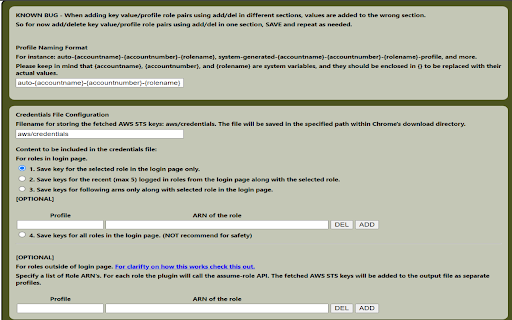
This extensions allows you to save keys in different configurations.
1.save keys for recent role logins (up to a maximum of 5).
2.save keys for user provided roles only.
3.save keys for all roles on the login page.
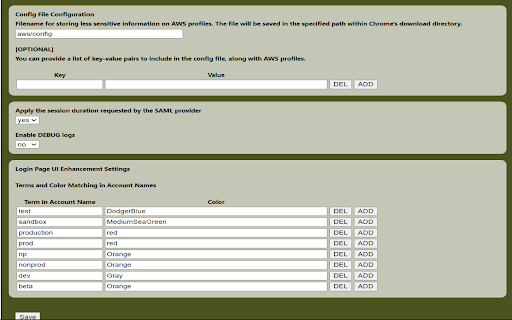
Also have the ability to store a configuration (config) file for storing less sensitive information and add optional keys for this file like region, ca-bundle,....
Also this provides some login page improvements like:
1.Option to configure accounts by color based on a specific term.
2.Optimized the Login Page UI by removing the logo (option to restore it will be available in future updates).
3.Aligned roles horizontally on the Login Page to prevent scrolling and reduce strain on engineers' hands, fingers, and wrists (option to revert to the previous layout will be available in future updates).
4.Replaced radio buttons with role buttons on the Login Page to eliminate extra clicks and enhance user experience (option to switch back to radio buttons will be available in future updates).
5.Moved the Recent Logins section to the top of the Login Page and added the last login time for improved visibility.
| 分类 | 📝工作流程与规划 |
| 插件标识 | nhcoglopkiacbogcjdcbhooedkaddimi |
| 平台 | Chrome |
| 评分 |
☆☆☆☆☆
0
|
| 评分人数 | 2 |
| 插件主页 | https://chromewebstore.google.com/detail/saml-to-aws-sts-keys-conv/nhcoglopkiacbogcjdcbhooedkaddimi |
| 版本号 | 3.3.1 |
| 大小 | 529KiB |
| 官网下载次数 | 168 |
| 下载地址 | |
| 更新时间 | 2023-07-10 00:00:00 |
CRX扩展文件安装方法
第1步: 打开Chrome浏览器的扩展程序
第2步:
在地址栏输入: chrome://extensions/
第3步: 开启右上角的【开发者模式】
第4步: 重启Chrome浏览器 (重要操作)
第5步: 重新打开扩展程序管理界面
第6步: 将下载的crx文件直接拖入页面完成安装
注意:请确保使用最新版本的Chrome浏览器
同类插件推荐

Script Tag Converter
"Script Tag Converter" is a handy Chrome

SMB Dark Mode
This extension enables dark mode for the Check Poi
SAML to AWS STS Keys Conversion Multi Profile
Generates credential/config file with multiple AWS

Bokoblin Extension
Donation companion for Kinstone Events. Track dona

AWS SAML Keys
Generate AWS access keys from a SAML login to the

SAML Assertion to AWS STS Assumption
Assumes an STS role and produces usable session cr

AWS AlwaysON
Stay logged in to AWS console and get STS credenti

My Web Routine - Goodbye bookmarks
Optimize your morning productivity by automatizing
StackOverflow Tweaks Tool
A tool to tweak the StackOverflow UI and boost you

AWS Account Name Finder
For SSO-based AWS accounts, display the Account Na

SAML to AWS STS Keys Conversion
Generates file with AWS STS Keys after logging in

ASTR Browser Companion: Discover affirmations
The best way to get motivated and discover new ins

AWS SSO Auto-Expand Accounts
Tired of clicking to expand an AWS SSO account to