
AWS AlwaysON Chrome 插件, crx 扩展下载
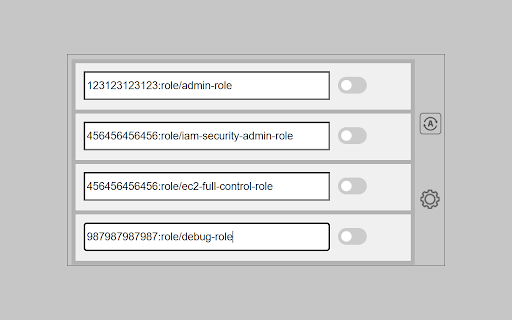
Stay logged in to AWS console and get STS credentials for CLI access.
This extension enhances the daily work with AWS when using Google Workspace (formerly GSuite) as it's Identity Provider.
Assuming you already have everything configured on both sides, this extension will help you with the following:
- Keep your AWS Web Console session refreshed. You will not have to press the AWS link in the Google apps section every hour.
- Get temporary STS credentials for CLI access (Replacing tools like aws-google-auth)
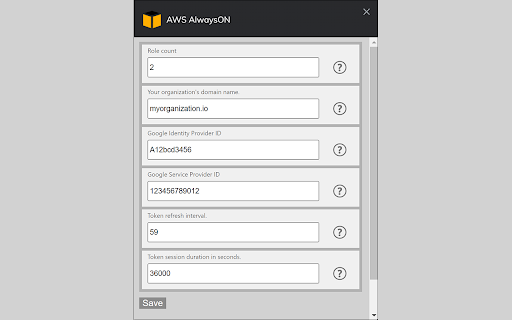
After installing this extension you need to configure multiple options to get the extension to work properly. Each property has an info tooltip which will explain everything in more detail.
This project is completely open source, so you can check it for any security concerns you might have.
v1.2.1
- Updater client now supports both Windows and Linux. Check the GIthub page for more info.
- You can now select the name of the SAML Provider you set in AWS. It was statically set to 'gsuite' till now.
- Default values for options are now set each time you start the extension and not only on the first run.
Full changelog available in GitHub.
| 分类 | 📝工作流程与规划 |
| 插件标识 | lfplgkokagjgodoeojaodphmjdhlpega |
| 平台 | Chrome |
| 评分 |
★★★★☆
4.8
|
| 评分人数 | 4 |
| 插件主页 | https://chromewebstore.google.com/detail/aws-alwayson/lfplgkokagjgodoeojaodphmjdhlpega |
| 版本号 | 1.2.1 |
| 大小 | 124KiB |
| 官网下载次数 | 232 |
| 下载地址 | |
| 更新时间 | 2023-01-22 00:00:00 |
CRX扩展文件安装方法
第1步: 打开Chrome浏览器的扩展程序
第2步:
在地址栏输入: chrome://extensions/
第3步: 开启右上角的【开发者模式】
第4步: 重启Chrome浏览器 (重要操作)
第5步: 重新打开扩展程序管理界面
第6步: 将下载的crx文件直接拖入页面完成安装
注意:请确保使用最新版本的Chrome浏览器
同类插件推荐

idpawssamlinterceptor
This extention intercepts SAML workflow between yo

SAML Assertion to AWS STS Assumption
Assumes an STS role and produces usable session cr

Simple AWS Launcher
Simple popup launcher for hundreds of AWS services
AWS AlwaysON
Stay logged in to AWS console and get STS credenti

Mixpanel Tools
A debugger tool helps to intercept mixpanel events

AWS Search Extension
A search-extension for quick, fuzzy-search results

AWS Navbar Region Color
Change AWS's navbar color depending on the reg

AWS Account Helper
Shows an extra header to identify the current AWS
AWS SSO Extender
Organize access to the AWS console & other AWS

Extension for AWS SSO
This extension is for AWS Single Sign-On (AWS SSO)

SAML to AWS STS Keys Conversion
Generates file with AWS STS Keys after logging in

Cloud Pegboard AWS Console Enhancer
Supercharge your AWS consoleOur free extension mak

Refined GitHub
Simplifies the GitHub interface and adds useful fe