
SAML to AWS STS Keys Conversion Chrome 插件, crx 扩展下载
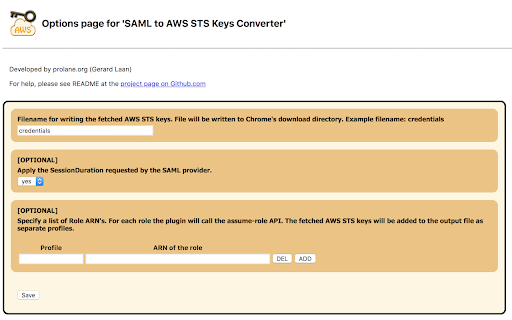
Generates file with AWS STS Keys after logging in to AWS webconsole using SSO (SAML 2.0). It leverages 'assumeRoleWithSAML' API.
Google Chrome Extension which converts a SAML 2.0 assertion to AWS STS Keys (temporary credentials -> AccessKeyId, SecretAccessKey and SessionToken).
### Why this Chrome Extension? ###
If you don't have any user administration setup within AWS Identity & Access Management (IAM) but instead rely on your corporate user directory, i.e. Microsoft Active Directory. Your company uses a SAML 2.0 Identity Provider (IDP) to log in to the AWS Web Management Console (Single Sign On). Then this Chrome Estension if for you!
You run into trouble as soon as you would like to execute some fancy scripts from your computer which calls the AWS API's. When sending a request to the AWS API's you need credentials, meaning an AccessKey and SecretKey. You can easily generate these keys for each user in AWS IAM. However, since you don't have any users in AWS IAM and don't want to create users just for the sake of having an AccessKey and SecretKey you are screwed. But there is a way to get temporary credentials specifically for your corporate identity.
The Security Token Service (STS) from AWS provides an API action assumeRoleWithSAML. Using the SAML Assertion given by your IDP the Chrome Extension will call this API action to fetch temporary credentials. (AccessKeyId, SecretAccessKey and SessionToken). This way there is no need to create some sort of anonymous user in AWS IAM used for executing scripts. This would be a real security nightmare, since it won't be possible to audit who did what. This Chrome Extension however will make it super easy for you to just use your corporate identity for executing scripts calling AWS API's.
| 分类 | 💻开发者工具 |
| 插件标识 | ekniobabpcnfjgfbphhcolcinmnbehde |
| 平台 | Chrome |
| 评分 |
★★★★☆
4.5
|
| 评分人数 | 12 |
| 插件主页 | https://chromewebstore.google.com/detail/saml-to-aws-sts-keys-conv/ekniobabpcnfjgfbphhcolcinmnbehde |
| 版本号 | 3.3 |
| 大小 | 157KiB |
| 官网下载次数 | 10000 |
| 下载地址 | |
| 更新时间 | 2023-03-21 00:00:00 |
CRX扩展文件安装方法
第1步: 打开Chrome浏览器的扩展程序
第2步:
在地址栏输入: chrome://extensions/
第3步: 开启右上角的【开发者模式】
第4步: 重启Chrome浏览器 (重要操作)
第5步: 重新打开扩展程序管理界面
第6步: 将下载的crx文件直接拖入页面完成安装
注意:请确保使用最新版本的Chrome浏览器
同类插件推荐

CloudKeeper - Credential Helper
AWS SSO External AWS Account - STS Keys GeneratorI

SAML to AWS STS Keys Conversion Multi Profile
Generates credential/config file with multiple AWS

AWS SAML Keys
Generate AWS access keys from a SAML login to the

Chrome AWS SAML Token Expiry Reminder
Re-authenticate with AWS federated ADFS (SAML) cre

aws-launcher
The easiest way to launch the console page of AWS

idpawssamlinterceptor
This extention intercepts SAML workflow between yo

SAML Assertion to AWS STS Assumption
Assumes an STS role and produces usable session cr
Console Recorder for AWS
Records actions made in the AWS Management Console

AWS Sidebar
AWS Console Navigation Sidebar for ChromeImproved
SAML to AWS STS Keys Conversion
Generates file with AWS STS Keys after logging in

AWS Extend Switch Roles
Extend your AWS IAM switching roles. You can set t

SAML Message Decoder
Collects and displays SAML messagesThis tool helps

SAML-tracer
A debugger for viewing SAML messagesA tool for vie