
Simple AWS Launcher Chrome 插件, crx 扩展下载
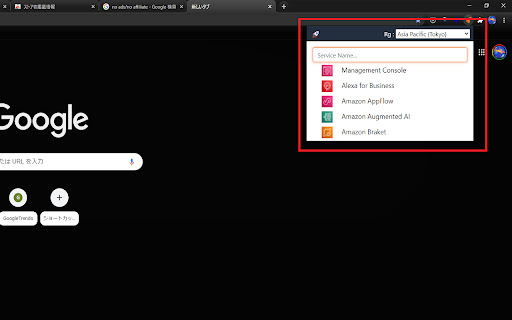
Simple popup launcher for hundreds of AWS services. Just press ctrl(cmd)+shift+L, or click an icon to open.
Introducing our simple popup launcher for accessing hundreds of AWS services on Chrome. With just a press of ctrl(cmd)+shift+L or a click of an icon, you can open the launcher and easily access your desired service without the need for mouse controls.
For instance, to open the S3 console, simply press "ctrl(cmd)+shift+L" and type "s3" into the search box.
The hotkey can be edited in settings by visiting "chrome://extensions/shortcuts" and recreating the shortcuts. In case the hotkey doesn't work on your browser, try the recreated shortcuts.
Our extension covers almost all AWS services, making it a convenient tool for your daily AWS tasks. Should you have any issues or requests for improving the extension, please let us know by adding an issue on the repository.
https://github.com/kota-imai/awslauncher-chromeex/issues
Install our Simple AWS Launcher now and streamline your AWS experience.
| 分类 | 📝工作流程与规划 |
| 插件标识 | odbbkogjmgpmdfindgkngoojldhephif |
| 平台 | Chrome |
| 评分 |
★★★★★
5
|
| 评分人数 | 8 |
| 插件主页 | https://chromewebstore.google.com/detail/simple-aws-launcher/odbbkogjmgpmdfindgkngoojldhephif |
| 版本号 | 2.1.5 |
| 大小 | 1.14MiB |
| 官网下载次数 | 86 |
| 下载地址 | |
| 更新时间 | 2024-09-28 00:00:00 |
CRX扩展文件安装方法
第1步: 打开Chrome浏览器的扩展程序
第2步:
在地址栏输入: chrome://extensions/
第3步: 开启右上角的【开发者模式】
第4步: 重启Chrome浏览器 (重要操作)
第5步: 重新打开扩展程序管理界面
第6步: 将下载的crx文件直接拖入页面完成安装
注意:请确保使用最新版本的Chrome浏览器
同类插件推荐

AWS Favorites To Pins
Pick up AWS services from favorites list and make

aws-launcher
The easiest way to launch the console page of AWS

AWS Services
AWS Services IndexAccess AWS services at a glance.
Simple AWS Launcher
Simple popup launcher for hundreds of AWS services

AWS AlwaysON
Stay logged in to AWS console and get STS credenti

AWS Search Extension
A search-extension for quick, fuzzy-search results

AWS Console Labels
Displays AWS Account Labels in the AWS Console hea

AWS Helper
Extension to help with using AWS ConsoleAllows use

AWS Sidebar
AWS Console Navigation Sidebar for ChromeImproved

AWS Extend Switch Roles
Extend your AWS IAM switching roles. You can set t

Cloud Pegboard AWS Console Enhancer
Supercharge your AWS consoleOur free extension mak

AWS Identity Center Credential Manager
Provides a simple interface to refresh credentials

aws-helper
this extension will set the tab icon according to