
Reference.Email Chrome 插件, crx 扩展下载
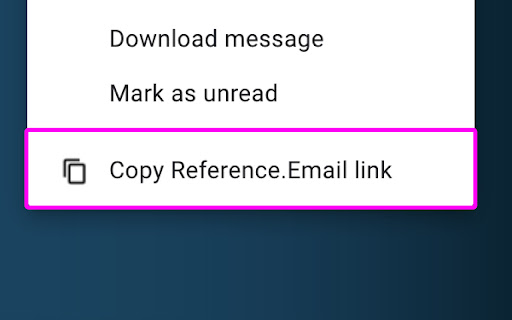
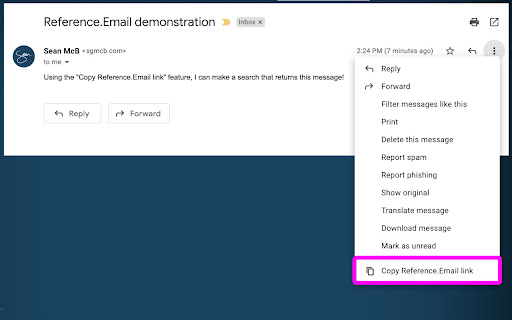
Reference.Email gives your emails a URL that all recipients can use to find that specific message.
This extension adds a button in your Gmail messages' context menu to generate a search URL unique to this message and copy it to your clipboard. You can paste this link anywhere and give other recipients a breadcrumb to reference that specific email by.
How? Using the "rfc822msgid" that each email has in its metadata. The Reference.Email link auto-searches for this value and surfaces the one message that matches.
(Note: This is Gmail specific, right now.)
View our "privacy policy" at dnbr.to/privacy.
(Hint, we don't use/store/transmit any private info.)
| 分类 | 🛠️工具 |
| 插件标识 | ohhblkgfjjbjcaddddgooclkoeiiklgk |
| 平台 | Chrome |
| 评分 |
☆☆☆☆☆
0
|
| 评分人数 | 2 |
| 插件主页 | https://chromewebstore.google.com/detail/referenceemail/ohhblkgfjjbjcaddddgooclkoeiiklgk |
| 版本号 | 2.1.0 |
| 大小 | 994KiB |
| 官网下载次数 | 92 |
| 下载地址 | |
| 更新时间 | 2024-12-07 00:00:00 |
CRX扩展文件安装方法
第1步: 打开Chrome浏览器的扩展程序
第2步:
在地址栏输入: chrome://extensions/
第3步: 开启右上角的【开发者模式】
第4步: 重启Chrome浏览器 (重要操作)
第5步: 重新打开扩展程序管理界面
第6步: 将下载的crx文件直接拖入页面完成安装
注意:请确保使用最新版本的Chrome浏览器
同类插件推荐
Reference.Email
Reference.Email gives your emails a URL that all r

Auto Save ChatGPT
Automatic saving, downloading and searching of Cha

Meta-Press.es
Decentralized press meta-search engineExplore the

Detail Page Optimizer
Detail Page OptimizerThe Keyword Identification an

Boss Hub | Card
Boss Hub Card | Your Business Card GeneratorBoss H

Congree Web Interface
Write according to your company's Style GuideT

TimeCrunch Tennis Browser Extension
TimeCrunch uses AI to remove all non-playing time

Krunch
Shorten URLs like never beforeThis powerful chrome

GPT Privacy: Anonymize your Chat GPT prompts
Anonymize your Chat GPT prompts and safeguard your

Suspend tabs
Free up your device's memory and speed up your
News Storyline
News StorylineIntroducing Timeline Tracker: Unveil

Stop It Grandpa
Prevents grandpa from lookin' at his favorite

Trello Bug Feature Colors
Sets colors on Trello cardsColors Trello cards tha