
Svelte Slicer Chrome 插件, crx 扩展下载
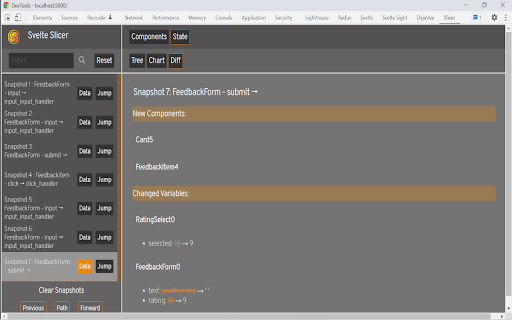
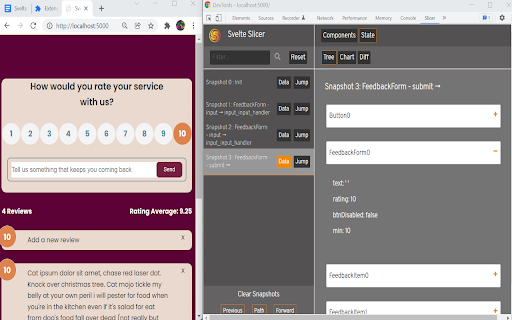
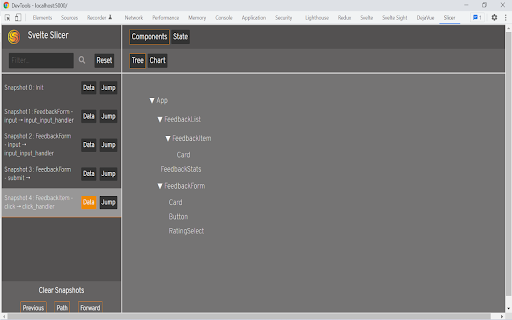
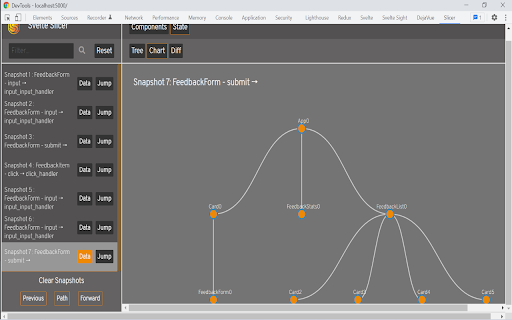
Browser devtools extension for time traveling and visualizing Svelte applications.
Svelte Slicer is an open-source Chrome Developer Tool that allows the user to view and traverse graphical and textual representations throughout its lifecycle, helping developers to more efficiently identify state-related bugs.
Key Features Include:
-Visualization of component relationships
-Moment-by-moment tracking of state variables
-Snapshot diffing to identify specific state changes
-Dynamic time travel through past state snapshots
To read more on Svelte Slicer, head over to our article on Medium.com at:
https://svelteslicer.medium.com/svelte-slicer-df5263a8e76f
Svelte Slicer is currently a work in progress and undergoing continual improvements. Please feel free to contribute at https://github.com/oslabs-beta/SvelteSlicer or contact one of our authors listed on GitHub.
| 分类 | 💻开发者工具 |
| 插件标识 | ohimeoplnpnoeapbnmgeddijpfobbijl |
| 平台 | Chrome |
| 评分 |
★★★★☆
4.6
|
| 评分人数 | 9 |
| 插件主页 | https://chromewebstore.google.com/detail/svelte-slicer/ohimeoplnpnoeapbnmgeddijpfobbijl |
| 版本号 | 0.0.0.1 |
| 大小 | 213KiB |
| 官网下载次数 | 92 |
| 下载地址 | |
| 更新时间 | 2022-02-18 00:00:00 |
CRX扩展文件安装方法
第1步: 打开Chrome浏览器的扩展程序
第2步:
在地址栏输入: chrome://extensions/
第3步: 开启右上角的【开发者模式】
第4步: 重启Chrome浏览器 (重要操作)
第5步: 重新打开扩展程序管理界面
第6步: 将下载的crx文件直接拖入页面完成安装
注意:请确保使用最新版本的Chrome浏览器
同类插件推荐
Svelte Slicer
Browser devtools extension for time traveling and

Scroll-Driven Animations Debugger
A DevTools extension to visualize and debug Scroll
Liveblocks DevTools
A browser extension that lets you inspect Livebloc

Tenderly Dev Toolkit
One-click exploration & debugging tools in you