
Medtel Cloud Extension Chrome 插件, crx 扩展下载
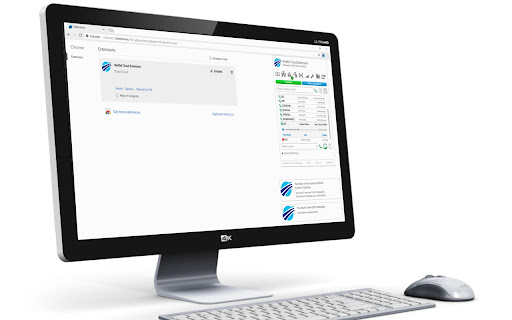
Used with your Amiba Cloud PBX to receive call-, voicemail- and chat messages, and Click2Dial from any webpage.
Medtel Cloud Extension.
Notifications:
Receive pop-up notifications for
- Incoming calls (with click to answer or reject),
- Incoming Chat messages (with click to replay),
- New Voice mail messages (with click to play the message).
POPUP Menu
Clicking on the Browser icon will display the POPUP Menu. Which allows you to:
- Open Your Portal quickly (Open your Portal web page)
- Enter a number to Dial (enter a number using keypad or the on screen keypad and click the Dial button to make a call)
- Search for another user to dial and click the Dial button to make a call
- Search for another user and click the Chat button to make a Chat call.
- Use Quick Dial Keys
- Link to Medtelcom HomePage
- Link to the Help
- Link to the Options web page (This allows you to change setting see Options below)
Click To Dial:
- You can highlight any numbers on a web page and right click to dial them.
- Also there are short-cut keys to allow you to dial any number in your clipboard.
Options:
- You can turn on and off each of the types of notifications.
- Option to Auto-Reject callers who do not show CLI.
- Option to Auto-Answer all incoming calls.
- Option to Set Forward to voice mail or set a type of DND when you PC becomes Locked.
- Edit Quick Dial Keys
What's New for 3.1 to 4.4:
- Fixed: Extension not handling the condition when a user has the DND option removed by the Admin.
- Fixed: Missed call and Voicemail badge location in the Popup.
- Fixed: Issue where Win 10 would only display an Incoming call Notification once.
- Fixed: Removed the requirement for Cookies in the manifest file.
- Added: support for New one Click to Dial (without having to high-lite the number first)
- Added: Hook and sidebar with access to Portal as part of the embedded Context script
- Added: support for Menu in Sidebar to access your Video Meetings
- Added: Position of hook stored.
- Added: Hook and SideBar portal frame cannot move off visible page (also for browser resize).
- Added: Login/logout and enabled/disable of extension dealt with better (i.e. the hook/frame + click2dial are all updated on already open tabs).
- Added: Improved hook sliding up/down.
- Added: Hook and SideBar portal frame are now displayed: fixed, which will keep them in place in the page scrolls.
4.5
Can close portal frame if portal frame has js error on it.
4.6
webRTCIPHandlingPolicy flag set to 'default_public_interface_only' to improve ice candidate gathering
4.7
bug fix for 'Display a notification for incoming chat messages' checkbox in options not appearing
new check box in options to enable side bar [default is off]
4.8
Answer and chat focus (notifications) for webphone
5.0
Bug fixes for, showing chat, showing correct portal frame and opening new tab on specified frames.
Fix for diversion speed dials (now have # added in storage) new speed dial layout in local storage.
Fix for dial from clipboard.
5.5.1
Bug fixes to not run click to dial on "textarea" html elements
Update to: Make video calls, removed storage permission and allow phase O and N to work
5.5.2
call/chat/video call notifications fixes
5.5.3
Improved click to dial number formatting
5.5.4
Fix for compatibility for phase O and N to work
6.0.0
manifest version 3
6.0.1
fix for default options on install
6.0.2
fix for default options on install
6.0.3
options page, url pattern and dial from Prompt
6.0.4
open portal on icon click as active, go to portal on answer(via notify), show recent list in popup by default
6.0.5
context menu dial number.
6.0.6
Fix: phase N used spg Index not device.
6.0.7
Added click to dial popup.
6.0.8
Fix for dialling numbers not correctly formatting. Add ring back tone and change audio output device.
6.0.9
Can change audio permission with checkbox in options.
6.1.0
make sure software Version has 3 decimal places
6.1.1
Bug Fixes
6.1.2
Fix for implicit call dialling and correct number format.
6.1.3
Bug Fixes
6.1.4
Update saved settings from mv2 to mv3
6.1.5
Fix for logging into phase N code
6.1.6
Added option to set user to DND mode 8 when PC is locked, and return the user to Available when PC is unlocked,
6.1.7
mediaelement-and-player.js, removed plugin stuff
6.1.8
Update comments to remove reference to external web sites
| 分类 | 📝工作流程与规划 |
| 插件标识 | oinaejchlfdgmpamifbjnjcjadgfdhng |
| 平台 | Chrome |
| 评分 |
☆☆☆☆☆
0
|
| 评分人数 | 1 |
| 插件主页 | https://chromewebstore.google.com/detail/medtel-cloud-extension/oinaejchlfdgmpamifbjnjcjadgfdhng |
| 版本号 | 6.1.8 |
| 大小 | 7.26MiB |
| 官网下载次数 | 2000 |
| 下载地址 | |
| 更新时间 | 2024-12-23 00:00:00 |
CRX扩展文件安装方法
第1步: 打开Chrome浏览器的扩展程序
第2步:
在地址栏输入: chrome://extensions/
第3步: 开启右上角的【开发者模式】
第4步: 重启Chrome浏览器 (重要操作)
第5步: 重新打开扩展程序管理界面
第6步: 将下载的crx文件直接拖入页面完成安装
注意:请确保使用最新版本的Chrome浏览器
同类插件推荐

The Day's Sidebar
A mashup of The Day's Color and Sidebar.io.Tir

MagnetVoice Cloud Extension
Used with your Amiba Cloud PBX to receive call-, v
Medtel Cloud Extension
Used with your Amiba Cloud PBX to receive call-, v

Vodafone Relate Cloud Extension
Used with your Amiba Cloud PBX to receive call-, v

KOMU PBX Cloud Extension
Used with your Amiba Cloud PBX to receive call-, v

Magnet Talk Cloud Extension
Used with your Amiba Cloud PBX to receive call-, v

PocketiTel Cloud Extension
Used with your Amiba Cloud PBX to receive call-, v

CryptoSonic
Make your cryptocurrency sing on Coinbase.com! On
DriveHub Cloud Storage Transferer
View, terminate the progress of using Drivehub to
iFrame'd it!
Put any video in an iframe, with one click!This us

Cloud Marketplace
Search over 500 AppsEasily search and launch your

PINBUSTERS
Automatically hides Pinterest images from your Goo

nShell
nShell.nShell is a terminal application that uses