
Image Magic Chrome 插件, crx 扩展下载
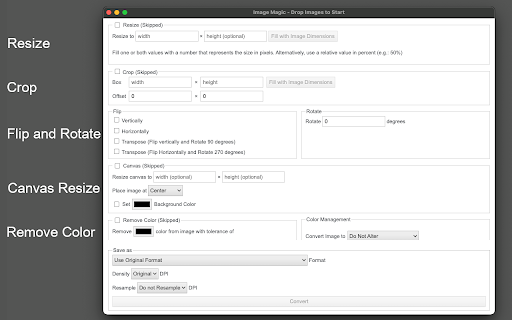
Swiss Army Knife of Image Manipulation (Resize, crop, flip, rotate, or remove background color)
The "Image Magic" provides a set of tools to convert images offline without any native image editor required. This tool can read and manipulate almost all known image types, even if your browser cannot render the image. It uses the "ImageMagic" command-line tool internally for all conversions.
Features:
1. Resize all images in bulk (This function accepts units in pixel and percent)
2. Crop an image with an optional offset from the top left side of the canvas.
3. Fip and image (vertical, horizontal, transpose, and transverse)
4. Rotate and image at an arbitrary angle.
5. Resize the image's canvas. You can optionally apply a solid color to the canvas as well
6. Convert a color to a transparent layer.
7. Save the images as grayscale.
8. Save in most known image formats (PNG, JPEG, TIFF, BMP, ...) or even in PDF format.
9. Resample the image to 1200, or 600 DPI
10. Change image density
How to Use:
Drag and drop single or multiple image files to the extension's interface. Select one or more operations and press the "Convert" button. The extension starts converting images one by one and saves the output in the default download directory of your browser.
About the internal "ImageMagic" JavaScript library:
ImageMagick is a free and open-source cross-platform library for displaying, creating, converting, modifying, and editing raster images. Created in 1987 by John Cristy, it can read and write over 200 image file formats. It and its components are widely used in open-source applications.
| 分类 | 🎨艺术与设计 |
| 插件标识 | pbdhabbdegnnjpdghecnibbeeicglfkc |
| 平台 | Chrome |
| 评分 |
★★★☆☆
3.8
|
| 评分人数 | 27 |
| 插件主页 | https://chromewebstore.google.com/detail/image-magic/pbdhabbdegnnjpdghecnibbeeicglfkc |
| 版本号 | 0.2.0 |
| 大小 | 1.42MiB |
| 官网下载次数 | 772 |
| 下载地址 | |
| 更新时间 | 2022-02-21 00:00:00 |
CRX扩展文件安装方法
第1步: 打开Chrome浏览器的扩展程序
第2步:
在地址栏输入: chrome://extensions/
第3步: 开启右上角的【开发者模式】
第4步: 重启Chrome浏览器 (重要操作)
第5步: 重新打开扩展程序管理界面
第6步: 将下载的crx文件直接拖入页面完成安装
注意:请确保使用最新版本的Chrome浏览器
同类插件推荐

Simple image resizer
Resize an image to different sizes consecutively.R

Resizing App
Resize, crop, optimize, or convert your images int

Image Magic
Swiss Army Knife of Image Manipulation (Resize, cr

Bulk Resize Photos
Resize ImagesFree, super-fast image resizing in yo

Simple Image Viewer
Default image viewer with advanced functionality:

Fullwidth Image
Fullwidth Image plugin makes your image fit to scr
resizemy.photos
Resize or crop any photo or image from any website

Full Width Image
Constrain a single image in your browser to be ful

Free Photo Editor
You can modify image text, image text, image water

Image Editor
You can modify image text, image text, image water

Bulk Image Resize
Resize multiple images with multiple sizeNeed a qu

Enhanced Image Viewer
Enhances the browser's default image viewerEnh

Better Image Scaling
Improves the image scaling of Chrome, providing cr