
Overleaf Copilot Chrome 插件, crx 扩展下载
Copilot for Overleaf
This extension is to provide a similar experience to GitHub Copilot in VSCode, for Overleaf users. For any issues or feature requests, visit https://github.com/dsp05/overleaf-copilot/issues or directly shoot me an email. It supports the following features:
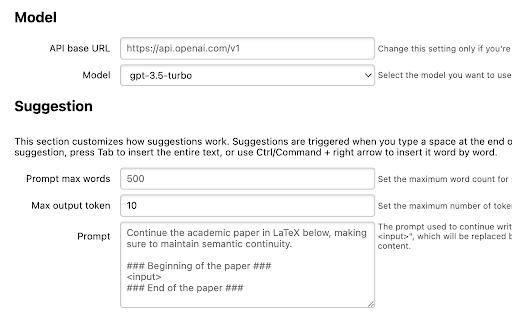
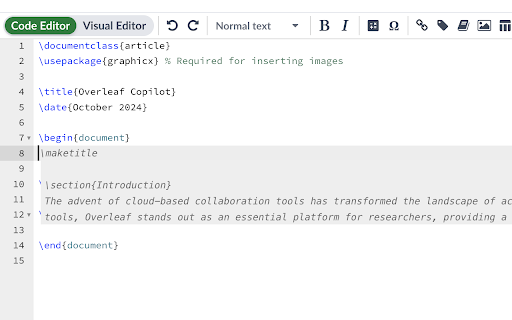
- Content Suggestions: It's triggered when you type a space at the end of a line, or when you press "Enter" to start a new line. Press "Tab" to accept the entire suggestion, or Ctrl/Command + "Right Arrow" to accept the next word.
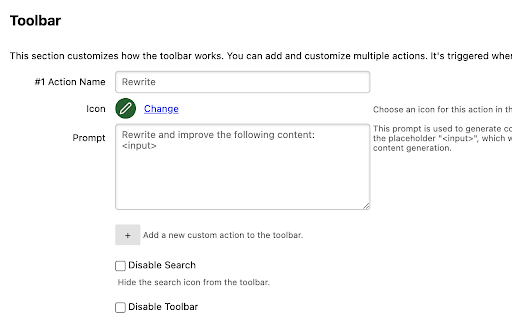
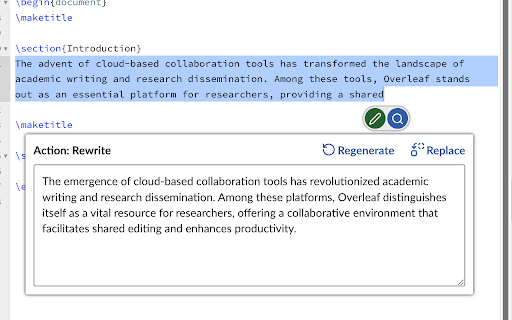
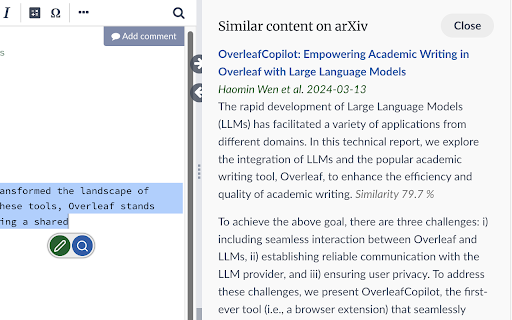
- Content Rewriting: Select a piece of text and click the pencil icon to rewrite it. You have full control of all actions and prompts in the toolbar.
- Relevant Content Search from arXiv: Select a piece of text and click the search icon.
You can use it without providing your own OpenAI API key. The free server is just to give you an idea of how it works. Requests are rate-limited, and custom configurations are unavailable.
It is recommended to use your own API key for heavy usage. You can customize the prompts for suggestions and rewrites, use more advanced models, and access larger token limits. Your API key is stored in your browser and is never shared.
| 分类 | 🛠️工具 |
| 插件标识 | pcmffklbilmgckfkbncpoffmicdpfkmm |
| 平台 | Chrome |
| 评分 |
☆☆☆☆☆
0
|
| 评分人数 | 1 |
| 插件主页 | https://chromewebstore.google.com/detail/overleaf-copilot/pcmffklbilmgckfkbncpoffmicdpfkmm |
| 版本号 | 0.2.4 |
| 大小 | 1.78MiB |
| 官网下载次数 | 766 |
| 下载地址 | |
| 更新时间 | 2024-11-05 00:00:00 |
CRX扩展文件安装方法
第1步: 打开Chrome浏览器的扩展程序
第2步:
在地址栏输入: chrome://extensions/
第3步: 开启右上角的【开发者模式】
第4步: 重启Chrome浏览器 (重要操作)
第5步: 重新打开扩展程序管理界面
第6步: 将下载的crx文件直接拖入页面完成安装
注意:请确保使用最新版本的Chrome浏览器
同类插件推荐

open-in-overleaf
Access the LaTeX source code of arXiv papers on Ov

Overleaf Copilot
Copilot for OverleafThis extension is to provide a

Simplify Overleaf
Simplify your overleaf to focus on editing!There e

Rafflesia for Overleaf
Handy tools for OverleafThis adds a bottom panel t

LeadhuntAI - Chrome Extension
This extension will allow you to easily retrieve s

GPT4Overleaf
GPT-based autocompletion for OverleafThis extensio

ChatGPT Recall Prompts
I recall ChatGPT prompts. That's it!"Chat

Writefull for Overleaf
Writefull is automated proofreading for academic w

Accessibility Checker for GitHub Markdown
Highlight accessibility issues as you write Markdo
Time Tracker, Todo, Sprint Manager - Basecamp
Sync daily tasks or work between Basecamp & Mo

Clear Portal Cache
Clearing the cache with a single click!Easily clea

Twitter Reaction Counter
This extension get list of Like/Retweet on a tweet

Apache KIE™ Serverless Workflow Editor for GitHub
Visualize and edit Serverless Workflow files using