
Tab Manager Chrome 插件, crx 扩展下载
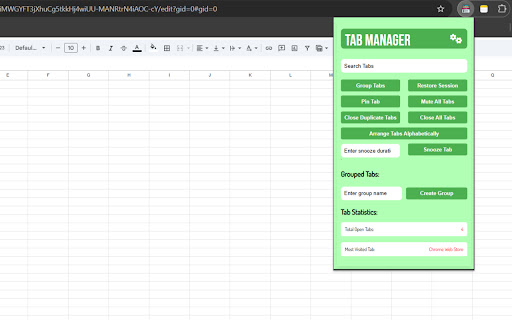

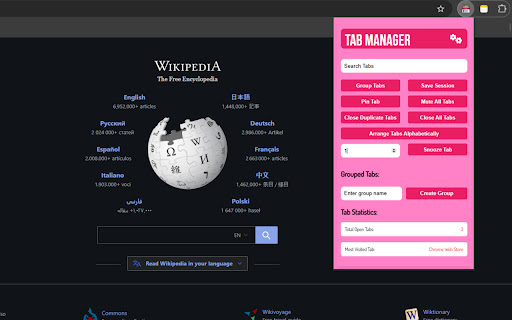
???????????? ??????, ????????, ??? ????????? ???? ??????? ???? ???? ???…
???????????? ??????, ????????, ??? ????????? ???? ??????? ???? ???? ??? ???????!
✨??? ????????:
⭐????? ???? ?? ????????: Automatically group your tabs into categories like Work, Social, Research, and a special Developers Group (including popular sites like GitHub, Stack Overflow, Geeks for Geeks, and more).
⭐??????? ????: Ungroup your tab groups anytime by ungrouping them with a single click, giving you full control over how your tabs are organized.
⭐???/????? ????: Easily pin or unpin your tabs and see the changes immediately. Keep important tabs always accessible by pinning them, and switch between pinned and unpinned states with a simple click.
⭐?????? ????: Temporarily close tabs and reopen them after a specified duration to reduce clutter and keep you focused. Simply choose how long you want to snooze the tab and it will automatically reopen after the set time.
⭐???? ???????: Save your current tab session with a single click, allowing you to close all tabs and restore them later when needed. Never lose your important tabs again!
⭐??????? ???????: Restore your previously saved tab session and continue where you left off. Bring back all your tabs with just one click.
⭐??? ??????: Quickly find the tab you need by searching through open tabs by title or URL. Switch between tabs with just one click from the search results.
⭐??????? ???? ??????????????: Tired of tabs being in a random order? Use the Arrange Tabs feature to sort your tabs alphabetically and group them for easier navigation.
⭐????? ????????? ????: Instantly highlight and close duplicate tabs to reduce clutter and free up memory. Keep your browser running smoothly without redundant open tabs!
⭐?????????-???????? ??? ????????: Dedicated to developers? We've got you covered with a group specifically for your dev resources like GitHub, Stack Overflow, Prettier, and more, keeping all your essential tools in one place.
✨??? ???'?? ???? ??:
Save time by keeping your tabs organized and reducing tab overload.
Increase productivity by grouping and sorting tabs automatically.
Eliminate duplicate tabs, improving browser performance and preventing confusion.
Stay focused with the Snooze Tabs feature, which helps manage tab clutter effectively.
Enjoy a seamless browsing experience with easy pinning and unpinning of tabs.
Never lose your tabs with the Save Session and Restore Session features.
With these enhanced features, Tab Manager becomes an indispensable tool for anyone looking to boost productivity and streamline their web browsing!
| 分类 | 📝工作流程与规划 |
| 插件标识 | pdimbjllbpmcpojgiaccdhpmbeggadmm |
| 平台 | Chrome |
| 评分 |
★★★★☆
4
|
| 评分人数 | 8 |
| 插件主页 | https://chromewebstore.google.com/detail/tab-manager/pdimbjllbpmcpojgiaccdhpmbeggadmm |
| 版本号 | 2.20 |
| 大小 | 3.05MiB |
| 官网下载次数 | 71 |
| 下载地址 | |
| 更新时间 | 2025-02-28 00:00:00 |
CRX扩展文件安装方法
第1步: 打开Chrome浏览器的扩展程序
第2步:
在地址栏输入: chrome://extensions/
第3步: 开启右上角的【开发者模式】
第4步: 重启Chrome浏览器 (重要操作)
第5步: 重新打开扩展程序管理界面
第6步: 将下载的crx文件直接拖入页面完成安装
注意:请确保使用最新版本的Chrome浏览器
同类插件推荐

Tab Manager
???????????? ??????, ????????, ??? ????????? ????

ProTABS - The Tab Manager for Pros
"I got 99 problems, but a tab ain't one.&

垂直侧边栏标签分组管理器
在浏览器侧边栏中快捷管理标签页和分组,支持多级分组、标签搜索、快速分组、标签改名、最近使用/关闭标签
Tab Groups List
Lists all tab groups across all browser windows. O

Advance Tab Groups
Auto tab group based on the url or regexAn extensi
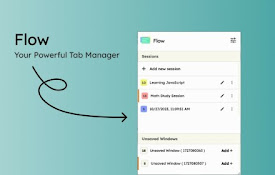
Flow - Tab Manager
A new way to manage chrome tabs and windows easily

Tab Group Manager
Tab Group Manager exends the native Tab Groups in

Tab Manager - sort, group and more
Tab Manager - sort, group and moreIntroducing Tab

Simple Tab Manager
Simple tab manager that allows you to easily manag

Astute Tab Manager
Your Ultimate Chrome Tab and Group Organizer**Intr

Tabber - 标签组织器
通过将未使用的标签分组到有组织的组中来简化您的浏览厌倦了拥有数十个打开的标签页吗?Tabber为您而

Tab Manager in Side Panel
Compatible with built-in and adds more easy-to-use
Tab Manager v2
Quickly and conveniently manage your open tabsTab