
gPass Chrome 插件, crx 扩展下载
gPass : global password manager
gPass : global Password for Firefox and Chrome
Introduction
gPass is an online, open source and self hosted password manager. It helps you to have a different and complex password for every account you own while only remembering one (or multiple) passwords !
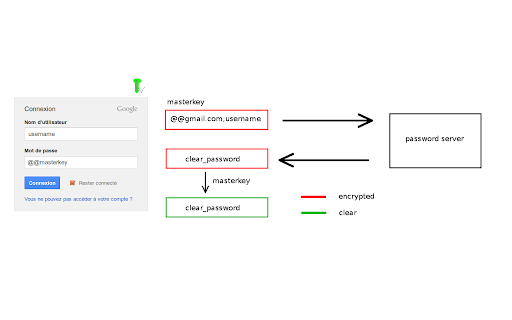
To have a high level of security, all information is stored encrypted (salt + AES 256-CBC). Nothing is stored on client. The decryption is done on the fly when it's needed and only with user input. So, a hacker can get your password database, it will not be able to see any information (except if it brute force or leak your masterkey) ! Thus it's important to choose a strong masterkey !
Usage
First thing is configuration :
1) Enable the extension for private browsing
2) Install your server (see below), or use the demonstration one and create your accout
2) Go to extension options and configure your server address ("https://server name/account")
3) Populate your password database. You can use "*" character to access to all subdomains of a specific website (ie *.google.com).
Then usage :
When you're in a login form and you want to use gPass, type your login (case sensitive !) and fill "@@masterkey" in password field (only if gPass icon is green !). Then submit and password will automatically be replaced by the one in the database (after addon decrypt it).
**You can also type "@_masterkey" to only replace your password without automatic submit. This allows to support more websites.**
Another option is to enter your credentials in the new popup menu by clicking on gPass icon. If it's possible, gPass will auto fill password field, if not result password is stored into your clipboard. **Popup path is a safest method as website page will never see your masterkey.**
** Warning ** : Sometimes, addon could make some websites unusable, especially for login form. In this case, you can deactivate it for only one website by clicking right on gPass icon and "disable or enable gPass for this website" in addon menu. It's a local configuration, so it must be done for each browser. gPass can also be disabled for ALL websites thanks to addon menu "Disable or enable gPass for ALL websites". _When gPass is disabled, you can still use popup feature_.
Server
To host a password server, you need a webserver. Just copy server files in a directory read/write for web server user (www-data). A sample apache2 configuration file is available in resources. Since v0.8 and the use of Crypto API, **it's manadatory to have an HTTPS access (valid SSL/TLS certificate) to the server**. Without that, the decryption will fails.
Configuration parameters are in conf.php
A demonstration server is available [here](https://gpass-demo.soutade.fr). It's the default server configuration for fresh installed addon (user demo).
**Warning** The master key derivation is partially based on account URL. So it's linked to your current server information. You can't move databases from servers with different URLs, you need to export them and import it again.
**Server side is available [here](http://indefero.soutade.fr/p/gpass/downloads)**
Client
Just install the package. You can have debug information by setting DEBUG in main.js.
License
All the code is licensed under GPL v3. Source code is available [here](https://forge.soutade.fr/soutade/gPass).
Privacy Policy
Privacy Policy can be found at http://indefero.soutade.fr/p/gpass/source/tree/master/PrivacyPolicy.md
| 分类 | ♿无障碍访问 |
| 插件标识 | pdmhjekonpgonlpdpgehaoekfpbmligk |
| 平台 | Chrome |
| 评分 |
★★★★☆
4
|
| 评分人数 | 1 |
| 插件主页 | https://chromewebstore.google.com/detail/gpass/pdmhjekonpgonlpdpgehaoekfpbmligk |
| 版本号 | 1.3 |
| 大小 | 71.1KiB |
| 官网下载次数 | 287 |
| 下载地址 | |
| 更新时间 | 2024-04-28 00:00:00 |
CRX扩展文件安装方法
第1步: 打开Chrome浏览器的扩展程序
第2步:
在地址栏输入: chrome://extensions/
第3步: 开启右上角的【开发者模式】
第4步: 重启Chrome浏览器 (重要操作)
第5步: 重新打开扩展程序管理界面
第6步: 将下载的crx文件直接拖入页面完成安装
注意:请确保使用最新版本的Chrome浏览器
同类插件推荐

UniquePasswordBuider
A strong password generator per siteA good securit
PwdFly
Generate Secure Password on the fly.In reality, us

PwdHash port
Pwdhash 1.7 for Chrome. Automatically generates pe

Hashword
Generate a unique, secure password for every web s
PassLok for Email
High security encryption for email. PassLok is in
Passwords
为您创建安全密码的。Even today there are people who make use
vPass
Make your online accounts secure without having to

Entropass
Open-source decentralized maximum-security passwor
gPass
gPass : global password managergPass : global Pass

Intuitive Password®: Password Manager
Intuitive Password® streamlines your web login exp

Hackers toolkit
Quickly encode or decode string with a certain enc

Safe Password Generator
Allows you to generate securely passwords using cr

Hack-Tools
The all in one Red team extension for web penteste