
Blackboard Grader Chrome 插件, crx 扩展下载
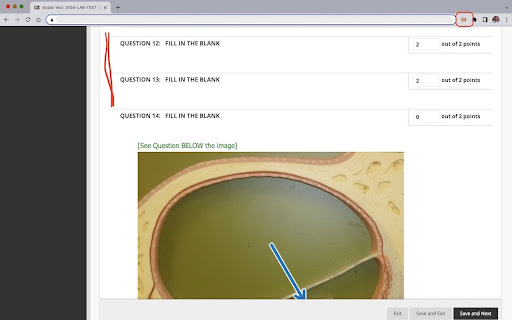
Hide questions marked as correct and show only questions with incorrect answers.
This extension is intended for faculty at Austin Community College, who administer online tests on Blackboard. The extension does not alter the content nor interact with content on the LMS server. Faculty can use this to hide all questions marked as correct and to show only those that are either partially correct or incorrect.
Once added as an extension, the user may pin the extension to the extensions bar for easy access. The extension is designed to work on pages that contain test items with correct or incorrect markings. Once the page is displayed, click the extension's icon (it will appear in color if the page you are on is on www.austincc.edu) to hide the questions marked as correct. User may then change the grades for any question just they would do while grading.
Hitting the icon again or clicking the 'refresh' button or moving to the next page will unhide the hidden questions and you may choose to hide the correct questions on the next page by clicking the extension icon again.
No logins are required and no data about the user or the test item on display will be collected or stored by the extension.
USE SCENARIO 1:
During Grading: Manual review and grading becomes faster as you need to focus only on questions that are incorrect. Hiding the questions marked as correct eliminates unnecessary page scrolling and fatigue.
USE SCENARIO 2:
During Test Reviews: When you are discussing a test with a student during a review, hiding the questions marked correct helps you focus on the areas the student failed to do well.
If you are not a faculty member at Austin Community College and would like to use this on your Blackboard site, contact us by email.
| 分类 | 📝工作流程与规划 |
| 插件标识 | pemdnnioakfiffdfhglndfhdgbhjglfd |
| 平台 | Chrome |
| 评分 |
★★★☆☆
3
|
| 评分人数 | 318 |
| 插件主页 | https://chromewebstore.google.com/detail/blackboard-grader/pemdnnioakfiffdfhglndfhdgbhjglfd |
| 版本号 | 0.0.1.0 |
| 大小 | 18.54KiB |
| 官网下载次数 | 89 |
| 下载地址 | |
| 更新时间 | 2023-04-12 00:00:00 |
CRX扩展文件安装方法
第1步: 打开Chrome浏览器的扩展程序
第2步:
在地址栏输入: chrome://extensions/
第3步: 开启右上角的【开发者模式】
第4步: 重启Chrome浏览器 (重要操作)
第5步: 重新打开扩展程序管理界面
第6步: 将下载的crx文件直接拖入页面完成安装
注意:请确保使用最新版本的Chrome浏览器
同类插件推荐
Blackboard Learn Exam Printing
This extension prints exams attempts from Blackboa
Blackboard Grader
Hide questions marked as correct and show only que

Blackboard Grades UVM
used to view calculated UVM Blackboard GradesIf UV

Old Blackboard
Reverts Blackboard back to the old UIUQ has update

School Cheats
Side by side scripts to help whilst working with s

Transcript - AI Homework Helper
Streamline your study experience with AI: Instant

Homework Helper
Right Click on highlighted text, to automatically

Dropin
DropIn is a software that utilizes AI technology t
Coursology
Introducing your “Know-it-all” Study Sidekick! Div

Quizzard
Quick and easy tool to rapidly search for homework

Canvas Quiz Loader
Automatically load correct answers from previous q
Quibble - Homework Helper
Learn smarter, not harder.Quibble harnesses the ca

Quiz Solver
Quiz Solver is Your AI-Powered Study Companion.Wel