
NetSuite :: WB/DS Query Export to SS 2.x Chrome 插件, crx 扩展下载
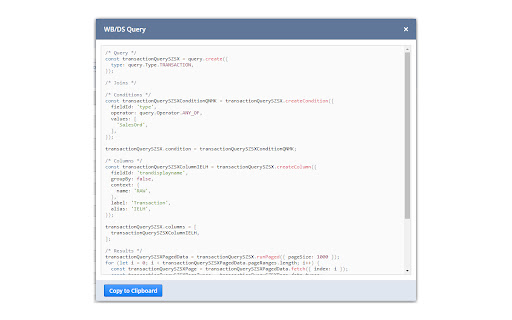
Export a NetSuite Workbook/Dataset Query to SuiteScript 2.x, formatted as TypeScript, a typed superset of JavaScript.
Create and save or load a previously created Workbook/Dataset Query in NetSuite. On the Dataset Builder page, click the "Export to SuiteScript 2.x" link, added to the top of the page, to display a modal window with the Workbook/Dataset Query exported to SuiteScript 2.x, formatted as TypeScript. Click the "Copy to Clipboard" button to copy the code in its entirety to the Clipboard for further use.
If a Workbook/Dataset Query cannot be exported, the "Export to SuiteScript 2.x" link will not be visible.
| 分类 | 💻开发者工具 |
| 插件标识 | pflaamfdnogeacnfmpblghdgongdccac |
| 平台 | Chrome |
| 评分 |
★★★★★
5
|
| 评分人数 | 2 |
| 插件主页 | https://chromewebstore.google.com/detail/netsuite-wbds-query-expor/pflaamfdnogeacnfmpblghdgongdccac |
| 版本号 | 0.2.0 |
| 大小 | 329KiB |
| 官网下载次数 | 611 |
| 下载地址 | |
| 更新时间 | 2023-11-07 00:00:00 |
CRX扩展文件安装方法
第1步: 打开Chrome浏览器的扩展程序
第2步:
在地址栏输入: chrome://extensions/
第3步: 开启右上角的【开发者模式】
第4步: 重启Chrome浏览器 (重要操作)
第5步: 重新打开扩展程序管理界面
第6步: 将下载的crx文件直接拖入页面完成安装
注意:请确保使用最新版本的Chrome浏览器
同类插件推荐
NetSuite :: WB/DS Query Export to SS 2.x
Export a NetSuite Workbook/Dataset Query to SuiteS

NetSuite Record JSON Viewer
This extension will stringify the current NetSuite

NetSuite :: Saved Search Export to SS 2.x
Export a NetSuite Saved Search to SuiteScript 2.x,

Suitelook: NetSuite Record Viewer
This extension allows you to visualize all the fie

NetSuite Query Tool
Simple Web IDE for the Netsuite Query Module.**V2

NetSuite Utils
NetSuite Utility ExtensionThis started as group of

NetSuite: Show Field IDs
Hover over NetSuite fields to show their IDs. Find

NetSuite: Saved Search and Dataset Export
Export your saved searches, datasets and workbooks

NetSuite Links
Load N/* Modules , search via Shortcut and More.No

NetSuite Field Explorer
Examine the fields in a Netsuite recordNetSuite Fi

Netsuite Utility Plugin
Basic stuff onlyA basic utility plugin helping wit

NetSuite Advanced Field Help
Extends the NetSuite Field Help and adds relevant

NetSuite: HTML Script Notes
Add HTML elements and styles to your script notes.