
AWS Console Bar Chrome 插件, crx 扩展下载
Increase your productivity in AWS Console with aws-console-bar Chrome Extension
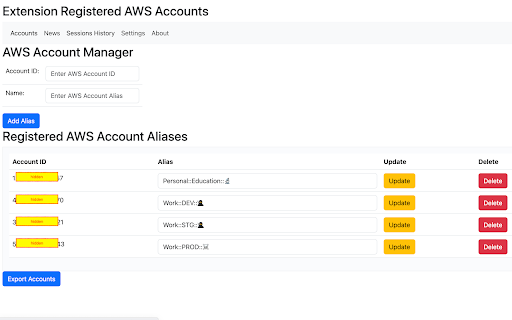
The single purpose of your Google Chrome extension is to enhance the AWS (Amazon Web Services) Console by adding a UI element that displays account names. Here's a more detailed description:
Extension Name: AWS Console Bar
Purpose:
The AWS Console Bar Chrome extension provides a seamless way for AWS users to quickly identify and distinguish between different AWS accounts when working in the AWS Management Console. By overlaying a user-friendly UI element on top of the AWS Console, this extension enhances the user experience and reduces the risk of accidental operations in the wrong account.
Key Features:
Account Identification: The extension identifies the AWS account currently in use within the AWS Console.
UI Overlay: It adds a non-intrusive UI overlay at the top of the AWS Console's interface, displaying the account's friendly name.
Customizable Labels: Users have the option to assign custom labels or nicknames to their AWS accounts for easier recognition.
Color Coding: Accounts can be color-coded, allowing users to quickly associate colors with specific accounts.
Multiple Account Support: The extension supports multiple AWS accounts, making it ideal for users who manage multiple AWS environments simultaneously.
Intuitive Interface: The UI element is designed to be minimalistic and intuitive, ensuring it doesn't clutter the AWS Console.
Benefits:
Enhanced Productivity: Users can work more efficiently by reducing the risk of mistakenly performing actions in the wrong AWS account.
User-Friendly: The extension's user interface is designed to be user-friendly and unobtrusive, ensuring a seamless experience.
Customization: Users have the flexibility to customize labels and colors according to their preferences.
Multi-Account Management: Ideal for developers, administrators, or teams managing multiple AWS accounts concurrently.
Compatibility:
The AWS Account Identifier Chrome extension is compatible with all AWS Console services, ensuring a consistent and improved experience across the AWS ecosystem.
Security:
The extension does not compromise AWS security. It only adds a UI overlay for user convenience and does not access, store, or transmit sensitive AWS credentials or data.
Privacy:
The extension respects user privacy and does not collect any personal or usage data.
In summary, the AWS Account Identifier Chrome extension is designed to simplify and improve the AWS Console experience by adding a non-intrusive UI element that helps users easily identify and manage their AWS accounts. It enhances productivity, reduces the risk of errors, and is customizable to suit individual preferences.
| 分类 | 💻开发者工具 |
| 插件标识 | pgngjkbemicbjobgdcekeoagfhdjpaba |
| 平台 | Chrome |
| 评分 |
☆☆☆☆☆
0
|
| 评分人数 | 1 |
| 插件主页 | https://chromewebstore.google.com/detail/aws-console-bar/pgngjkbemicbjobgdcekeoagfhdjpaba |
| 版本号 | 1.24.0 |
| 大小 | 755KiB |
| 官网下载次数 | 24 |
| 下载地址 | |
| 更新时间 | 2025-01-01 00:00:00 |
CRX扩展文件安装方法
第1步: 打开Chrome浏览器的扩展程序
第2步:
在地址栏输入: chrome://extensions/
第3步: 开启右上角的【开发者模式】
第4步: 重启Chrome浏览器 (重要操作)
第5步: 重新打开扩展程序管理界面
第6步: 将下载的crx文件直接拖入页面完成安装
注意:请确保使用最新版本的Chrome浏览器
同类插件推荐
AWS Console Bar
Increase your productivity in AWS Console with aws

AWS Account Name Finder
For SSO-based AWS accounts, display the Account Na

GitHub Name Changer
show nickname instead of id on GitHubDo you know t
GPT Extension for Salesforce
Gets a GPT answer about a Salesforce item (flow, d

Fantasy Hockey Assistant
See your team's expected performance in your n
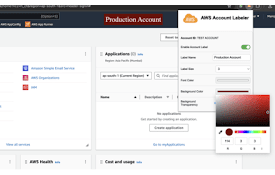
AWS Account Labeler
Customize and display labels for different AWS acc

New Relic ZIP Tools
New Relic Tools - by: Gabriel Moreira/PINGUIN.ZIPI

SEO Insights
Chrome extension to know about page metrics of pag

UndoFlow
Brings back the undo and redo buttons in Webflow D

SustEarn
Reduce your carbon footprint. Earn rewards for sus

Tab Search Pro
Search active tabs, highlight results, save search

Hop
An icon-first bookmark managerSee, click, go ? In