
Warframe Sens Converter Chrome 插件, crx 扩展下载
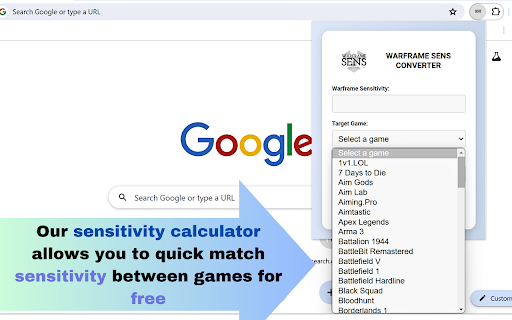
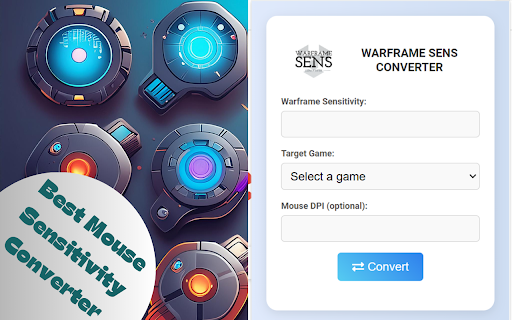
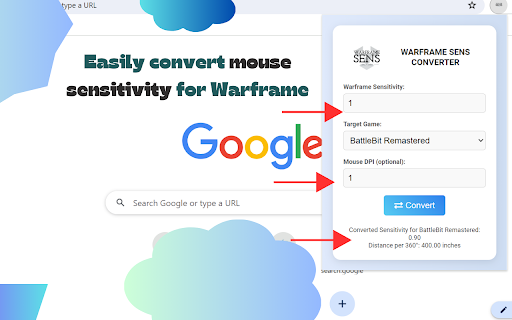
Convert mouse sensitivity from Warframe to another game.
Warframe Mouse Sensitivity Converter Calculator | How do I make my warframe sens same as source game sens?
1. What is a Warframe Sens Converter?
A Warframe Sens Converter is a tool that helps players convert their mouse sensitivity settings from Warframe to other games or vice versa, ensuring consistent aim and gameplay experience across different titles.
2. How does the Warframe Sens Converter work?
The converter uses a mathematical algorithm to adjust sensitivity settings based on the game's mechanics, DPI (dots per inch) of the mouse, and other relevant parameters to match the feel of Warframe's sensitivity in another game.
3. Why do I need to convert my sensitivity settings from Warframe?
Converting your sensitivity settings allows for a more consistent aiming experience when switching between games, which can improve your overall performance and muscle memory.
4. Which games are supported by the Warframe Sens Converter?
The converter supports a wide range of games including Apex Legends, CS, Fortnite, Valorant, Overwatch, Call of Duty series, and many more.
5. How do I use the Warframe Sens Converter?
Input your current sensitivity settings from Warframe, select the target game, and the converter will provide the equivalent sensitivity setting for the new game.
6. Do I need to know my mouse DPI to use the converter?
Yes, knowing your mouse DPI is important as it influences the accuracy of the sensitivity conversion.
7. Is the Warframe Sens Converter free to use?
Yes
8. Can the converter handle different aspect ratios and FOV (Field of View) settings?
Yes, advanced Warframe Sens Converter take into account aspect ratios and FOV settings to provide a more accurate sensitivity conversion.
9. How accurate are the sensitivity conversions?
The accuracy of the conversion depends on the algorithm used by the converter. Our reputable Warframe Sens Converter
extension provide highly accurate results that closely match the in-game experience.
10. Does the converter work for both PC and console versions of games?
Typically, sensitivity converters are designed for PC games. Console versions may have different sensitivity settings and might not be supported.
11. Can I use the Warframe Sens Converter for different gaming peripherals?
Yes, the converter should work regardless of the brand or model of your mouse, as long as you know the DPI settings.
12. Do I need to adjust my in-game settings after using the converter?
After obtaining the new sensitivity setting from the converter, you should input it into the target game's settings to ensure proper calibration.
| 分类 | 🎮游戏 |
| 插件标识 | phnapephmakepgheijgbampfhadopgle |
| 平台 | Chrome |
| 评分 |
☆☆☆☆☆
0
|
| 评分人数 | 1 |
| 插件主页 | https://chromewebstore.google.com/detail/warframe-sens-converter/phnapephmakepgheijgbampfhadopgle |
| 版本号 | 1.0 |
| 大小 | 25.79KiB |
| 官网下载次数 | 19 |
| 下载地址 | |
| 更新时间 | 2024-07-08 00:00:00 |
CRX扩展文件安装方法
第1步: 打开Chrome浏览器的扩展程序
第2步:
在地址栏输入: chrome://extensions/
第3步: 开启右上角的【开发者模式】
第4步: 重启Chrome浏览器 (重要操作)
第5步: 重新打开扩展程序管理界面
第6步: 将下载的crx文件直接拖入页面完成安装
注意:请确保使用最新版本的Chrome浏览器
同类插件推荐
Warframe Sens Converter
Convert mouse sensitivity from Warframe to another

Serperbuy(For legacy)
Worked to work :: (Warning) This extension is appl

YTMusic Listener
Share what you are currently listening to on YTMus

Discord Webhook Extension
A Chrome extension for sending data to Discord web

Discord Announcer
An easy way to send messages to your Discord Serve

XHordes
The official XHordes extension. Allows users to lo

xify
A chrome extension that modifies twitter/x.com lin

Tab Manager AI
in10search Tab Manager AI - Browser Sidebar - Sea

League Exporter
Export item sets from Mobafire into League formatE

Geforce Now OS Switcher
Play Genshin Impact on Geforce now on Linux/Steam

BulkMessageApp Cloud Helper
Helper Chrome Extension for BulkMessageApp CloudIt

DiscExport - discord chat exporter
easy for discord chat message exportDiscExport: Si

Krunch
Shorten URLs like never beforeThis powerful chrome