
Quick Anki Adder Chrome 插件, crx 扩展下载
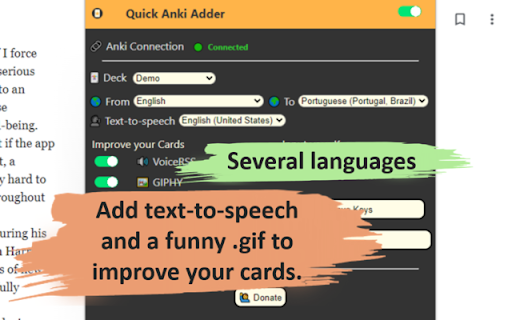

Quick Anki card adder with translate, animated picture (.gif), and text-to-speech (TTS ) resources.
A quick Anki card adder with translate, animated picture (.gif), and text-to-speech (TTS ) resources.
How to Use: https://www.linkedin.com/pulse/quick-anki-adder-chrome-extension-fran%C3%A7ois-souza/
- - - - - Setup - - - - -
In order to use this app, you need to have the AnkiConnect (2055492159) add-on and do a little configuration described as follows:
“Now, click on the AnkiConnect add-on and then on the Config button. In the windows that show up, there is the field "http://localhost". You need to change this to "*". This is a crucial step to do to make possible the communication between Anki and any website, otherwise, the connection will fail. You can read more about this with the CORS docs provided by the Mozilla ?.”
- - - - - Features - - - - -
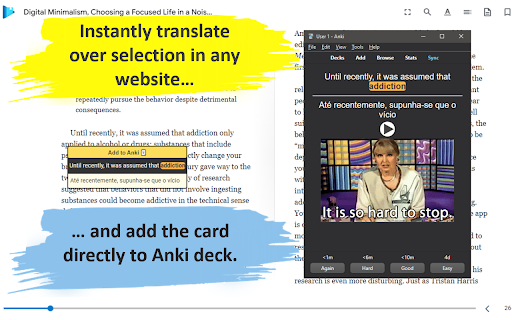
Instantly translate from selected word/sentence in any website: If you select a text on website a little popup will appers below your selection with the original sentence (that you can highlight any word by click on them) and the automatic translation ?;
Instantly add a card to Anki: After setting up the target Anki language and deck by clicking the Quick Anki Adder icon, simply select the phrase on the website and click the Add to Anki ? button. That's it! your card was created in a few seconds ?️;
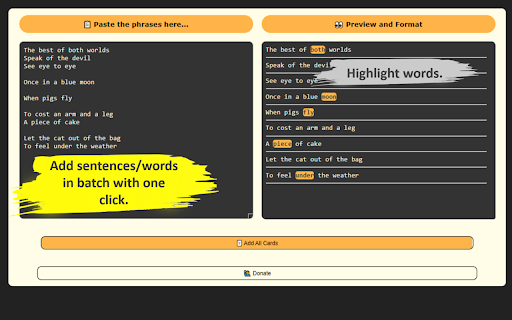
If you study on a smartphone or in books and collect phrases from there, just add all phrases in one batch option by clicking the ? Add multiple phrases button in the popup. It will open a new page where you can paste your sentence on the left side and on the right side the formed sentences will appear that you can highlight. It's an efficient way to add multiple sentences in just a few seconds ?;
You can improve your cards with the amazing free Text-To-Speech (TTS) feature provided by the VoiceRSS API. Just visit the Voice RSS website to request your key and place it in the Quick Anki Adder popup ?;
You can enhance your cards with funny GIFs provided by GIPHY. Again, to use it, you just need to order a free key from the GIPHY website and place it in the Quick Anki Adder popup ?️;
| 分类 | 📝工作流程与规划 |
| 插件标识 | pkikplidifkocgobiakiiofcpcpnljjd |
| 平台 | Chrome |
| 评分 |
★★★★☆
4.9
|
| 评分人数 | 7 |
| 插件主页 | https://chromewebstore.google.com/detail/quick-anki-adder/pkikplidifkocgobiakiiofcpcpnljjd |
| 版本号 | 0.0.0.1 |
| 大小 | 40.51KiB |
| 官网下载次数 | 479 |
| 下载地址 | |
| 更新时间 | 2022-07-26 00:00:00 |
CRX扩展文件安装方法
第1步: 打开Chrome浏览器的扩展程序
第2步:
在地址栏输入: chrome://extensions/
第3步: 开启右上角的【开发者模式】
第4步: 重启Chrome浏览器 (重要操作)
第5步: 重新打开扩展程序管理界面
第6步: 将下载的crx文件直接拖入页面完成安装
注意:请确保使用最新版本的Chrome浏览器
同类插件推荐

Anki Dictionary
Build your vocabulary with Anki DictionaryAnki Dic

Anki 划词制卡助手
划词翻译,一键制卡英语学习者在新闻网站或者社交媒体上进行增量阅读(Incremental Readi

Clip to Anki
Clip page content to Anki (currently supported: ar

Quick Anki Adder
Quick Anki card adder with translate, animated pic

Ankinow
Ankinow is an extension to add words in a web page
Anki Quicker
Anki Quicker was developed for users of the study

Anki Highlight Helper
Easily create Anki cards from highlighted text in

Quick Anki
Add new notes to your Anki decks with a click of a

Anki Image Card Adder:沉浸式制作anki记忆卡片
Anki Image Occlusion is an immersive, low-cost and

在线词典助手
显示在线词典内容的弹窗助手(支持Anki制卡)在线词典助手是一个Chrome插件。用于浏览网页时查询

Youtube2Anki
Convert YouTube Transcripts to Anki cardsDownloads

Ruzu Anki pop-ups
Chrome extension that periodically presents Anki c

Anki generator, powered by open ai GPT
PhagosMaximize your study effectiveness and learni