Recently Closed Chrome 插件, crx 扩展下载
CRX扩展文件安装方法
第1步: 打开Chrome浏览器的扩展程序
第2步:
在地址栏输入: chrome://extensions/
第3步: 开启右上角的【开发者模式】
第4步: 重启Chrome浏览器 (重要操作)
第5步: 重新打开扩展程序管理界面
第6步: 将下载的crx文件直接拖入页面完成安装
注意:请确保使用最新版本的Chrome浏览器
同类插件推荐

Backup and Restore Tabs
Backup all opened urls, and restore them next time

你上次的页签
你上次的页签,哔哩叭啦哔哩叭啦哔哩叭啦……Chrome默认的会话恢复机制中,只有全部打开上次访问的页

Recently Closed
View and restore recently closed Tabs and WindowsA

Improved History
A nice and modern look for browser's history p

Recent History
本扩展可以在一个弹窗中显示你的最近访问历史、最近关闭的标签页、最常访问的页面和最近添加的书签。Tha

Reopen closed tab Button™
Provides 1-click "Reopen closed tab" wit

Recent Tabs and History (Wrona History Menu)
Restore, filter or remove recently closed tabs, wi
Tab Restore
Tab Restore helps to restore recently closed tabs

SimpleUndoRecents
这个简单的弹出可让您轻而易举的撤销关闭的标签和该标签的历史!Almost a twin of Sim

Recent Tabs with your browsing history
Undo closed tabs with your browsing historyExtensi

Last Tabs
Provides a menu with your previous tabs in order o
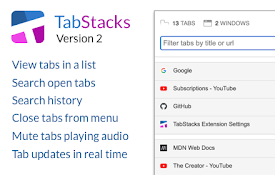
TabStacks: tab and history search
View and search through open tabs and browser hist

TabMate
TabMate helps you manage the tab clutter. Easily s