
CodeGrader Chrome 插件, crx 扩展下载
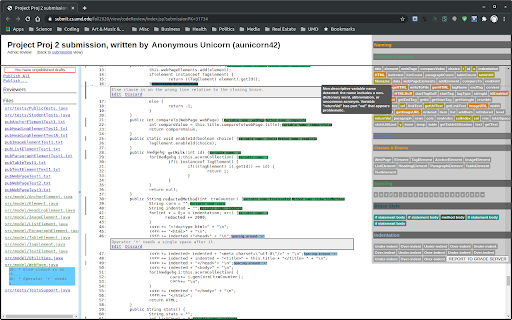
A plugin to ease code style grading of student project submissions at UMD/CP CS department.
The CodeGrader plugin was developed to ease the burden of Teaching Assistants (TAs) at University of Maryland. Every semester, TAs go through thousands of lines of student code manually, checking it for style, grading it, and reporting back to each student, explaining code style problems to help the students learn to code better.
In 2013, the idea and some code tailored for a couple of specific UMD course was introduced by Dr. Tak Yeon Lee, who shortly obtained his PhD in Human-Computer Interaction from UMD and moved on to Adobe Research. In 2020, another graduate student, Gregory Kramida, led the effort to implement the plugin so it can be used across any Java course in the UMD CS curriculum, introducing static code analysis and modules that can be configured for any UMD Java project using the internal Submit Server. William Kaiyang Siew and Matthew Walter Simmons, both undergraduate teaching assistants at the time, have since aided with the project, which is quickly becoming an indispensable productivity-booster for graders and a great way to issue more meaningful reports to students at a fraction of the time it took for manual grading.
For submitting issues, feature requests, and contributing to the effort, please see the project repository at https://github.com/Algomorph/CodeGrader.
| 分类 | 📝工作流程与规划 |
| 插件标识 | apfmnhgmjijhimfpmdabfbohpmelaaik |
| 平台 | Chrome |
| 评分 |
★★★★★
5
|
| 评分人数 | 2 |
| 插件主页 | https://chromewebstore.google.com/detail/codegrader/apfmnhgmjijhimfpmdabfbohpmelaaik |
| 版本号 | 1.0.3 |
| 大小 | 4.58MiB |
| 官网下载次数 | 129 |
| 下载地址 | |
| 更新时间 | 2022-07-26 00:00:00 |
CRX扩展文件安装方法
第1步: 打开Chrome浏览器的扩展程序
第2步:
在地址栏输入: chrome://extensions/
第3步: 开启右上角的【开发者模式】
第4步: 重启Chrome浏览器 (重要操作)
第5步: 重新打开扩展程序管理界面
第6步: 将下载的crx文件直接拖入页面完成安装
注意:请确保使用最新版本的Chrome浏览器
同类插件推荐

Select all in context menu
This extension allows the user to select all text

CodeGrader
A plugin to ease code style grading of student pro

UMD Professor Ratings
This extension displays professor ratings next to
UMD Schedule of Classes Professor Rating
This extension will add professor ratings to each

Better Testudo
Upgrades the Testudo class search system to make i

Meta Reader
Extension for reading meta, headers and images for

UMDStats
Enhances browsing experience on University of Mary

TabIt - NewTab: Productivity in Access
Inimitable NewTab pages by TabItNew Tab page's
meta
Meta is a web application that puts online news me

Code Search
Find coding answers quicklyGet questions and answe

Where is it?
Whereisit is an extension that helps you to easily
Tabs Counter
A simple extension for displaying the tab number n

GitHub Recommender
Get similar repositories on GitHub pageGet recomme