
Proxy Toggle: Simple System Proxy Switcher Chrome 插件, crx 扩展下载
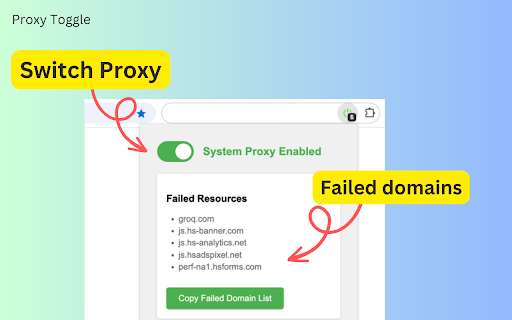
Toggle system proxy and collect failed domains
# Proxy Toggle: Simple System Proxy Switcher
Proxy Toggle is a straightforward browser extension that allows you to switch between your system proxy and a direct internet connection with a single click.
## Key Features
- One-click toggle between system proxy and direct connection
- Visual icon feedback for current proxy state
- Remembers your settings across browser sessions
- Display and copy list of domains of failed resources (New feature)
## How to Use
1. Install the Chrome extension from the [Chrome Store](https://chrome.google.com/webstore/detail/bcalikfdfalhmdfinflciajgopeomhfb)
2. Click the extension icon in your browser toolbar
3. Green icon means system proxy is on, gray means direct connection
4. View and copy the list of failed domains, if any (New feature)
Perfect for developers, privacy-conscious users, and anyone who frequently switches between proxy and direct connections.
Simplify your browsing experience with Proxy Toggle!
## Open Source
This project is open source. You can view the code and contribute on GitHub: https://github.com/PlayerYK/ProxyToggle
## Changelog
### Version 1.1.0 (2024-09-09)
- New feature: Display list of domains that failed due to proxy
- New feature: Button to copy the list of failed domains
- Optimization: Copy button only shows when there are failed domains
### Version 1.0.0 (2024-08-30)
- Initial release
- Implemented basic proxy switching functionality
- Added icon state feedback
| 分类 | 🛠️工具 |
| 插件标识 | bcalikfdfalhmdfinflciajgopeomhfb |
| 平台 | Chrome |
| 评分 |
★★★★★
5
|
| 评分人数 | 5 |
| 插件主页 | https://chromewebstore.google.com/detail/proxy-toggle-simple-syste/bcalikfdfalhmdfinflciajgopeomhfb |
| 版本号 | 1.1.0 |
| 大小 | 19.11KiB |
| 官网下载次数 | 268 |
| 下载地址 | |
| 更新时间 | 2024-09-10 00:00:00 |
CRX扩展文件安装方法
第1步: 打开Chrome浏览器的扩展程序
第2步:
在地址栏输入: chrome://extensions/
第3步: 开启右上角的【开发者模式】
第4步: 重启Chrome浏览器 (重要操作)
第5步: 重新打开扩展程序管理界面
第6步: 将下载的crx文件直接拖入页面完成安装
注意:请确保使用最新版本的Chrome浏览器
同类插件推荐

Substratum Proxy Toggle
Route your internet traffic through SubstratumNode

Proxy SwitchyOmega Pro
Manage and switch between multiple proxies quickly

Rayobyte Proxy Switcher - Free Proxy Extension
The Rayobyte Proxy Extension allows you to switch

Proxyfy
Tiny proxy switcherSimple proxy switcher, like lat
Proxy Toggle: Simple System Proxy Switcher
Toggle system proxy and collect failed domains# Pr

LeetSox Proxy Manager
Proxy Manager is a user-friendly Chrome extension

Proxy Switchy Auto
Automated proxy switching per domain using PAC scr

Proxy Switcher
Easily switch between multiple proxies via toolbar

SOCKS5 Proxy
Automatic proxy socks5 (or manual), and open amazo

San Proxy
San Proxy - A Chromium Based Extension for using S

Proxy Switcher and Manager
Manage and switch between multiple proxy types (SO

BigMama Proxy Connect
BigMama Proxy Network connect addonBigMama Proxy C

Socks5 Configurator
Configure your browser with socks5 proxySocks5 Con