
Image Rotator for WhatsApp™ Web Chrome 插件, crx 扩展下载
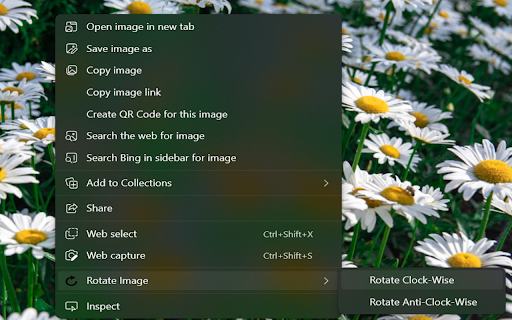

An unofficial extension that uses the context menu to rotate images from WhatsApp™ Web.
Introducing our useful, unofficial Chrome extension designed specifically for WhatsApp™ Web. Say goodbye to the discomfort of viewing improperly oriented images that often crop up during your online conversations.
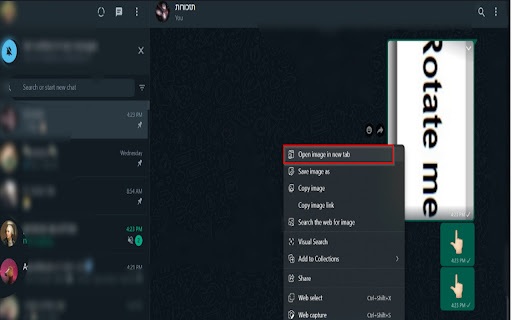
Once you've installed our extension, adjusting any image from WhatsApp™ Web becomes a breeze. Simply right-click the desired image and select 'Open image in new tab'. Then, another right click reveals the 'Rotate Image' option. With each click on this option, your image will rotate either clockwise or counterclockwise in 90-degree increments.
Enhancing the user experience even further, we've integrated keyboard shortcuts in our latest update. For a clockwise rotation, use 'ctrl+shift+right key'. Alternatively, for a counterclockwise adjustment, 'ctrl+shift+left key' is your go-to command.
Avoid straining your neck with stubborn, improperly angled pictures in WhatsApp™ Web. Let our extension handle the rotation, providing you with a comfortable viewing experience.
To learn more, or to contribute to this ongoing project, visit our GitHub repository: https://github.com/BatelBB/Rotate_Image_Extension
Download our extension today - the unofficial, yet extremely efficient solution for image rotation in WhatsApp™ Web. Say goodbye to neck strain and hello to convenience!
Note: WhatsApp™ is a trademark of WhatsApp Inc.
| 分类 | 📝工作流程与规划 |
| 插件标识 | bcgcckcljjhmgfdaoaokoaamjidpjgfh |
| 平台 | Chrome |
| 评分 |
★★★☆☆
3.5
|
| 评分人数 | 168 |
| 插件主页 | https://chromewebstore.google.com/detail/image-rotator-for-whatsap/bcgcckcljjhmgfdaoaokoaamjidpjgfh |
| 版本号 | 1.6 |
| 大小 | 10.98KiB |
| 官网下载次数 | 2000 |
| 下载地址 | |
| 更新时间 | 2023-12-01 00:00:00 |
CRX扩展文件安装方法
第1步: 打开Chrome浏览器的扩展程序
第2步:
在地址栏输入: chrome://extensions/
第3步: 开启右上角的【开发者模式】
第4步: 重启Chrome浏览器 (重要操作)
第5步: 重新打开扩展程序管理界面
第6步: 将下载的crx文件直接拖入页面完成安装
注意:请确保使用最新版本的Chrome浏览器
同类插件推荐
Girar tarefa no Classroom
Adiciona um botão para girar as fotos ou pdf das a

RotateX - Rotate Your Image
A simple extension For Rotate Image# Image-Rotater

Rotate image online
Online service for rotating and flipping images wi
Image Rotator for WhatsApp™ Web
An unofficial extension that uses the context menu

Rotaty
Rotaty is a Chrome extension that rotates images i

Simple Image Rotator
(extremely) basic extension to rotate images in-pl

Simple Image Viewer
Default image viewer with advanced functionality:

Random Rotation
Randomly rotates everything on every webpage you v
Rotate Page in Google Books
Click on a book page to get arrows in the upper co

Flip this
Flip/rotate page or html elements.The extension th

Rotato - Rotate Images in Chrome
Rotate any image in Chrome with ease!Rotato allows

Webpage Rotator
A handy Chrome extension that lets you rotate any
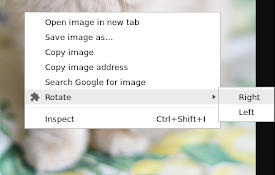
Image Rotate Context
Allows you to rotate an image with the right click