
MyGlue Chrome Extension Chrome 插件, crx 扩展下载
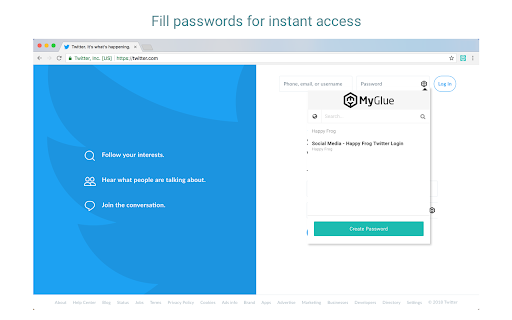
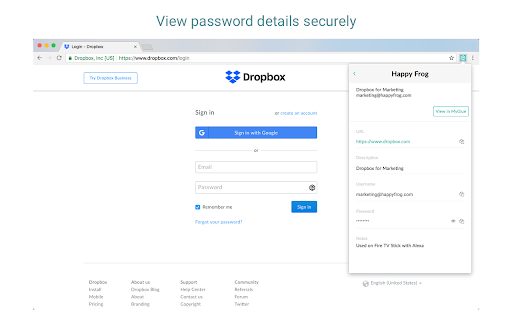
With MyGlue Chrome Extension, you can now quickly and securely access all of your MyGlue passwords right from within Chrome.
Securely access MyGlue password, documents, and more on any Chrome extension web pages
With the MyGlue Chrome extension, you’ll have instant access to MyGlue information whenever you need it. You can quickly and securely access all of your MyGlue passwords, create passwords, and preview assets right from within the browser extension. This means no more switching pages and no more copy/paste of usernames and passwords to sign in to websites and services. The extension also supports Single Sign-On (SSO), should your organization have it enabled.
Passwords:
- Create, access and view passwords within the browser extension - all passwords that are saved in MyGlue will be available
- Password creation: ability to create business personal and team based passwords in browser extension
- Password autofill: usernames and passwords stored in IT Glue are automatically populated in login fields
- Password auto-creation: When creating a new password, users will be auto-promoted to add their passwords to MyGlue
Search:
- Quick search: access any item in MyGlue via the Search feature, not just passwords on any webpages by pressing "Q"
- Globally search for any passwords your account has permission to access
Security:
- The extension also supports Single Sign-On (SSO), should your organization have it enabled.
- At-rest and in-transit encryption of passwords keeps your data safe
- Sign in once and go: Share a sign-in session between the MyGlue web app and MyGlue Chrome extension for maximum time saving
| 分类 | 📝工作流程与规划 |
| 插件标识 | bfcdaalpeodhimbiipneeaoeogkkminc |
| 平台 | Chrome |
| 评分 |
★★★★★
5
|
| 评分人数 | 1 |
| 插件主页 | https://chromewebstore.google.com/detail/myglue-chrome-extension/bfcdaalpeodhimbiipneeaoeogkkminc |
| 版本号 | 2.1.0 |
| 大小 | 3.43MiB |
| 官网下载次数 | 30000 |
| 下载地址 | |
| 更新时间 | 2025-02-20 00:00:00 |
CRX扩展文件安装方法
第1步: 打开Chrome浏览器的扩展程序
第2步:
在地址栏输入: chrome://extensions/
第3步: 开启右上角的【开发者模式】
第4步: 重启Chrome浏览器 (重要操作)
第5步: 重新打开扩展程序管理界面
第6步: 将下载的crx文件直接拖入页面完成安装
注意:请确保使用最新版本的Chrome浏览器
同类插件推荐

ConnectWise Service Ticket Tab Updater
Sets the Service Ticket number and title as the na

1stream Click to Dial
1stream Click-to-dialSimple One Click Dialing (Cli

MyGlue Chrome Extension
With MyGlue Chrome Extension, you can now quickly
Datto RMM UI Enhancer
Improves the Datto RMM (previously known as AEM) U

IT Glue Offline Mode
IT Glue offline modeOffline Mode for Passwords all

Passly
PasslyThe Passly Browser extension will allow user

My Apps Secure Sign-in Extension
My Apps Secure Sign-in ExtensionThis extension is

IT Glue Chrome Extension
Quickly and securely access all of your IT Glue pa

Password Boss
Remember every password and and login to websites

Weeklee
Weeklee browser extensionWeeklee.ai is the ultimat

GoldDust
Ask a question about a company or a person. If the

Saverd Recipe Clipper
Save recipes from hundreds of recipe sites right t