
Tiktok unfollow all Chrome 插件, crx 扩展下载
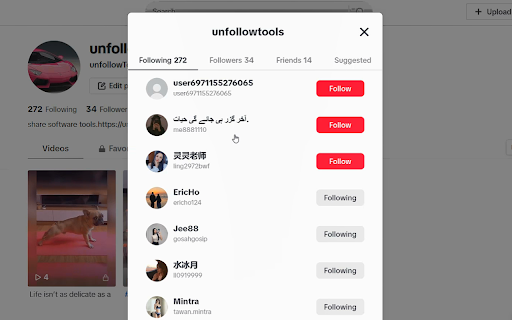
Tiktok unfollow all fast and easy
mass unfollow on tiktok
Search for "Tiktok unfollow all" in the Edge browser and Google Chrome web store to obtain the extension and install it
Description:
Tiktok unfollow all is a convenient and practical browser extension program designed to help users manage their Tiktok following list more efficiently. Through this extension program, users can easily unfollow friends, eliminating tedious manual operation steps and improving the user experience.
Main features:
1. Batch operation: One click unfollow multiple TikTok friends to improve operation efficiency.
2. Customized selection: Users can flexibly choose to unfollow users according to their own needs.
3. Real time feedback: The extension program will display the progress of unfollowing in real time, allowing users to clearly understand the operation situation.
4. User friendly: The interface is simple and intuitive, easy to use, and even users who are not skilled in technical operations can easily get started.
Usage Guide:
1.Download the TikTok unfollow all extension from the Chrome Web Store: Search for "TikTok unfollow all" on Chrome Web Store and click install
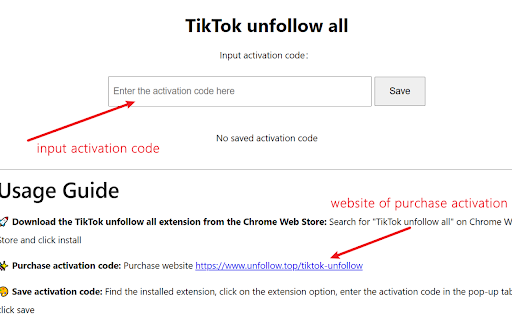
2.Purchase activation code: Purchase website https://www.unfollow.top/tiktok-unfollow
3.Save activation code: Find the installed extension, click on the extension option, enter the activation code in the pop-up tab, and click save
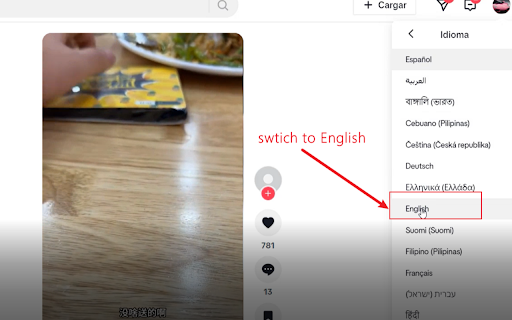
4.Log in to TikTok in the browser:After logging in, Hover the mouse over the personal avatar to find the language option and switch the language to English. Be sure to switch the language to English
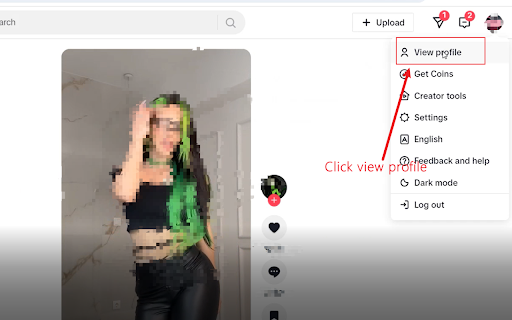
5.Enter personal homepage:Hover the mouse over the personal avatar to click view profile. After entering the personal homepage, be sure to refresh the webpage again for the extension program to work
6.Choose whether to clear friends: The extension program defaults to clearing friends and following.In the pop-up window, choose whether to clear friends or not
7.Loading following: Do not operate the mouse and keyboard, hand over the work to the extension program. The extension program will automatically click "Following" and load all the friends it follows, which takes some time. The more friends it has, the longer it takes
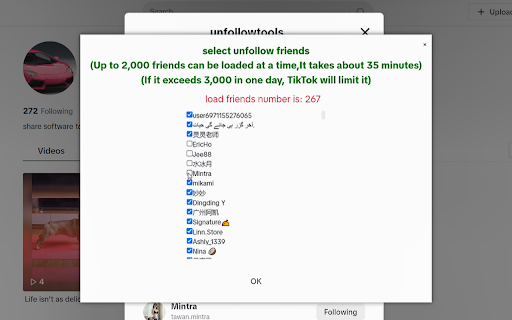
8.Select the someone you want to unfollow:After loading the follow friends, a pop-up window will appear. Friends who do not intend to unfollow can check the corresponding friend name
9.Waitting. It takes about 0.5-2 seconds to unfollow each friend. Do not operate the computer during this process. After completion, the extension program will pop up a prompt
10.Complete. If there are still some friends who have not been cancelled, you can refresh the interface and repeat the above process. After canceling all of them, close the extension program in the browser extension management interface
Caution:
1. Be sure to switch the language to English
2. After entering the personal homepage, be sure to refresh the page again, otherwise the extension program will not work
3. During the automatic unfollow process of the extension program, a pop-up window will appear that requires manual sliding of the slider for verification, which needs to be completed manually
4. TikTok cannot unfollow more than 3000 people per day, otherwise clicking on it will have no effect
5. The browser extension will only unfollow friends in bulk and will not collect any personal information. At the same time, it is not responsible for the possible impact of unfollowing friends in bulk on the account
| 分类 | 🎬娱乐 |
| 插件标识 | cgkoodklfijobaehnnkhkpkfcdnhmoga |
| 平台 | Chrome |
| 评分 |
★★☆☆☆
2.4
|
| 评分人数 | 20 |
| 插件主页 | https://chromewebstore.google.com/detail/tiktok-unfollow-all/cgkoodklfijobaehnnkhkpkfcdnhmoga |
| 版本号 | 1.0.0 |
| 大小 | 53.52KiB |
| 官网下载次数 | 111 |
| 下载地址 | |
| 更新时间 | 2024-08-22 00:00:00 |
CRX扩展文件安装方法
第1步: 打开Chrome浏览器的扩展程序
第2步:
在地址栏输入: chrome://extensions/
第3步: 开启右上角的【开发者模式】
第4步: 重启Chrome浏览器 (重要操作)
第5步: 重新打开扩展程序管理界面
第6步: 将下载的crx文件直接拖入页面完成安装
注意:请确保使用最新版本的Chrome浏览器
同类插件推荐

TikTok All Favorite Videos Remover
A Chrome extension to remove all favorite videos o
Delete All My Videos on TikTok™
Delete all TikTok videos at once. Quickly remove a

Tiktok : Unfollower !
very simple Macro unfollower for tiktokThis is a j

Tiktok unfollow all
Tiktok unfollow all fast and easymass unfollow on

TikTok Unfollower
A handy tool to unfollow all accounts on TikTok wi

TikTok All Reposted Videos Remover
A Chrome extension to remove all reposted videos o
TikTok Auto Unfollow
This app allows you to unfollow everyone you follo

Super Automation for TikTok
There are Auto DM, Like, UnLike, Follow, UnFollow,

TK Follow Bot - TT Automation Tool
Mass follow and unfollow on TikTok, The best TikTo

TikFollow - Export TikTok Follower/Following
Export Tiktok followers and following to CSV or Ex

Social Media Bot. Auto Clicker Growbot.
Social Media Bot auto clicker growbot for X, TikTo

TikTok All Liked Videos Remover
A Chrome extension to remove all liked videos on T

TikTok Leads
Using AI generate leads on TikTok like a Pro! The