
AppsScript Color Chrome 插件, crx 扩展下载
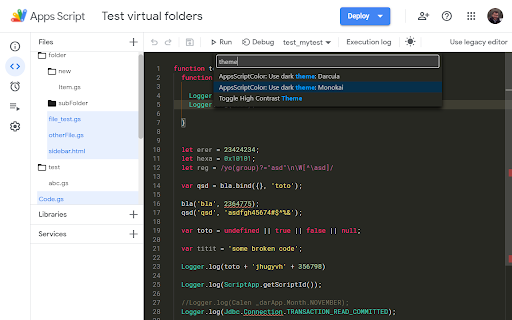
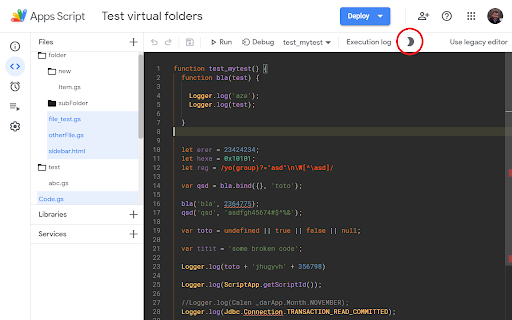
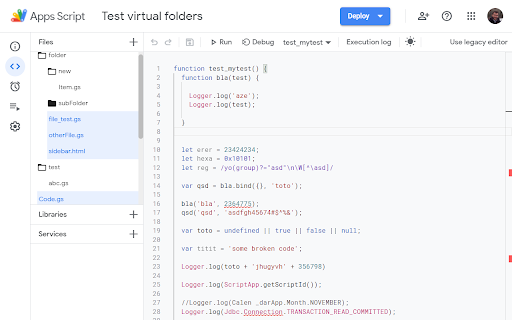
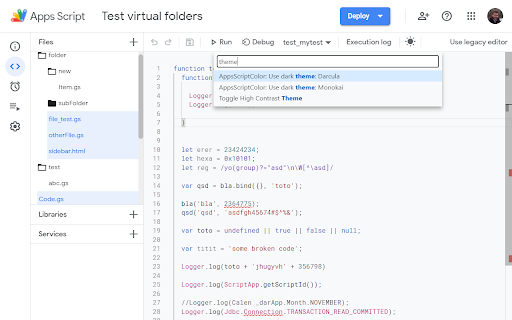
Provides folders display and a dark color theme to the google apps script editor.
AppsScript Color provides other color themes for Apps Script developers.
These dark themes are more contrasted and comfy, allowing to code for hours !
Choose from the 'Colors' integrated menu one of the following themes :
3 dark themes are available in the IDE (themes only applies to the IDE, not to the full page)
Use the "Sun/Moon" icon to toggle the dark mode on and off, To select a different color theme, open the IDE action menu with [F1] (while focusing the IDE), then type either "theme", or one of the following:
- Darcula
- Monokai
- BlackFoxConsole
For now the extension applies a color theme of your choice on Apps Scripts open on script.google.com
It works for standalone scripts and scripts linked to native Google documents.
AppsScriptColor also add a structured Folder view for a tidier file list !
To add folders, rename your files to include the path in their name:
myFolder/some_subfolder/myfileName
## ChangeLog
v1.5.1
- [#39](https://github.com/JeanRemiDelteil/appsScriptColor/issues/39) Fix: issue with Chrome Update
v1.5.0
- [#31](https://github.com/JeanRemiDelteil/appsScriptColor/issues/31) Updated the extension to support Chrome Extension Manifest V3
- [Clean-up] Remove all Maestro related code
- [#30](https://github.com/JeanRemiDelteil/appsScriptColor/issues/30) Fix: Navigating away from file does not remove light blue highlighting
- [#22](https://github.com/JeanRemiDelteil/appsScriptColor/issues/22) Fix: Creating a New Project (script) with the Extension will crash Chrome
- [#20](https://github.com/JeanRemiDelteil/appsScriptColor/issues/20) Fix: Duplicated entries in action menu
- [#19](https://github.com/JeanRemiDelteil/appsScriptColor/issues/19) Mitigated: Color insertion fails when no function
v1.4.1
- Fix https://github.com/JeanRemiDelteil/appsScriptColor/issues/21
v1.4.0
- Full support of the new GAS online IDE (not all theme are available)
v1.1.1
- Fix some colors changes
v1.1.0
- Custom theme editor allows to create theme derivated from the 3 default themes\
Find the Theme Editor in the color menu
v1.0.2
- Folder are grouped above files
- Folder color match their nesting level
v1.0.1
- New Folder system: use the '/' character in your file names to display a structure Folder view This will allow great compatibility with the new CLASP command line
tool (https://github.com/google/clasp)
v0.3.6
- Fix adding or removing a folder work as expected again
v0.3.5
- Fix Color not applied at page loading
v0.3.3
- Fix GAS CSS update for font
v0.3.2
- New scroll-bar color for Black fox console
v0.3.1
- Smoother folder opening
v0.3.0
- Added custom Folders to sort your files locally !
- Updated color schemes to account for the folders
v0.2.3
- Minor bug fixes : the extension only run script edit page
v0.2.0
- New color theme : Darcula, with bigger font
- Colors menu: Choose from the 2 existing themes or set to the default
v0.1.1
- Added more suited color for HTML template tokens ( <? ?> )
| 分类 | 💻开发者工具 |
| 插件标识 | ciggahcpieccaejjdpkllokejakhkome |
| 平台 | Chrome |
| 评分 |
★★★★☆
4.7
|
| 评分人数 | 99 |
| 插件主页 | https://chromewebstore.google.com/detail/appsscript-color/ciggahcpieccaejjdpkllokejakhkome |
| 版本号 | 1.5.1 |
| 大小 | 48.29KiB |
| 官网下载次数 | 30000 |
| 下载地址 | |
| 更新时间 | 2023-03-20 00:00:00 |
CRX扩展文件安装方法
第1步: 打开Chrome浏览器的扩展程序
第2步:
在地址栏输入: chrome://extensions/
第3步: 开启右上角的【开发者模式】
第4步: 重启Chrome浏览器 (重要操作)
第5步: 重新打开扩展程序管理界面
第6步: 将下载的crx文件直接拖入页面完成安装
注意:请确保使用最新版本的Chrome浏览器
同类插件推荐

DevTools Theme: Atom Dark with Green Cursor
A highly customized dark theme for Devtools with a
Darcula Theme for DevTools
Darcula Theme for DevToolsThis is a theme for the
AppSheet View Customizer
Customize Your Way to Better AppSheet AppsIntroduc

Appsheet Translate
Translate appsheet.com to any languageBoost produc
AppsScript Color
Provides folders display and a dark color theme to

Google Apps Script Custom IDE
Es una extensión que agrega funcionalidades al ent

Google Apps Script Tools
It is an extension that adds functionalities to th

Black Apps Script
This extension brings new functionality to the Goo

Google Apps Script GitHub 助手
使用GitHub/GitHub Enterprise/Bitbucket/GitLab管理GAS的i
App Script Editor PRO
The best chrome extension for Google Apps Script d

GAS Prettier + AI Completion
Google Apps Script Prettier Formatter Chrome Exten

Google 应用脚本助手
一个帮助你编写Google应用脚本代码的AI扩展。此扩展程序可帮助您使用 AI 编写和解释 Goog
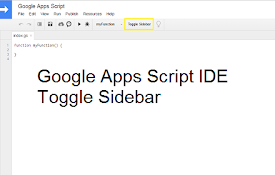
Google Apps Sidebar Toggle
Toggle the project navigator sidebar open and clos