
Mercury: Degiro Portfolio Tracking, Visualizations & AI Metrics Chrome 插件, crx 扩展下载
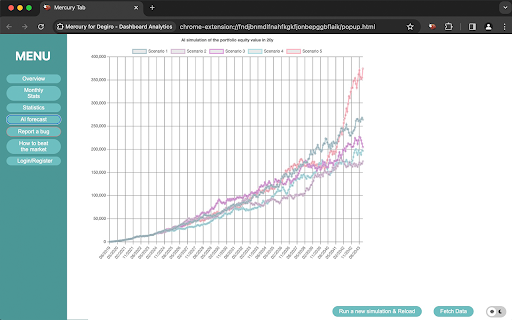

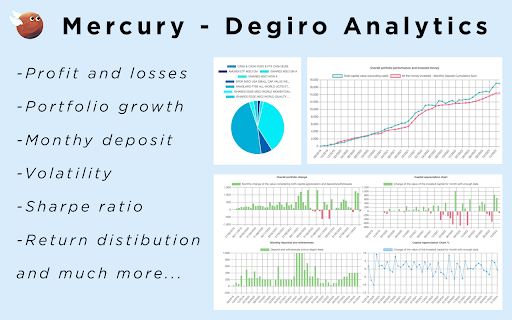
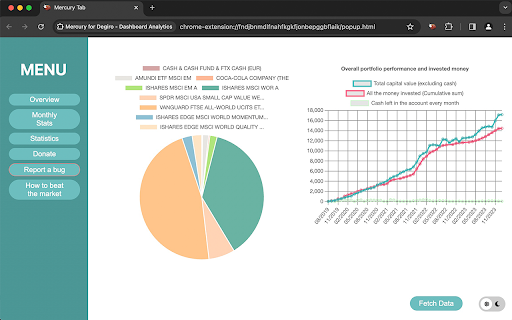
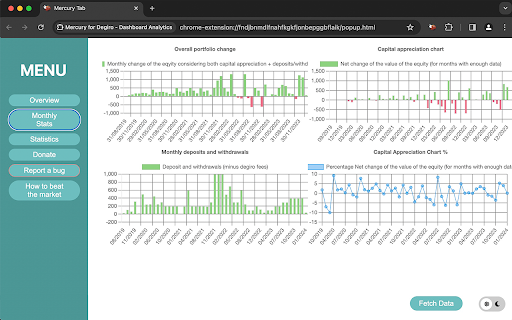
Track & Visualize your Degiro portfolio performance with AI, an amazing dark theme while being privacy focused.
Portfolio Management with AI Forecasting!
Experience the power of AI forecasting to visualize your Degiro portfolio's performance over the next 20 years. Mercury offers a suite of features tailored to optimize your investment strategy, including:
Performance Tracking: Keep tabs on your portfolio's performance effortlessly.
Investment Monitoring: Monitor total invested amounts with precision.
Portfolio Composition: Stay informed about your portfolio's asset distribution.
Month-to-Month Evaluation: Analyze performance changes with and without considering deposits.
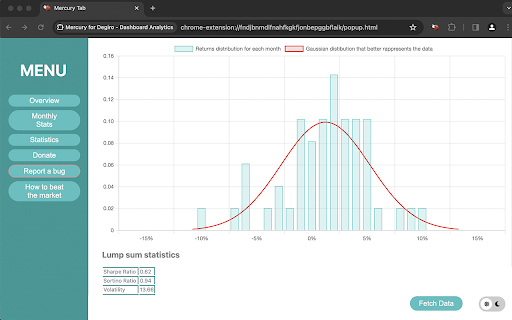
Advanced Statistics: Dive deep into Gaussian distributions, Sharpe ratio, yearly returns, volatility, and Sortino ratio.
Personalization: Tailor your experience with a sleek dark theme.
By utilizing the Mercury Chrome Extension, you acknowledge and agree to Mercury's terms and conditions.
Key Features:
Privacy Priority: Mercury respects your privacy, ensuring that your personal data is handled securely.
Direct Data Sourcing: All necessary data is sourced directly from your Degiro account.
Strict Data Confidentiality: Your information is securely stored locally in your browser, with no disclosure to third parties.
No External Operations: Mercury operates solely within your browser, without any external account operations.
Mercury stands as the ultimate Degiro Portfolio Tracker and Visualizer, providing a seamless solution for monitoring your portfolio growth and investment performance.
Keywords: Portfolio Management, AI Forecasting, Degiro Portfolio Tracker, Investment Monitoring, Portfolio Visualization, Advanced Statistics, Privacy Protection, Data Security, Personalization, Investment Performance, Financial Analysis.
How to use it.
Mercury does not ask your password or login informations.
You just need to fetch the data with the fech button.
Since mercury does not know your login to Degiro you need to fetch the data while the degiro page is open.
After that the data will be imported and you can use the app even offline.
Use case:
Mercury is specialized on tracking long term portfolios as DCA.
If you are a trader and buy/sell deposit/withdraw often the numbers may not be correct since degiro does not discose those information and they cannot be easlily incorporated in Mercury
Supported currencies: EU, USD, CA, AU, CHF, GBP
| 分类 | 🛠️工具 |
| 插件标识 | codebcdegkebiploiddbbofkljbcigij |
| 平台 | Chrome |
| 评分 |
★★★★★
5
|
| 评分人数 | 3 |
| 插件主页 | https://chromewebstore.google.com/detail/mercury-degiro-portfolio/codebcdegkebiploiddbbofkljbcigij |
| 版本号 | 4.2.0 |
| 大小 | 1.33MiB |
| 官网下载次数 | 324 |
| 下载地址 | |
| 更新时间 | 2024-07-05 00:00:00 |
CRX扩展文件安装方法
第1步: 打开Chrome浏览器的扩展程序
第2步:
在地址栏输入: chrome://extensions/
第3步: 开启右上角的【开发者模式】
第4步: 重启Chrome浏览器 (重要操作)
第5步: 重新打开扩展程序管理界面
第6步: 将下载的crx文件直接拖入页面完成安装
注意:请确保使用最新版本的Chrome浏览器
同类插件推荐

Mercury: Degiro Portfolio Tracking, Visualizations & AI Metrics
Track & Visualize your Degiro portfolio perfor

Degiro Statistics
Shows interesting portfolio statistics at the webs

Zeus - Degiro Portfolio Manager
Track your portfolio growth with Zeus Portfolio Ma

GA4 annotations Test
Create annotations on GA4GA4 Annotations+ is a web

ChatGPT for Google Search
Adds ChatGPT results alongside Google search resul

NovuloTraceFormatter
Enables collapsing and expanding of rows in a Novu

Debricked Select Extension
Open Source Select will help developers find and u

LeadhuntAI - Chrome Extension
This extension will allow you to easily retrieve s

Indent TextArea
Enables indent on textarea from context menu.Enabl

Anti FeR toolkit
Adds features and extensions for the bushtarion we

Naro
Naro - AssistantNaro is an always-on sales knowled

Regna | Ens Discovery Tool
Twitter Ens discovery. Inspect any profile that ha

GitHub to CircleCI
Open your CircleCI pipelines directly from a GitHu