
Zillow/Google Maps Connect Chrome 插件, crx 扩展下载

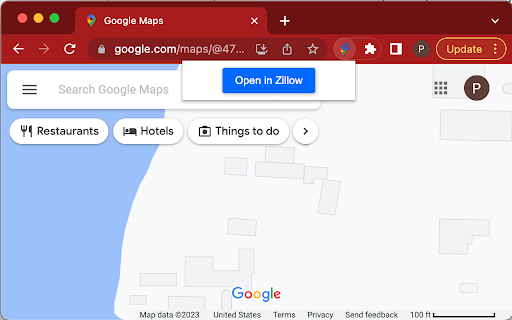
When viewing a location in Google Maps or Zillow, this extension will open the same location in Zillow or Google Maps, respectively.
This extension enables the user to navigate between the map views on Zillow and Google Maps. So if you're viewing a map location or a singular address on Google Maps, and you want to see the same location or address on Zillow, click the button and a new tab will open up with that exact location or property displayed in Zillow.
This functionality works the same way if you're viewing a map location in Zillow--the button will open a new tab with the corresponding location Google Maps.
This extension only works on google.com and zillow.com.
| 分类 | 🛠️工具 |
| 插件标识 | dbfknbbfkohjliodplkgapjmkhiolaem |
| 平台 | Chrome |
| 评分 |
☆☆☆☆☆
0
|
| 评分人数 | 1 |
| 插件主页 | https://chromewebstore.google.com/detail/zillowgoogle-maps-connect/dbfknbbfkohjliodplkgapjmkhiolaem |
| 版本号 | 1.0.0 |
| 大小 | 21.67KiB |
| 官网下载次数 | 114 |
| 下载地址 | |
| 更新时间 | 2023-02-15 00:00:00 |
CRX扩展文件安装方法
第1步: 打开Chrome浏览器的扩展程序
第2步:
在地址栏输入: chrome://extensions/
第3步: 开启右上角的【开发者模式】
第4步: 重启Chrome浏览器 (重要操作)
第5步: 重新打开扩展程序管理界面
第6步: 将下载的crx文件直接拖入页面完成安装
注意:请确保使用最新版本的Chrome浏览器
同类插件推荐
Zillow/Google Maps Connect
When viewing a location in Google Maps or Zillow,

Kloser
Close all tabs and open default tabSimple extensio

Batch Cache
Customisable Bookmark Navigation HubThe Batch Cach

Smartlink Health
Smartlink Heatlh is a software used to extract app

Scrapethings
Scrape any data from any website with zero code.Sc

Spaceduck Web Clipper
Capture and bookmark web content, organizing it in

HintEd Smart Manuals Editor
Build an interactive onboarding and training exper

Linqbase - LinkedIn CRM & Outreach
Effortlessly collect, organize, and export detaile

Thymeline
Add events to your timeline the easy wayKeep track

brocrobes
Browser plugin for https://transcrob.esBrocrobes i

BoostPic - Search Google Images on the fly
Uncover the possibility to search Google Images qu

Team Bookmarks
Conquer Bookmark Chaos: Boost Team Efficiency. Spe

GitHub to CircleCI
Open your CircleCI pipelines directly from a GitHu