
Quick Find for Google Chrome™ Chrome 插件, crx 扩展下载


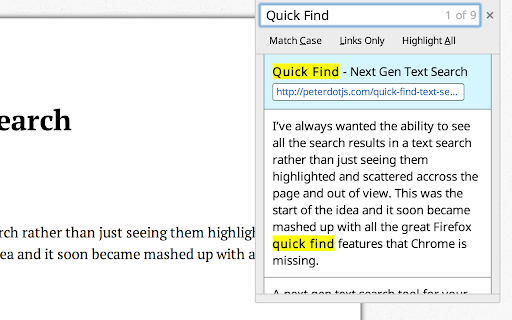
Port of Firefox Quick Find features + awesome new ones. Search results in one location. Navigate to links in just a few keystrokes.
For a more easily readable description please visit:
https://github.com/peterdotjs/quick-find
****
Change Log:
0.0.14 - Manifest v3 support
0.0.13 - Updated reference url
0.0.12 - Added ability to change default shortcut keys
0.0.11 - Fixed issue where search is broken in Chrome 40.
Motivation
--------------------
I’ve always wanted the ability to see all the search results in a text search rather than just seeing them highlighted and scattered across the page and out of view. This was the start of the idea and it soon became mashed up with all the great Firefox quick find features that Chrome is missing.
If you like it please rate it and if you have any feature requests, questions or bugs you file it here:
https://github.com/peterdotjs/quick-find/issues
Demo
------------
https://www.youtube.com/watch?v=x2PEyTyJ6iM
Description
--------------------
Next generation text search. A new text search tool for your Chrome web page. Start a search and simply press enter/return on a highlighted link and you’ll instantly navigate to that page. A mashup of Firefox quick find features (case match, links only search, highlight all, search selected text) as well as awesome new ones (scroll/navigate through all search results with context) - brought to Chrome.
SHORCUT KEYS
---------------------------
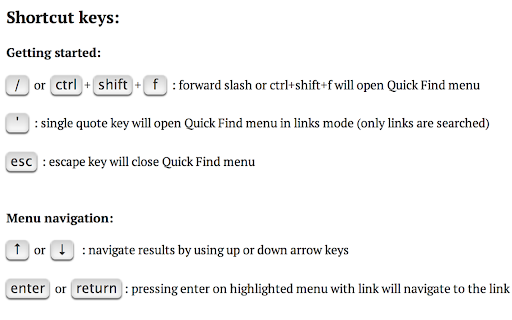
Getting started
-----------------------------
/ or ctrl + shift + f : forward slash or ctrl+shift+f will open Quick Find menu
' : single quote key will open Quick Find menu in links mode (only links are searched)
esc : escape key will close Quick Find menu
Menu navigation
-------------------------------
↑ or ↓ : navigate results by using up or down arrow keys
enter or return : pressing enter on highlighted menu with link will navigate to the link
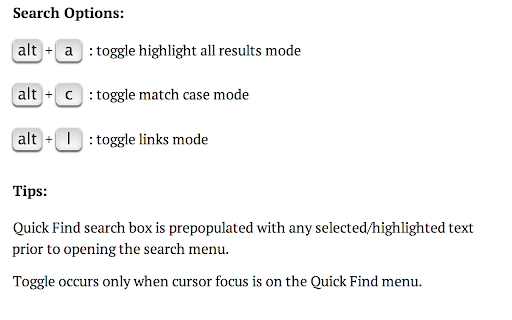
Search Options
-----------------------------
alt + a : toggle highlight all results mode
alt + c : toggle match case mode
alt + l : toggle links mode
Tips
-------------------
Quick Find search box is pre-populated with any selected/highlighted text prior to opening the search menu.
Toggle occurs only when cursor focus is on the Quick Find menu.
Limitations
-------------------------
Extension only works on sites that allow content scripts. The chrome webstore page itself for example doesn't even allow content scripts to be run.
After you've installed it make sure you are using it on a newly loaded or refreshed page. The script won’t be loaded on existing tabs without a refresh.
Quick find does not search through iframes, script, or code html elements.
When results show up in same html element, will be shown only as one result.
Other website shortcuts or extensions may conflict with these shortcuts. A future enhancement can be to select your own shortcuts to open the menu.
Additional Notes
-------------------------------
Anonymous page view tracking is used to improve the extension and user experience. You can opt out in the options menu.
Chrome is a trademark of Google Inc. Use of this trademark is subject to Google Permissions.
| 分类 | 🛠️工具 |
| 插件标识 | dejblhmebonldngnmeidliaifgiagcjj |
| 平台 | Chrome |
| 评分 |
★★☆☆☆
2.8
|
| 评分人数 | 15 |
| 插件主页 | https://chromewebstore.google.com/detail/quick-find-for-google-chr/dejblhmebonldngnmeidliaifgiagcjj |
| 版本号 | 0.0.14 |
| 大小 | 260KiB |
| 官网下载次数 | 4000 |
| 下载地址 | |
| 更新时间 | 2024-06-10 00:00:00 |
CRX扩展文件安装方法
第1步: 打开Chrome浏览器的扩展程序
第2步:
在地址栏输入: chrome://extensions/
第3步: 开启右上角的【开发者模式】
第4步: 重启Chrome浏览器 (重要操作)
第5步: 重新打开扩展程序管理界面
第6步: 将下载的crx文件直接拖入页面完成安装
注意:请确保使用最新版本的Chrome浏览器
同类插件推荐

Spot: Better Find in Page
Helps to find information inside a pageSpot finds

Search Highlighter
Search and highlight keywords in any webpage via t

Chrome Regex Search
An extension for Regex Search in lieu of Chrome

Awesome Button Bar
Button bar, combining downloads, bookmarks, extens

Quickfind
highlight all occurrences of a specific phrase on

Multi Search & Multi Jump
您可以跳转到每个搜索字的搜索结果。Search inside the page and highli

Quick Find for Google Chrome™
Port of Firefox Quick Find features + awesome new

Type-ahead-find
Find text or links as you typeType-ahead-find [1]

MultiHighlighter
MultiHighlighter allows multi-word searching/highl

Selection Search
Search for the selected text in search enginesWith

Highlighty: Search, Find, Multi Highlight
Searching and Multi Highlighting made effortless!

Search the current site (站内搜索)
一个使用 Google 搜索任意网站所有页面的工具栏按钮。一个工具栏按钮扩展。使用Google、Ya

All in one web searcher
Search anything on the internet easily by typing i