
Schedule Helper Updated Chrome 插件, crx 扩展下载
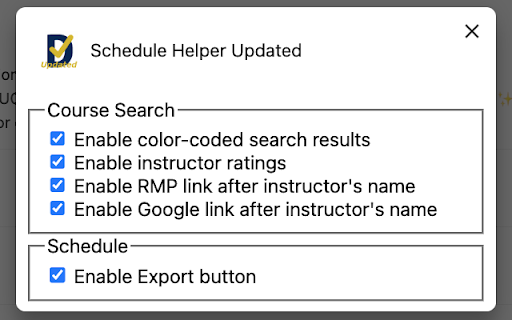
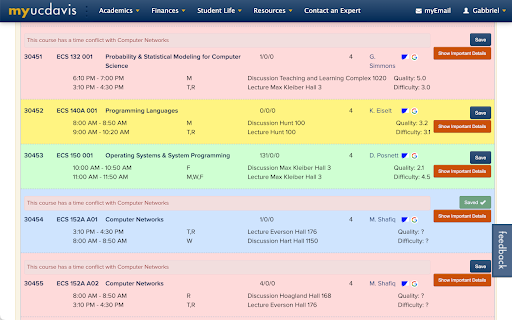
Improve UC Davis Schedule Builder with ✨color-coded search results✨ and ✨student-submitted ratings for each instructor✨
Red: Conflicts with your current schedule
Yellow: Class is full, but doesn't conflict
Green: Fits in your schedule
Blue: Already selected
- Click the icon next to the instructor's name to open RMP in a new tab
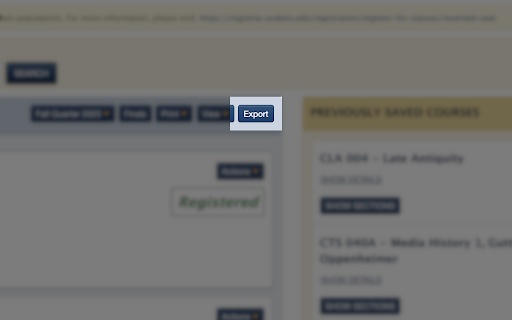
- Click Export to download the current schedule as an iCalendar file (.ics)
- To import the .ics file into Google Calendar, see https://support.google.com/calendar/answer/37118
Useful Links:
- For all majors: https://schedgo.com
- For computer science majors: https://ucdecs.github.io
Changelog:
0.6.2 (Nov 2, 2024)
- Updated ratings data
0.6.1 (Sep 12, 2024)
- Updated ratings data
0.6 (Jul 4, 2024)
- Updated ratings data
- Added Export button for summer sessions and 2024-2025
0.5.1 (May 10, 2024)
- Updated ratings data
0.5 (Jan 28, 2024)
- Updated ratings data
| 分类 | 📝工作流程与规划 |
| 插件标识 | ecdefcjnbldbmbjcmahofgfekbhdfpil |
| 平台 | Chrome |
| 评分 |
☆☆☆☆☆
0
|
| 评分人数 | 2 |
| 插件主页 | https://chromewebstore.google.com/detail/schedule-helper-updated/ecdefcjnbldbmbjcmahofgfekbhdfpil |
| 版本号 | 0.6.2 |
| 大小 | 66.44KiB |
| 官网下载次数 | 330 |
| 下载地址 | |
| 更新时间 | 2024-11-03 00:00:00 |
CRX扩展文件安装方法
第1步: 打开Chrome浏览器的扩展程序
第2步:
在地址栏输入: chrome://extensions/
第3步: 开启右上角的【开发者模式】
第4步: 重启Chrome浏览器 (重要操作)
第5步: 重新打开扩展程序管理界面
第6步: 将下载的crx文件直接拖入页面完成安装
注意:请确保使用最新版本的Chrome浏览器
同类插件推荐

UC Davis Schedule Helper
Finds conflicts in your schedule, so you don't
Schedule Helper Updated
Improve UC Davis Schedule Builder with ✨color-code

ZyBooks Auto
Automatically speeds through ZyBooks participation

Sort My Classes
Sort the classes on schedule builder based on rati

UC Schedule Helper
Load RateMyProfessor ratings on the UC Davis sched
AWS Account Labeler
Customize and display labels for different AWS acc

Qwokka
See what's actually good on Netflix.Netflix Ra

9GAG Customizer
Improve your experience on 9gag.com by blocking AD

VidNav for Youtube
Navigate video chapters with ease : Get a general

Stay Up Search
Revolutionize your new tab page!A new dynamic tab

RMP Schedule Builder Links
Get links to the ratemyprofessor pages for the pro

Default profile for Disney+
Default profile for Disney+, auto-logs chosen prof

Gympass ScreenSaver
Gympass, the ultimate chrome extension that keeps