
iD Strava Heatmap Chrome 插件, crx 扩展下载
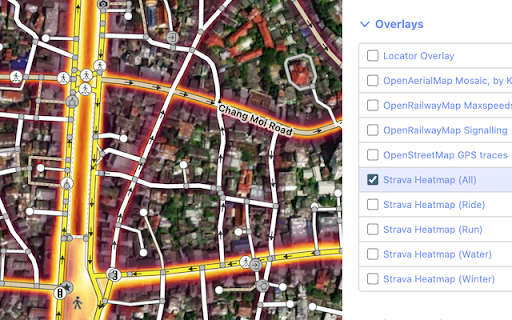
Easily overlay the Strava Global Heatmap in your iD editor and gain valuable insights into popular routes and activity patterns.
This browser extension brings a seamless integration of the Strava Global Heatmap into the OpenStreetMap iD editor, enhancing your mapping capabilities.
With this extension, you gain automatic access to all Strava activities as Heatmap overlays, eliminating the need for manual URL handling.
=== Instructions ===
1. Add this extension to Chrome
2. Log in into strava.com/login (If you don't have an account yet, sign up for a free one)
3. Visit strava.com/heatmap
4. Launch your iD editor
5. Look for "Background Settings" > "Overlays"
7. Select "Strava Heatmap (All)", or any specific activity e.g "(Ride)", "(Run)", "(Water)", or "(Winter)".
=== Troubleshoot ===
Q: Why are the heatmap overlays blurred?
A: Please ensure that you are signed in to Strava.com AND have visited the Strava Global Heatmap webpage. Once done, reload your iD editor page to resolve the issue.
=== Browser Support ===
Also available as a Firefox extension: https://addons.mozilla.org/en-US/firefox/addon/id-strava-heatmap/
Please note that we haven't tested or fully supported it on other Chromium-based browsers like Brave and Opera.
=== Feature and Bug requests ===
Submit new issues at https://github.com/cmoffroad/id-strava-heatmap-extension
| 分类 | 🛠️工具 |
| 插件标识 | eglbcifjafncknmpmnelckombmgddlco |
| 平台 | Chrome |
| 评分 |
★★★★☆
4.8
|
| 评分人数 | 9 |
| 插件主页 | https://chromewebstore.google.com/detail/id-strava-heatmap/eglbcifjafncknmpmnelckombmgddlco |
| 版本号 | 0.8.2 |
| 大小 | 26.69KiB |
| 官网下载次数 | 684 |
| 下载地址 | |
| 更新时间 | 2024-12-12 00:00:00 |
CRX扩展文件安装方法
第1步: 打开Chrome浏览器的扩展程序
第2步:
在地址栏输入: chrome://extensions/
第3步: 开启右上角的【开发者模式】
第4步: 重启Chrome浏览器 (重要操作)
第5步: 重新打开扩展程序管理界面
第6步: 将下载的crx文件直接拖入页面完成安装
注意:请确保使用最新版本的Chrome浏览器
同类插件推荐

JOSM Strava Heatmap
A browser extension that simplifies getting the TM

OpenStreetMap Tags Editor
Adds an "edit tags" button to every obje

OSM Smart Menu
Helps OpenStreetMap contributors to easily switch

StatsHunters
Show tiles on Strava route builderTo make it easie
iD Strava Heatmap
Easily overlay the Strava Global Heatmap in your i

Strava, export gpx track
Export gpx-track from strava.com (c) Eugene Ivanov

Elevate for Strava
Elevate your strava experience and goals! Track yo

Strava Enhanced Experience
Adds multiple enhancements to the free Strava webs

VeloViewer Strava Plugin
Additions to Strava website to provide helpful lin

Strava companion
Upgrade Strava features with free analytics and vi

Sauce for Strava™
Additional functionality for your cycling and runn

Strava Ranks
Quality of life features for Strava. Sort segments

Passive Aggressive Email Translator Extension
Chrome extension that identifies and translates pa