
MrxSEO - Light MetaTags Highlighter Chrome 插件, crx 扩展下载
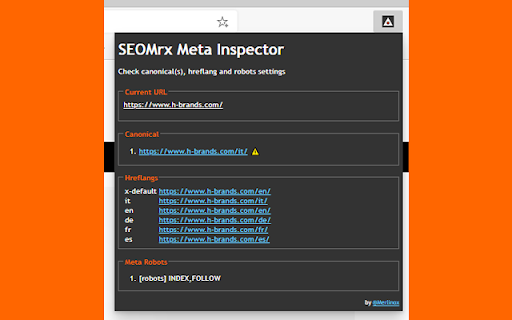
Show the main SEO tags in the page: canonical(s), hreflangs, robots, amps
Check canonical, hreflang, amp and robots settings.
The scope of this SEO Extension (for Google Chrome and Microsoft Edge) is to support SEOs to identify immediately the main page tags, without any other noise.
Main features:
??Check the canonical tag and check if there are more than one canonical in page
??Check if canonical matches the current URL
??Check hreflang tags
??Check amp reference
??Check robots tag (googlebot, bingbot too)
??Check title and meta description
??The extension icon changes when canonical is different than page location or when page is noindex
??Check img tags without width or height attribute
For canonical and meta description you can see if there are more than one tag too.
---
Have you got some new feature to suggest? Please write to me via email or via Twitter.
If you like this extension, please share to your SEO friends :)
| 分类 | 📝工作流程与规划 |
| 插件标识 | eicdbjmlpbdljohpjdeiendgamkkfnfm |
| 平台 | Chrome |
| 评分 |
★★★★★
5
|
| 评分人数 | 1 |
| 插件主页 | https://chromewebstore.google.com/detail/mrxseo-light-metatags-hig/eicdbjmlpbdljohpjdeiendgamkkfnfm |
| 版本号 | 2.1 |
| 大小 | 326KiB |
| 官网下载次数 | 353 |
| 下载地址 | |
| 更新时间 | 2022-04-18 00:00:00 |
CRX扩展文件安装方法
第1步: 打开Chrome浏览器的扩展程序
第2步:
在地址栏输入: chrome://extensions/
第3步: 开启右上角的【开发者模式】
第4步: 重启Chrome浏览器 (重要操作)
第5步: 重新打开扩展程序管理界面
第6步: 将下载的crx文件直接拖入页面完成安装
注意:请确保使用最新版本的Chrome浏览器
同类插件推荐

GSC Performance Report Style Fixer
Fix the Google Search Console Performance Report s
Meta tags - SEO Tool
This extension will list all the meta tags in a we

Perseo
The best tool for SEO professionals that helps you
MrxSEO - Light MetaTags Highlighter
Show the main SEO tags in the page: canonical(s),

Get hreflang and alternate links
This extension gets hreflang, alternate links on t

GTM Sonar
Debug your page template to see if it works with G

Page Info
Show the page info and the canonical URL, Copy as
Full Width for Google Search Console
View Google Search Console at full widthA must-hav

Hreflang Tag Checker
Adapt Worldwide Hreflang Tag Checker Chrome Extens

Schema Builder for Structured Data
Easily build validated json-ld structured data mar

Robots Exclusion Checker
Checks robots.txt, meta robots, x-robots-tag with

Core SERP Vitals
Show the Core Web Vitals data from the Chrome User

View Rendered Source
View source is dead. See how the browser renders a