
Navigate Up WE Chrome 插件, crx 扩展下载
Navigate up one or more URL levels.
CHANGES
Version 31.2
• Minor bug fix.
OVERVIEW
Navigate Up WE provides a simple facility to navigate up one or more levels of the URL path.
Navigate Up WE is an alternative no-restart version of the well established Navigate Up add-on.
Navigate Up WE is implemented using the new WebExtensions API and is available for both Firefox and Chrome with identical functions and user interfaces.
OPTIONS PAGE
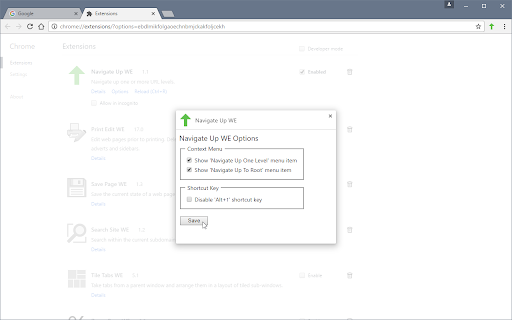
The Navigate Up WE Options page can be accessed as follows:
• Firefox - On the menu bar select Tools > Add-ons (or press Ctrl+Shift+A), select the Extensions tab, and then click on the Options button.
• Chrome - Right-click on the toolbar button, and then select Options.
TOOLBAR BUTTON
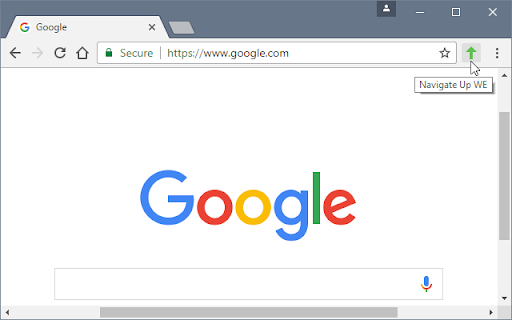
After installation of Navigate Up WE, there will be a new green 'up-arrow' button on the main toolbar.
If Navigate Up WE cannot be used with the current page, the toolbar button will be disabled (greyed-out).
To navigate up, just click on the Navigate Up WE icon.
There is an option to set the button action as:
• Navigate Up One Level
• Navigate Up to Root
There is an option to double-click on the button to Navigate Up To Root.
CONTEXT MENU & BUTTON MENU
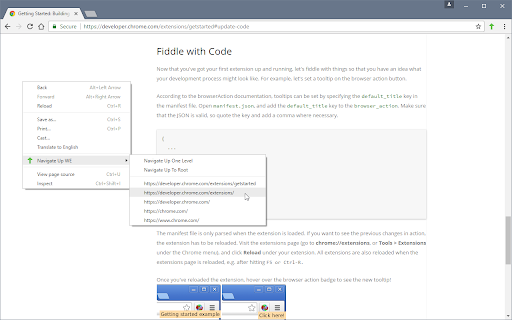
To navigate up to a specific level, right-click on the page contents to open the context menu, select the Navigate Up WE sub-menu, and then select one of the menu items.
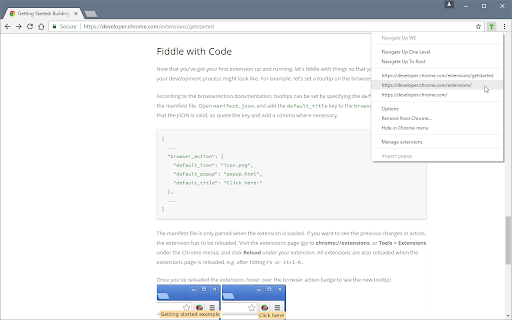
Alternatively, right-click on the Navigate Up WE toolbar button to open the button menu, and then select one of the menu items.
The menus are divided into two sections:
• The first contains two menu items for quick access - Navigate Up One Level and Navigate Up To Root.
• The second contains menu items for each higher level URL, plus one or two menu items for related high level URLs.
There is an option to show/hide the Navigate Up WE submenu item on the context menu.
There are options to show/hide the Navigate Up One Level and Navigate Up To Root menu items.
There is an option to open higher-level URLs (shown in menus) in new background/foreground tabs.
KEYBOARD SHORTCUTS
To navigate up, press Alt+U.
SUPPORT
Please e-mail: [email protected]
LICENSE
Distributed under the GNU General Public License version 2.
See LICENCE.txt file and http://www.gnu.org/licenses/
| 分类 | 🛠️工具 |
| 插件标识 | enpignbamdhfjfipfefolmfbjhpkabpm |
| 平台 | Chrome |
| 评分 |
★★★★☆
4.4
|
| 评分人数 | 8 |
| 插件主页 | https://chromewebstore.google.com/detail/navigate-up-we/enpignbamdhfjfipfefolmfbjhpkabpm |
| 版本号 | 31.2 |
| 大小 | 60.68KiB |
| 官网下载次数 | 893 |
| 下载地址 | |
| 更新时间 | 2022-11-01 00:00:00 |
CRX扩展文件安装方法
第1步: 打开Chrome浏览器的扩展程序
第2步:
在地址栏输入: chrome://extensions/
第3步: 开启右上角的【开发者模式】
第4步: 重启Chrome浏览器 (重要操作)
第5步: 重新打开扩展程序管理界面
第6步: 将下载的crx文件直接拖入页面完成安装
注意:请确保使用最新版本的Chrome浏览器
同类插件推荐

Alt+Up
Go to parent address. Use Alt+Up to move up one le

Up Url
enables auto-parsing and navigation of current url

GoUp
Adds the button Go Up into the page site.If you wi

ezUP
Navigate UP through the levels of the current site

Breadcrumb Navigator
This extension allows you to navigate any URL in a

Navigate Up WE
Navigate up one or more URL levels.CHANGES Versio

NavigUp
Go to parent address. Use Alt+Up (Shift = +1, Ctrl

Zoom Page WE
Zoom web pages (either per-site or per-tab) using

SimpleTabOrder
一个简单的方法来控制浏览器的标签顺序。Simple series number 5! This

ContextSearch web-ext
轻松添加搜索引擎并从右键菜单和方便的弹出窗口中搜索ContextSearch web-ext Th

Vaux Tab
Vaux Tab Manager and Window OrganizerVaux is an in

Ultra Button
控制一切的按钮!您现在能够在一个按钮中,使用大多数浏览器的功能 包含: 书签,扩充功能,下载管理,历

Search Site WE
Search within the current subdomain or within the