
Gmail Sender Icons Chrome 插件, crx 扩展下载
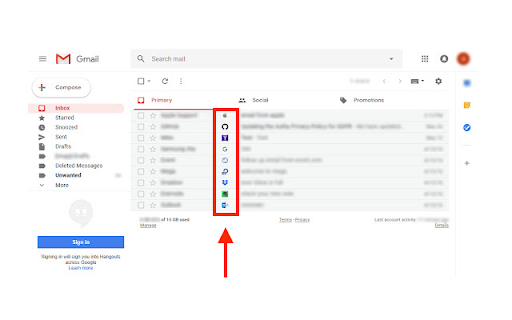
Add a sender symbol to all emails in your Gmail inbox.
"Gmail Sender Icons" is a browser plugin that allows you to add icons for individual emails (according to the sender's address) in your Gmail inbox with ease.
Simply install the extension in your browser and check or reload your Gmail inbox. For each message, you'll notice a symbol next to the - subject - column. The domain address of the email was used to create the icon. Please note that icons are designed to be 16 pixels wide by 16 pixels high.
Note: To hide icons, please press the toolbar button once to turn off the addon before refreshing the Gmail tab.
Important note: The Gmail Sender Icons for GmailTM add-on is not affiliated with Google Inc in any way. It is an unlicensed add-on produced and maintained independently by its creator. Google, Inc's GmailTM is a registered trademark.
| 分类 | 📝工作流程与规划 |
| 插件标识 | faompcbgpfindoifdlcfkibfomiaohol |
| 平台 | Chrome |
| 评分 |
★★★★☆
4.6
|
| 评分人数 | 753 |
| 插件主页 | https://chromewebstore.google.com/detail/gmail-sender-icons/faompcbgpfindoifdlcfkibfomiaohol |
| 版本号 | 0.1 |
| 大小 | 95.25KiB |
| 官网下载次数 | 27 |
| 下载地址 | |
| 更新时间 | 2022-07-02 00:00:00 |
CRX扩展文件安装方法
第1步: 打开Chrome浏览器的扩展程序
第2步:
在地址栏输入: chrome://extensions/
第3步: 开启右上角的【开发者模式】
第4步: 重启Chrome浏览器 (重要操作)
第5步: 重新打开扩展程序管理界面
第6步: 将下载的crx文件直接拖入页面完成安装
注意:请确保使用最新版本的Chrome浏览器
同类插件推荐

Gmail Notes - Add notes to email in Gmail
Add note to Gmail emails for remind something, lik

Gmail Sender Icons
Add a sender symbol to all emails in your Gmail in

Gmail Sender Icons
Quickly identify the sender of email messages in G

Sender Icons for Gmail™
Add a sender icon for all emails in your Gmail inb