
Duolingo Sound Controls Chrome 插件, crx 扩展下载
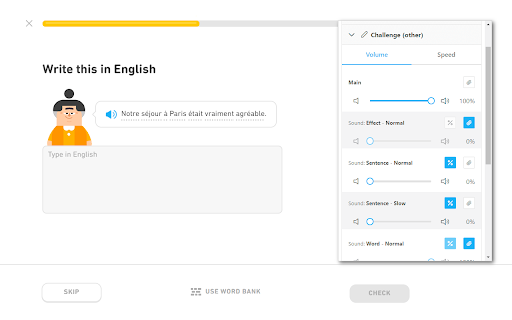
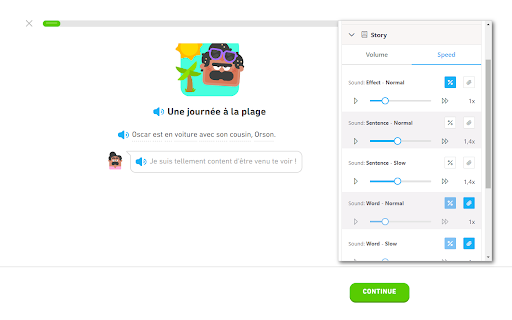
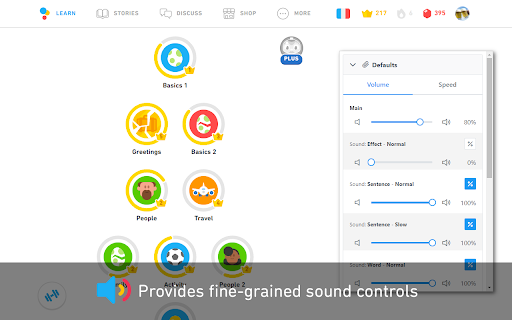
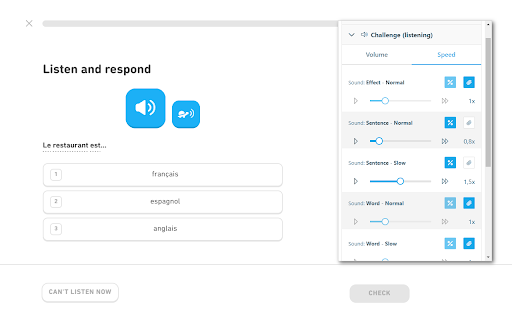
Provides fine-grained sound controls for Duolingo.
For more detailed information, screenshots, or if you have any support request, visit the development page of the extension here:
https://github.com/blmage/duolingo-sound-controls
[Usage]
Click on the extension icon in the browser's toolbar (you may have to pin it first) to open the extension popup and customize the sound settings. New settings will be applied from the next sound played.
[Features]
- Allows defining different volume and speed settings for each type of sound:
- effects,
- normal and slow sentences,
- words,
- and other sounds,
depending on the context in which it is played:
- listening challenges,
- other challenges,
- stories,
- guidebooks,
- characters,
- forum discussions,
- and other contexts.
- All settings can be defined relative to the original settings, or override them entirely (useful if you do not want story sentences to be slowed down on subsequent playbacks, for example).
- Default settings can be defined for each sound type, and reused across multiple contexts.
- A main volume setting is available to quickly adjust the volume of all sounds in a given context.
[Compatibility]
If you are using the Duolingo TTS Controls extension, the corresponding settings will take precedence over those from this extension.
The extension should be compatible with all others out of the box:
settings applied to sounds by other extensions are treated in the same way as the original Duo settings.
[Limitations]
- The extension is deeply tied to the inner workings of Duolingo, meaning that significant changes on their side could (temporarily) break it. If that happens, you can either:
- wait for me to fix it (you can open an issue on the support page if there is none about it yet),
- if you're a developer, try to fix it yourself, then open a related PR on the development page.
- Due to technical constraints, the volume of the sounds can not be raised over 100%.
| 分类 | 🎉趣味休闲 |
| 插件标识 | fdgmdpdkmbmoikgppbpdkcagdnhgkiih |
| 平台 | Chrome |
| 评分 |
★★★★☆
4
|
| 评分人数 | 6 |
| 插件主页 | https://chromewebstore.google.com/detail/duolingo-sound-controls/fdgmdpdkmbmoikgppbpdkcagdnhgkiih |
| 版本号 | 1.8.0 |
| 大小 | 247KiB |
| 官网下载次数 | 982 |
| 下载地址 | |
| 更新时间 | 2024-05-30 00:00:00 |
CRX扩展文件安装方法
第1步: 打开Chrome浏览器的扩展程序
第2步:
在地址栏输入: chrome://extensions/
第3步: 开启右上角的【开发者模式】
第4步: 重启Chrome浏览器 (重要操作)
第5步: 重新打开扩展程序管理界面
第6步: 将下载的crx文件直接拖入页面完成安装
注意:请确保使用最新版本的Chrome浏览器
同类插件推荐
Duolingo Sound Controls
Provides fine-grained sound controls for Duolingo.

Duolingo Unicode Normalizer
Automatically normalizes Duolingo answers.Duolingo

Remove Duolingo cartoons
Remove Duolingo cartoons.Automatically remove cart

Airport1 Duolingo Improvement
Use space bar (instead of mouse) to activate micro

Duolingo Image Hider
When practicing languages at Duolingo, the website

duoleavemealone for Duolingo
Makes Duolingo more user-friendlyThis extension ma

Duolingo Practice Button
Restore the Duolingo practice buttonDuolingo used

Duolingo Annoyance Blocker
Remove annoying stuff from Duolingo such as pop-up

Duolingo Spaced Repetition
A Chrome Browser Extension to Add Spaced Repetitio

Duolingo Discord
Add flags and other visual cues to Duolingo Discor

Duolingo Text Editor
Simplifies the formatting of comments and posts. P

Duolingo Custom Sounds
Allows you to customise various sound effects on D

Duolingo TTS Controls
Provides playback controls for some of the challen