
Web Component DevTools Chrome 插件, crx 扩展下载
Developer tooling for Web Components and Web Component Libraries
Developer tooling for Web Components and Web Component Libraries
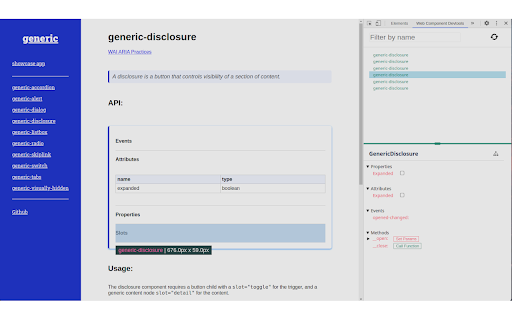
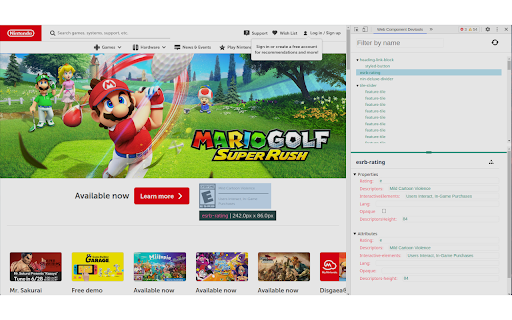
Web Component DevTools is aimed at all developers working with Web Components. The tooling provided creates a new Chrome Devtools panel, which allows a quick look at the custom elements on the current page, and enables modification of attributes and properties of said components.
Web Component DevTools utilizes the Custom Elements Manifest (https://github.com/webcomponents/custom-elements-manifest) to analyze the Web Components.
Features:
Web Component DevTools provides advanced features to the developer, straight from the browser's UI to, for example:
- Listing custom elements on the page, and accessible iframes inside the page
- Filtering custom elements on the list
- Inspecting and modifying the attributes of custom elements
- Inspecting and modifying the properties (even objects and arrays) of custom elements
- Observing dispatched events
- Calling functions of the custom element, and logging the return values
- View the source code of web components on page
- Interact directly with web components through the console
Why?
In the process of developing Web Components, wether it be with a library like Lit, or without any kind of library, there comes situtations in which you might want to have a bit more control over your components than what the regular browser devtools gives you.
You might for example want to:
Toggle the Attributes of the element
Toggle the Properties of the element
Monitor when events get dispatched from the element
Call functions
And when you're working with Web Components, Shadow DOM usually is present, making it fairly difficult to find the path to the element. And even if you got the path, having to write document.querySelector("my-selector-string > element-name").setAttribute("my-attr", "foo") every time you want to modify a value is quite cumbersome.
For this use case the Web Components DevTools were created: To enable the developer to easily modify the attributes, properties and therefore state of their element straight from the devtools window with the click of a button.
Issues:
Any issues you run into while using the DevTools should be submitted to the GitHub Repository (https://github.com/Matsuuu/web-component-devtools/issues).
| 分类 | 💻开发者工具 |
| 插件标识 | gdniinfdlmmmjpnhgnkmfpffipenjljo |
| 平台 | Chrome |
| 评分 |
★★★★☆
4.8
|
| 评分人数 | 255 |
| 插件主页 | https://chromewebstore.google.com/detail/web-component-devtools/gdniinfdlmmmjpnhgnkmfpffipenjljo |
| 版本号 | 0.2.2 |
| 大小 | 1.74MiB |
| 官网下载次数 | 7000 |
| 下载地址 | |
| 更新时间 | 2023-02-02 00:00:00 |
CRX扩展文件安装方法
第1步: 打开Chrome浏览器的扩展程序
第2步:
在地址栏输入: chrome://extensions/
第3步: 开启右上角的【开发者模式】
第4步: 重启Chrome浏览器 (重要操作)
第5步: 重新打开扩展程序管理界面
第6步: 将下载的crx文件直接拖入页面完成安装
注意:请确保使用最新版本的Chrome浏览器
同类插件推荐
DevTools Author
A selection of author settings for Chrome Develope
Lit Prism
Inspect Lit or Polymer webcomponents 'through

Chrome Devtools Styler
Change Chrome Devtool StylesDevtools Styler to cha

Custom Elements Locator
This extension will find any custom element on a p

Preact Developer Tools
Adds debugging tools for Preact to ChromeDebugging

DOM Treemap
Helps you explore the distribution of DOM nodes in
Web Component DevTools
Developer tooling for Web Components and Web Compo
Dev Tools
Collection of Handy tools for web/developers!Boost

MobX Developer Tools
Dev-tools for MobX and ReactInspect mobx-react obs

Solid Devtools
Chrome Developer Tools extension for debugging Sol

React Context DevTool
Devtool for React Context and useReducerReact Cont

VisBug
Open source browser design toolsOpen source web de

axe DevTools - Web Accessibility Testing
Accessibility Checker for Developers, Testers, and