
Blogger » Free Custom Robots txt Generator Chrome 插件, crx 扩展下载
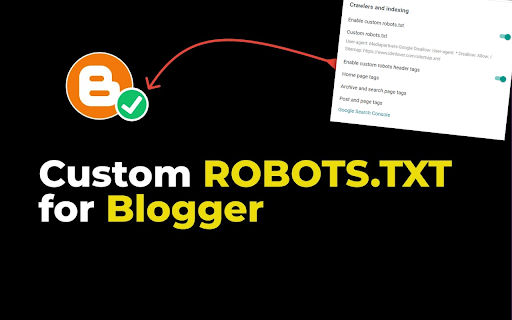
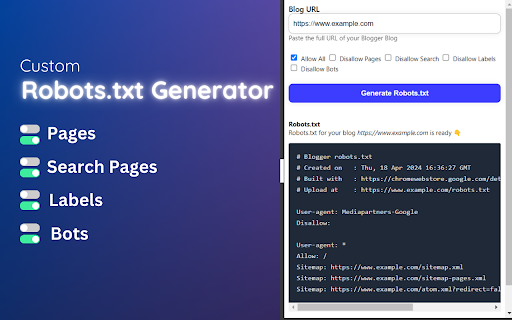
Create a perfect custom robots.txt file for Blogger Free ✔️ Optimize your blog for search engines in 2024
Custom Robots.txt Generator for Blogger [Sitemap Generator for Blogger] is a powerful Chrome extension designed to simplify the process of generating custom robots.txt files for Blogger websites.
Robots txt is a crucial file that tells search engine crawlers which pages or sections of a website should be crawled or indexed, helping website owners control their site's visibility and ranking in search engine results.
✅ How to Generate Custom Robots.txt for Blogger using this Extension:
1. Install the Custom Robots.txt Generator for Blogger extension from the Chrome Web Store.
2. Click on the extension icon in the browser toolbar to open the popup.
3. Enter the URL of your Blogger blog in the provided input field.
4. Select the desired options, such as allowing/disallowing homepage, pages, search, labels, and blocking specific bots.
5. Click the "Generate Robots.txt" button to generate the custom robots.txt file.
6. Copy the generated robots.txt content using the "Copy to Clipboard button".
✔️ How to Update Robots.txt of Blogger using Custom Robots.txt Generator for Blogger Extension:
1. After generating the custom robots.txt file using the extension, copy the generated content.
2. Log in to your Blogger account with your Gmail account.
3. From the left menu, click on "Settings."
4. Navigate to the "Crawlers and indexing" section.
5. Enable the "Custom robots.txt" toggle button.
6. Click on "Custom robots.txt" and Paste the copied robots.txt content into the provided text area.
7. After adding the code, click on "Save."
Custom Robots.txt Generator for Blogger [Free Sitemap Generator for Blogger] extension offers a user-friendly interface and advanced features to help Blogger users effectively manage their site's crawling and indexing directives. Improve your site's search engine visibility and SEO performance with ease using this handy extension!
| 分类 | 💻开发者工具 |
| 插件标识 | godmaealnfgfnpimbficamaaoebpdgoo |
| 平台 | Chrome |
| 评分 |
★★★☆☆
3.7
|
| 评分人数 | 45 |
| 插件主页 | https://chromewebstore.google.com/detail/blogger-»-free-custom-rob/godmaealnfgfnpimbficamaaoebpdgoo |
| 版本号 | 2.0 |
| 大小 | 16.25KiB |
| 官网下载次数 | 367 |
| 下载地址 | |
| 更新时间 | 2024-05-15 00:00:00 |
CRX扩展文件安装方法
第1步: 打开Chrome浏览器的扩展程序
第2步:
在地址栏输入: chrome://extensions/
第3步: 开启右上角的【开发者模式】
第4步: 重启Chrome浏览器 (重要操作)
第5步: 重新打开扩展程序管理界面
第6步: 将下载的crx文件直接拖入页面完成安装
注意:请确保使用最新版本的Chrome浏览器
同类插件推荐

WordPress » Free Custom Robots.txt Generator
Create a perfect custom robots.txt file for WordPr

Aibuster - Ai Auto Blogging and Ai Content Generation Tool
Aibuster is a Ai Auto Blogging Content Creation &a
Blogger » Free Custom Robots txt Generator
Create a perfect custom robots.txt file for Blogge

TeraBox Link Video Player Online » without App/Login/PC Client
TeraBox Viewer Online ▷ Watch TeraBox Video Online

TeraBox Link Video Viewer Online » Direct Download Link Generator
TeraBox Downloader + Online Viewer ▷ Download Vide
![2025 ▷ TeraBox 链接视频下载器 [无应用程序]](https://www.chajianmi.com/images/9EphuVJCCOieKjIoPcn_kSBiVsp5A2w8DTCTYtqxuyLy2llI3AiaDFQouVW6Y1wK_QV17xtxlTzaTs3XwD_tb0B0Lg=s275-w275-h175)
2025 ▷ TeraBox 链接视频下载器 [无应用程序]
无需应用程序即可下载 Terabox 视频✔️ TeraBox 直接下载链接生成器免费在线。▷Ter

Keyword Planner
Keyword Planner expands the number of search sugge

Blogger Helper: Free Version
Blogger Helper: All In One Seo Tools## All New Upd

Custom Blogger Extension
Custom hacks for blogger developersChrome Extensio

Blogging Helper Extension
Blogging Helper is your research guide to find all

Sitemap Generator
Generate sitemaps using Chrome browser. Especially

Blogger HTML Editor Hotkey
In HTML editor page, save changes using Ctrl + S (

Website SEO Checker
Get free on-page SEO report by 100+ parameters wit