
Shade Custom Hours for Google Calendar Chrome 插件, crx 扩展下载
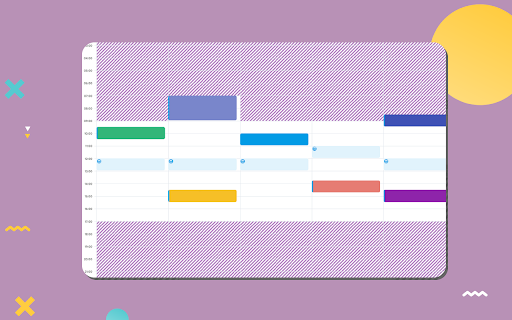

Easily shade specific time blocks in Google Calendar to better visualise your schedule!
? Shade Custom Hours for Google Calendar
• Easily shade specific time blocks in Google Calendar to better visualise your schedule!
? About
• Shade your chosen time blocks in Google Calendar's day, week, and 4-day views.
• Specify your work hours, personal time, or any custom schedule.
? Usage Instructions
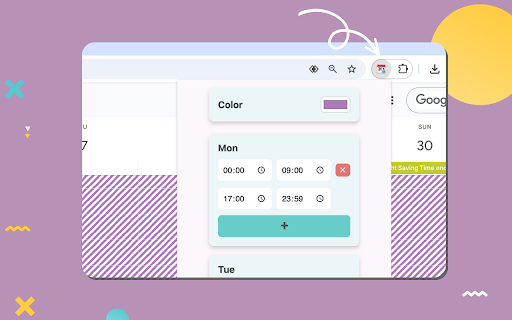
• Click the extension icon to customise your shaded time blocks.
• Set unique schedules for each day of the week.
☕ Support My Work
• If you get value from this extension, consider supporting me: https://buymeacoffee.com/madeleinesmithsoftware
⚠️ Disclaimer
• This extension is not affiliated with Google or the Google Calendar brand.
| 分类 | 📝工作流程与规划 |
| 插件标识 | hdlfamnpialfmlkddnmijnimciflhbjo |
| 平台 | Chrome |
| 评分 |
★★★★☆
4.4
|
| 评分人数 | 21 |
| 插件主页 | https://chromewebstore.google.com/detail/shade-custom-hours-for-go/hdlfamnpialfmlkddnmijnimciflhbjo |
| 版本号 | 1.10.0 |
| 大小 | 652KiB |
| 官网下载次数 | 4000 |
| 下载地址 | |
| 更新时间 | 2024-12-20 00:00:00 |
CRX扩展文件安装方法
第1步: 打开Chrome浏览器的扩展程序
第2步:
在地址栏输入: chrome://extensions/
第3步: 开启右上角的【开发者模式】
第4步: 重启Chrome浏览器 (重要操作)
第5步: 重新打开扩展程序管理界面
第6步: 将下载的crx文件直接拖入页面完成安装
注意:请确保使用最新版本的Chrome浏览器
同类插件推荐

Google Calendar Weekend Highlighter
Custom Colour for Weekends in Google Calendar>&

Hue: More Colors for Google Calendar
A Chrome extension designed to enhance and persona

Shade Custom Hours for Google Calendar
Easily shade specific time blocks in Google Calend

Time Tasker
Change the duration length of Google tasks on Goog
日历暗模式
在清新的暗模式中体验谷歌日历!以全新的视角发现谷歌日历,或者更确切地说,在黑暗中,借助日历暗模式扩展

Google Calendar Resize Sidebar
Customize your Google Calendar sidebar width with

Calendar Plus
Google Calendar extension that provides insights i

Today - Google Calendar Highlighter for Today
Highlight the today box in Google CalendarHighligh

Google Calendar Event Checker
Mark events as completed or cancelled in Google Ca
GCalPlus
Extra Options for Google CalendarBe more productiv

Hide morning in Calendar
Hide morning hours on your Google Calendar to stop

Event Durations for Google Calendar
Shows event durations on Google Calendar.** Google