
RTL Jira Chrome 插件, crx 扩展下载
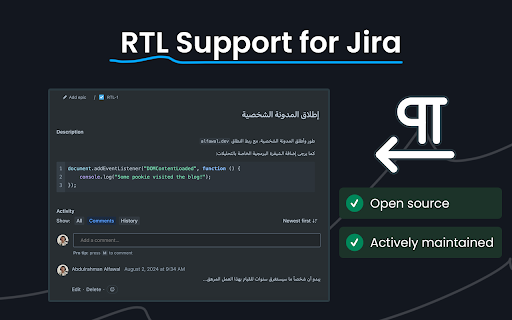
Right-to-Left Support for Atlassian products like Jira and Confluence
Add Right-to-Left support to Atlassian products like Jira and Confluence to easily read, write and modify content in Arabic, Persian or any RTL language.
Jira support includes:
- Backlog items
- Issues Navigator (Queries page)
- Issue Summary and Description
- Code snippets
- Tables
- Info panels
- Expand elements
- Bullet lists
- Numbered lists
- Link preview cards
- Linked issues
- Comments
- Mentions
| 分类 | 📝工作流程与规划 |
| 插件标识 | hginkadmmbneamgflaflgecjlgkopeck |
| 平台 | Chrome |
| 评分 |
★★★★☆
4.5
|
| 评分人数 | 17 |
| 插件主页 | https://chromewebstore.google.com/detail/rtl-jira/hginkadmmbneamgflaflgecjlgkopeck |
| 版本号 | 1.2 |
| 大小 | 48.07KiB |
| 官网下载次数 | 134 |
| 下载地址 | |
| 更新时间 | 2024-08-05 00:00:00 |
CRX扩展文件安装方法
第1步: 打开Chrome浏览器的扩展程序
第2步:
在地址栏输入: chrome://extensions/
第3步: 开启右上角的【开发者模式】
第4步: 重启Chrome浏览器 (重要操作)
第5步: 重新打开扩展程序管理界面
第6步: 将下载的crx文件直接拖入页面完成安装
注意:请确保使用最新版本的Chrome浏览器
同类插件推荐

JiraRTL
Enables well aligned and properly established dire

Jira Persian improver
تجربه بهتر جیرا و کانفلوئنس برای پارسی زبـانان جها

JIRA RTL
JIRA RTLSet right-to-left direction to Jira ticket

Jira RTL Fixer
Automatically fixes RTL issue in Jira Cloud descri
RTL Jira
Right-to-Left Support for Atlassian products like

Auto RTL
Auto switches to RTL layout whenever you translate

RTL Text Director
Automatically adjusts the text direction to RTL. I

DirX - RTL LTR
Toggle the X-axis flow direction of a webpage or i

RtL Fixer
Fix the RTL languages sentences when mixed with LT

LTR-RTL
This extension allows you to change web page text

RTL ALL
Flip web pages to right-to-left for Arabic display

fix RTL translate
fix RTL translate From https://bidar.appIf you use

ChatGPT RTL (Persian/Farsi): ChatGPT,DeepSeek,Claude,Copilot,...
راستچین کردن ابزار های هوش مصنوعی بصورت هوشمند و ا