
BigQuery Cost Tracker Chrome 插件, crx 扩展下载
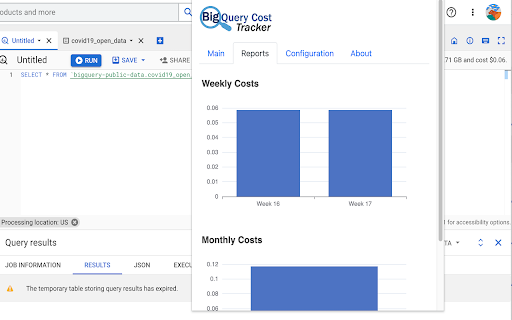
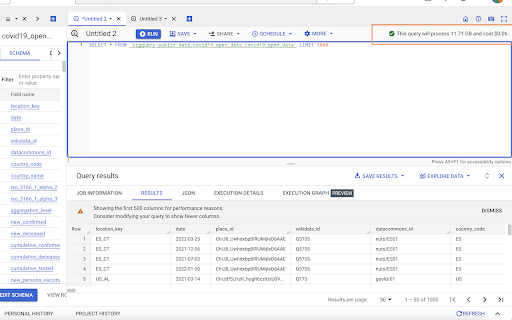
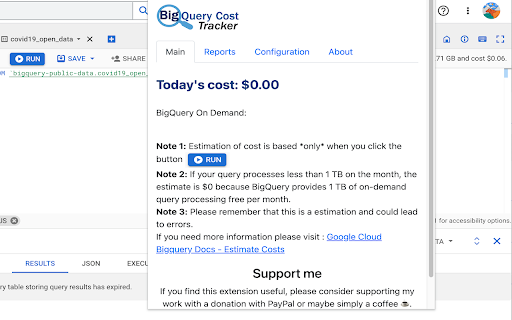
Keep track of your BigQuery expenses in real-time with this easy-to-use Chrome extension. Get daily,monthly cost reports.
Keep track of your BigQuery expenses in real-time with this easy-to-use Chrome extension. Get daily, weekly, and monthly cost reports at a glance.
- This is designed to work with the new tabbed UI.
- Estimation and display is render on observation of changes of the HTML and it is replacing the phrase "when run" to the specific amount.
- There is no track or record of your queries or any information is stored outside your chrome browser (If you need the code I am happy to provide that)
- Storage of cost is based *only* when you click the button "RUN".
- If your query processes less than 1 TB, the estimate is $0 because BigQuery provides 1 TB of on-demand query processing free per month.
RELEASE NOTES
1.0.0 - First Release
1.0.2 - Fixed small issues regarding initial Chrome Storage access.
| 分类 | 💻开发者工具 |
| 插件标识 | kbdpebmmlgeadcdbdmdebipfhngoiefp |
| 平台 | Chrome |
| 评分 |
★★★★☆
4.5
|
| 评分人数 | 4 |
| 插件主页 | https://chromewebstore.google.com/detail/bigquery-cost-tracker/kbdpebmmlgeadcdbdmdebipfhngoiefp |
| 版本号 | 1.0.2 |
| 大小 | 450KiB |
| 官网下载次数 | 838 |
| 下载地址 | |
| 更新时间 | 2023-05-02 00:00:00 |
CRX扩展文件安装方法
第1步: 打开Chrome浏览器的扩展程序
第2步:
在地址栏输入: chrome://extensions/
第3步: 开启右上角的【开发者模式】
第4步: 重启Chrome浏览器 (重要操作)
第5步: 重新打开扩展程序管理界面
第6步: 将下载的crx文件直接拖入页面完成安装
注意:请确保使用最新版本的Chrome浏览器
同类插件推荐

BigQuery Cost Estimator
Estimates BigQuery spend based on processed dataBi
BigQuery Cost Tracker
Keep track of your BigQuery expenses in real-time

BigQuery Cost Estimator
Estimates BigQuery spend based on processed dataEf

superQuery - BigQuery AI optimization engine
Powerful BigQuery IDE powered by AI that turns dat

BigView for BigQuery
Get a bigger view on the BigQuery consoleTurn the
BigQuery Toolbox
Improves the BigQuery UI: Toggle the different sid

ObservePoint Debugger
Troubleshoot analytics tags, variables, events, co

GA4BQ™ - GA4 BigQuery SQL Generator
GA4BQ™ - SQL generator for Google Analytics 4 on G

Omnibug
Omnibug is a browser extension to decode and displ

BigQuery Mate
Companion tool for Google BigQuery UI used by myse

Datalayer Checker
The easiest way to debug and check the dataLayer i

Adswerve - dataLayer Inspector+
DataLayer Tools for Digital AnalystsThe Adswerve d

Analytics Debugger
Your Single Source of Truth (SSOT) for debugging a