
Lovify Chrome 插件, crx 扩展下载



Enhance your Lovable.dev experience with improved prompts, plan management, and more
Lovify: Supercharge Your Lovable.dev Experience!
Meet Lovify – your all-in-one Chrome extension that makes working on Lovable.dev a breeze! Whether you're debugging code, managing project plans, or transferring GitHub projects, Lovify has you covered with a playful and intuitive interface.
Key Features:
Smart Debugging Prompts ?
- Easily generate helpful debugging prompts directly from your code with just a right-click. Say goodbye to endless error Googling!
Streamlined Plan Management ?
- Organize your tasks and project plans right on your favorite development site. Lovify’s integrated plan tab keeps you on track without missing a beat.
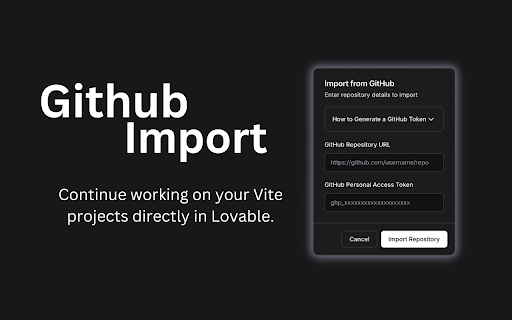
Effortless GitHub Integration ?
- Quickly import and manage your GitHub projects with our simple transfer guide – no fuss, just seamless integration.
User-Driven Feedback ?
- Enjoy a smooth, interactive feedback experience to share your thoughts and help us improve even more!
SEO Settings & Favicon Creator ?
- Easily configure SEO settings and generate a favicon to enhance your project's branding and discoverability.
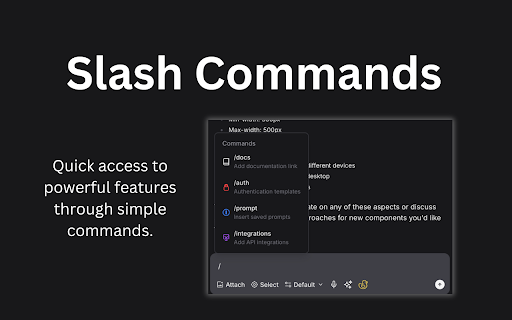
Slash Commands for Cleanup ?️
- Use slash commands to analyze and clean up code, keeping your work efficient and polished.
Third-Party Documentation & Authentication Templates ??
- Quickly insert third-party documentation and authentication templates to streamline development.
Saved Prompts & Verified Integrations ⚡
- Insert your saved prompts effortlessly and access verified Lovable integrations in just a click.
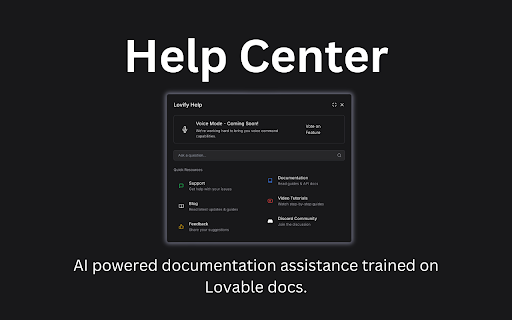
Help Button & Prompt Improver ❓✨
- Search the docs for instant answers and improve your prompts for better AI interactions.
Voice Mode ?️
- Enable voice mode for hands-free, interactive coding assistance.
Lovify is designed to enhance your workflow on Lovable.dev and lovable.app, making your daily coding adventure faster, simpler, and a whole lot more fun. Give it a try and add a dash of magic to your development journey!
| 分类 | 💻开发者工具 |
| 插件标识 | keeckabhiagcjpbibabdjnklfphghngf |
| 平台 | Chrome |
| 评分 |
★★★★☆
4.5
|
| 评分人数 | 11 |
| 插件主页 | https://chromewebstore.google.com/detail/lovify/keeckabhiagcjpbibabdjnklfphghngf |
| 版本号 | 1.1.0 |
| 大小 | 5.6MiB |
| 官网下载次数 | 779 |
| 下载地址 | |
| 更新时间 | 2025-02-13 00:00:00 |
CRX扩展文件安装方法
第1步: 打开Chrome浏览器的扩展程序
第2步:
在地址栏输入: chrome://extensions/
第3步: 开启右上角的【开发者模式】
第4步: 重启Chrome浏览器 (重要操作)
第5步: 重新打开扩展程序管理界面
第6步: 将下载的crx文件直接拖入页面完成安装
注意:请确保使用最新版本的Chrome浏览器
同类插件推荐

Lovable Helper
Enhance your Lovable.dev experience with prompt te

Lovify
Enhance your Lovable.dev experience with improved

Lovable.dev Add-ons
Add Voice Input, Groq Support, Prompt Library, Pro

Bolt to GitHub
Automatically process your Bolt project zip files

Supercharge for Bolt.new
Enhance your Bolt experience with additional featu

Vercel
Use the Vercel Toolbar on production deploymentsIn

Arcade
Arcade is an interactive demo platform that empowe

Guidde - Magically create video documentation
Magically create video documentation with AIguidde

html.to.design
Convert any website into fully editable Figma desi
HTML to Framer
Bring your own website into Framer with a few clic

Cursorful - Screen Recorder with Auto Zoom
Cursorful creates beautiful screen recordings with

mymind — An extension for your mind
Add images, bookmarks, notes, quotes or text highl

Browse AI: Fast Web Scraping & Monitoring
Scrape, monitor, and automate any website in 2 min