
SynthPass Chrome 插件, crx 扩展下载
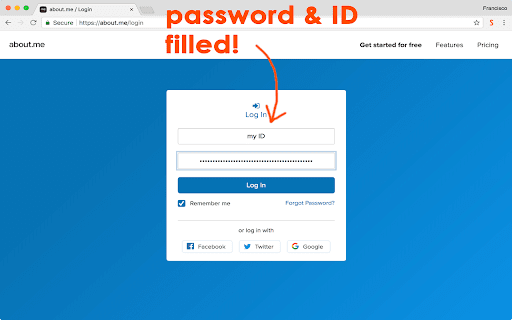
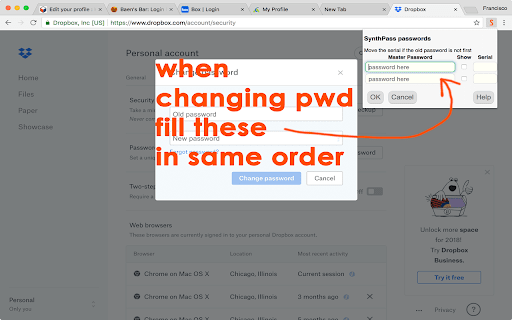
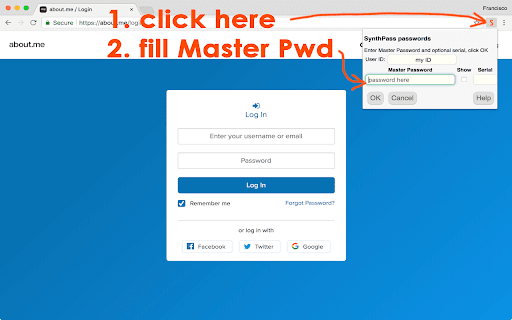
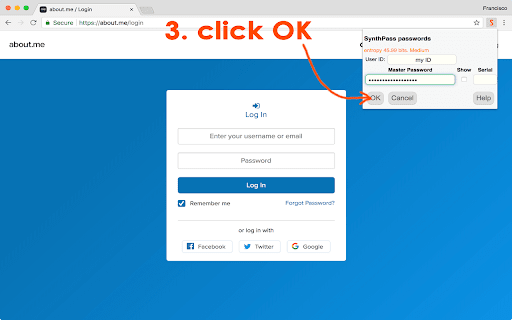
High-security password synthesizer
SynthPass is a different kind of password manager: it is a password synthesizer.
With SynthPass, there is no "vault" that has to be protected from hackers because your passwords are synthesized on the fly, just as you need them. SynthPass-made passwords are always high strength and comprise letters, numbers, and special characters. Passwords for different websites are guaranteed to be totally different.
You never have to change your Master Password. When a website forces you to change its password, simply change the optional serial that is used to synthesize that password. SynthPass will remember the serial, as well as your user ID. Your Master Password will never be stored, and it disappears from memory after five minutes not using it.
And, if you absolutely must use a certain password, SynthPass can use that too! It is encrypted for storage and synced with the browser's own files so no third parties need to be involved.
Unlike conventional password managers, SynthPass
- won't pop up and interrupt your flow; it is activated only when you click its icon on the browser toolbar
- won't store anything secret, only user IDs and optional serials, if you allow it
- is always available, because it does not have to connect to "the Cloud"
- makes only strong passwords
- won't ask you for money
- won't show ads
SynthPass is based on the WiseHash key-stretching algorithm, which evaluates the information entropy of your Master Password and subjects it to a variable number of rounds of SCRYPT key-stretching. The weaker the password, the more stretching. This forces would-be hackers to spend an inordinate amount of computer time testing weak passwords before they can get to yours. SynthPass displays an accurate measurement of your Master Password's entropy to help you come up with a strong one. This is the same algorithm stretching the user password in PassLok Privacy and PassLok for Email, also in this web store.
When there is no password to be filled, SynthPass displays a box where you can store securely encrypted notes for that particular website. Good place for extra login instructions, your first pet's name, or whatnot. Like everything else, the notes sync with the browser without a need for extra servers.
There's also a button for moving the current page into an isolation cage similar to Incognito Mode, but within the same set of tabs as the regular pages. This is also accessible via the right-click menu.
This is a browser extension, and therefore is poorly supported on mobile devices. There is, however, a web app that includes the same password-making engine and runs well on mobile devices. It can be found at:
https://synthpass.com/app
| 分类 | 📝工作流程与规划 |
| 插件标识 | khkpfnickpejcjhajmkljfadcaegphkd |
| 平台 | Chrome |
| 评分 |
★★★★☆
4.8
|
| 评分人数 | 16 |
| 插件主页 | https://chromewebstore.google.com/detail/synthpass/khkpfnickpejcjhajmkljfadcaegphkd |
| 版本号 | 0.2.9 |
| 大小 | 94.65KiB |
| 官网下载次数 | 27 |
| 下载地址 | |
| 更新时间 | 2023-03-26 00:00:00 |
CRX扩展文件安装方法
第1步: 打开Chrome浏览器的扩展程序
第2步:
在地址栏输入: chrome://extensions/
第3步: 开启右上角的【开发者模式】
第4步: 重启Chrome浏览器 (重要操作)
第5步: 重新打开扩展程序管理界面
第6步: 将下载的crx文件直接拖入页面完成安装
注意:请确保使用最新版本的Chrome浏览器
同类插件推荐

SeeOnce Privacy
High strength end-to-end encryption with perfect f

PawHash
Securely generate website-specific passwords from
Page Cage
Loads a page inside a frame so it can't be see
PassLok Privacy
High security asymmetric encryption and steganogra
SynthPass
High-security password synthesizerSynthPass is a d
PassLok Universal
High security encryption for any email, plus Passw
FusionKey
High-security passwords and encryptionTAKE PRIVACY
PassLok Image Steganography
The reigning champion of image steganographyStegan
PwdFly
Generate Secure Password on the fly.In reality, us

Hashword
Generate a unique, secure password for every web s
PassLok for Email
High security encryption for email. PassLok is in

Phishing Boat
Phishing Boat helps prevent phishing attacks. If y

MasterPassword for chrome
Remember your MasterPassword, and this app will ge