
Salesforce Share Chrome 插件, crx 扩展下载
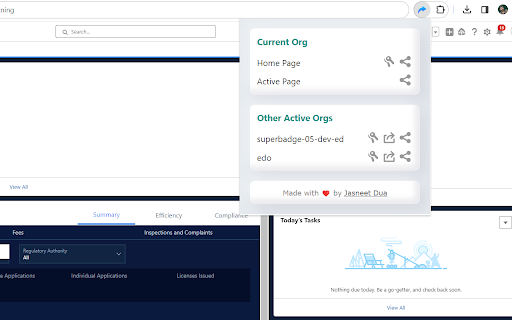
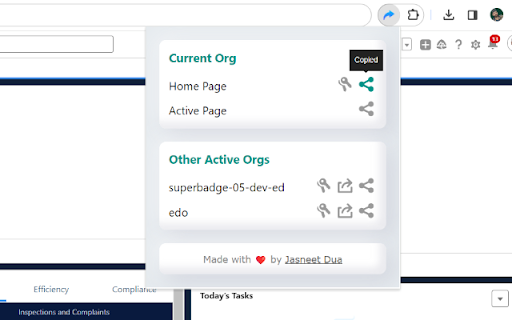
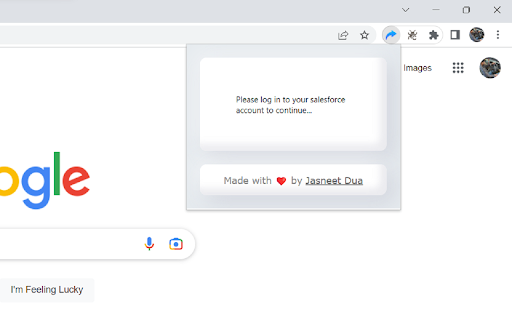
A browser extension that will allow sharing session-based Salesforce URLs for direct login.
The Salesforce Share (chrome extension) is a tool designed to enhance the functionality of your org, a cloud-based customer relationship management platform. It works with both Lightning and Classic Experience and allows users to share session-based URLs, which provide a direct login to specific org records or pages. This helps streamline the process of accessing important information, eliminating the need to manually log in and navigate to the desired record or page.
This extension integrates seamlessly with the your org, providing an intuitive and user-friendly interface. With just a few clicks, users can generate and share a session-based URL, making it easier for others to access important information quickly and efficiently. The extension is designed to ensure the security of sensitive information, with robust security protocols and data encryption technology in place to protect user data.
This extension is an invaluable tool for users, providing a more efficient and streamlined way to share information and collaborate with others. Whether it's sharing information with colleagues, partners, or customers, the extension makes it easy to share session-based URLs, providing a direct and secure route to the desired information. Whether working remotely or in a traditional office setting, this extension is an essential tool for anyone using the Salesforce platform.
Whether collaborating with colleagues, partners, or customers, this extension remains indispensable. Share session-based URLs securely and efficiently, facilitating direct access to critical information. Whether working remotely or within a traditional office setup, this extension remains a must-have for anyone leveraging the Salesforce platform.
Additionally, we're excited to announce extended support for digital experience sites. Now, sharing session-based URLs isn't limited to internal records or pages; you can seamlessly share access to your digital experience site, promoting collaboration beyond organizational boundaries.
Now, not only can you effortlessly share session-based URLs for direct logins to specific org records or pages, but you can also capitalize on two new features.
The first addition is the ability to access your org directly from the extension's popup. No more navigation hassle; jump straight into your org with a simple click, saving precious time and effort.
Moreover, leveraging the power of REST APIs is easier than ever. You can now copy the access token directly from the extension, simplifying its usage in REST API explorers. This streamlines your workflow, allowing quick access to APIs for smoother interactions.
| 分类 | 🛠️工具 |
| 插件标识 | koaaaaidkhaabciffhnpfoadehbenagj |
| 平台 | Chrome |
| 评分 |
★★★★☆
4.9
|
| 评分人数 | 12 |
| 插件主页 | https://chromewebstore.google.com/detail/salesforce-share/koaaaaidkhaabciffhnpfoadehbenagj |
| 版本号 | 0.0.0.2 |
| 大小 | 100KiB |
| 官网下载次数 | 298 |
| 下载地址 | |
| 更新时间 | 2023-11-20 00:00:00 |
CRX扩展文件安装方法
第1步: 打开Chrome浏览器的扩展程序
第2步:
在地址栏输入: chrome://extensions/
第3步: 开启右上角的【开发者模式】
第4步: 重启Chrome浏览器 (重要操作)
第5步: 重新打开扩展程序管理界面
第6步: 将下载的crx文件直接拖入页面完成安装
注意:请确保使用最新版本的Chrome浏览器
同类插件推荐

Salesforce Easy Navigator
Salesforce Easy Navigator – One-Click Access to Yo

Salesforce Field Detective
A helpful extension for Salesforce users. Add API
Salesforce Share
A browser extension that will allow sharing sessio

Salesforce Session Id Extractor
Tool to salesforce session id url.This extension h

Salesforce Code Coverage Navigator
Adds a class name filter to Salesforce's test

Salesforce Debug Logs (sfdl)
Increases productivity during debugging process Ap

Salesforce Revamp
Boost productivity with Flow and Apex Test Search,

Salesforce Tab Organizer
Effortlessly manage multiple Salesforce instances

Salesforce Assistant
Salesforce Admin and Dev Assistant who help to Qui

Maven Tools for Salesforce
One tool to rule them all! An ever-growing collect

ORGanizer for Salesforce
ORGanizer - The best Salesforce Extension everThe

Salesforce advanced Code searcher
By using the advanced quick find you can get your

Share Session
Share your session, from any device, at the same t