
GigaBrain - AI Companion for Reddit Chrome 插件, crx 扩展下载



GPT for Reddit. The quickest way to get the most useful answers from real people
Automatically find the most useful comments from real people across reddit and the internet's most active communities.
? NEW - Profile Analysis - When you're browsing reddit, click the Gigabrain logo next to any username to quickly see whether they might be a bot, marketer, or sockpuppet account.
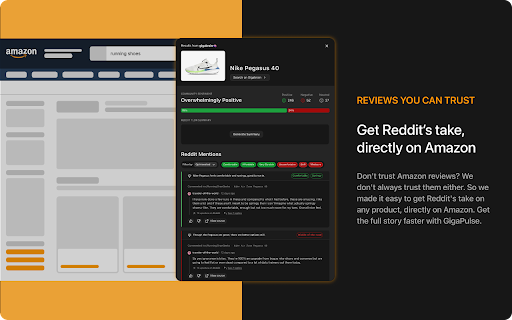
? - Introducing GigaPulse! Get the reddit pulse on any product when you shop Amazon. Just click the GigaBrain tab to see what redditors think about any item.
? - Invoke GigaBrain search from text on any website. Just highlight the text, right click and select 'Search on GigaBrain' to get reddit analysis right where you are.
⭐️You can invoke a GigaBrain search automatically whenever you include words like 'reddit', 'best', or 'forum' in your google searches. GigaBrain will pop up on your search result page and let you know when it has found the most relevant human commentary for your search.
?GigaBrain scans billions of online discussions from reddit and other online communities to find you the most relevant and authentic comments and posts. Cut through the noise to find the nuggets of wisdom from the most active online communities.
? Privacy-focused: Although our extension runs on Google, we value your privacy and do not save or track your Google searches. Your Google search data stays with you.
✅ Automatically bring the magic of GigaBrain's discussion analysis to your Google experience.
✅ See comments from popular communities like reddit pre-screened for relevance to your question.
✅ Important points and products from user content are automatically highlighted for you.
✅ New types of content analysis constantly being added to help filter out paid shills and marketers.
| 分类 | 📝工作流程与规划 |
| 插件标识 | kofkhnkdmpbngifdgbjeedlppjilcaei |
| 平台 | Chrome |
| 评分 |
★★★★☆
4.4
|
| 评分人数 | 67 |
| 插件主页 | https://chromewebstore.google.com/detail/gigabrain-ai-companion-fo/kofkhnkdmpbngifdgbjeedlppjilcaei |
| 版本号 | 0.1.2 |
| 大小 | 9.85MiB |
| 官网下载次数 | 10000 |
| 下载地址 | |
| 更新时间 | 2025-01-15 00:00:00 |
CRX扩展文件安装方法
第1步: 打开Chrome浏览器的扩展程序
第2步:
在地址栏输入: chrome://extensions/
第3步: 开启右上角的【开发者模式】
第4步: 重启Chrome浏览器 (重要操作)
第5步: 重新打开扩展程序管理界面
第6步: 将下载的crx文件直接拖入页面完成安装
注意:请确保使用最新版本的Chrome浏览器
同类插件推荐

Link Drop
Get reminded of important links when it's conv

PackPack - AI书签管理器,浏览器扩展程序
文章、社交媒体帖子、图片、视频等内容 - AI 让一切都可保存且易于阅读。PackPack 超越了传

Briefy: AI summarizer with visual views for webpages, YouTube, PDFs
Summarize all kinds of content with just 1 click.

Recall | Summarize Anything, Forget Nothing
Summarize online content and save it to your knowl

Glimpse – Google Trends Supercharged
增强 Google 趋势数据以获得更好的洞察力让 Google Trends 100倍更好。在趋势成

Mano - Your AI Copilot powered by GPT-4
Mano brings the most powerful AI tools directly in

GigaBrain - AI Companion for Reddit
GPT for Reddit. The quickest way to get the most u

Perplexity - AI Search
Upgrade your default search engineSet Perplexity a

Perplexity - AI Companion
Ask anything while you browseEver found yourself b

mymind — An extension for your mind
Add images, bookmarks, notes, quotes or text highl

Sublime
Collect and connect anything interesting you find

Readwise Highlighter
Save a page to Readwise ReaderThis is the official

Fabric web clipper – save anything from the web
? All your stuff in one place. ? Collaborate on an