
Emoji Autocomplete Chrome 插件, crx 扩展下载
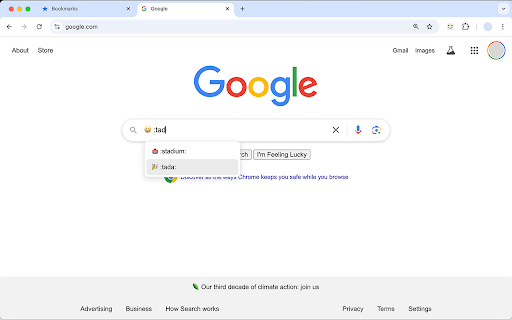
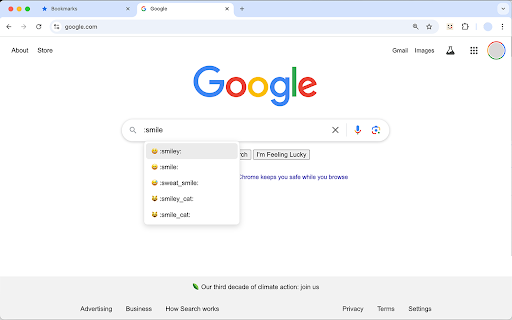
Easily insert emojis by typing ':' followed by a word, just like in Slack, Discord, GitHub and other apps
Add Emojis Anywhere, Anytime! ?
Say goodbye to the hassle of copying and pasting emojis! ?
Emoji Autocomplete brings you the power of emoji autocompletion — just like in Slack, Discord, GitHub, and more — right into your browser for use on any website.
Whether you're typing an email, chatting on social media, or leaving comments on forums, now you can easily insert emojis by simply typing : followed by a word, like :laughing or :heart. A pop-up will instantly show matching emoji suggestions, letting you quickly pick the perfect one for your message.
❤️ Top Features ❤️
✓ Universal compatibility: Works seamlessly across all websites, including Twitter, Reddit, Gmail, Facebook, LinkedIn, and more.
✓ Customizable control: You decide which websites will use emoji autocomplete—turn it on or off for specific sites with ease.
✓ Effortless typing: Simply type : followed by a keyword, and you’ll get a list of relevant emojis to choose from. Make your messages more engaging in seconds!
✓ Time-saving tool: Skip the need to search for emojis or copy-paste from other sources. With Emoji Autocomplete, your favorite emojis are always at your fingertips.
✓ Lightweight and fast: The extension is designed to be lightweight, ensuring it doesn't slow down your browsing experience.
? Why Choose Emoji Autocomplete? ?
✓ Save time: Whether you’re writing emails, comments, or social media posts, typing emojis with autocompletion speeds up your workflow.
✓ More fun: Make your online conversations more expressive, colorful, and fun by adding emojis effortlessly.
✓ User-friendly: No complicated setup. Just install, and you’re ready to use emoji shortcuts anywhere.
✓ Affordable: A small, one-time fee (enough for a coffee!) with a personal touch—reach out for a discount and get started without breaking the bank.
? How It Works ?
Simply start typing a colon (:) followed by a few letters, like :sun, and watch as a pop-up of matching emojis appears. This works on any website and integrates seamlessly with your typing flow.
| 分类 | 🛠️工具 |
| 插件标识 | lkicimekniagfoifhgkieaomcdhofpfn |
| 平台 | Chrome |
| 评分 |
★★★★★
5
|
| 评分人数 | 2 |
| 插件主页 | https://chromewebstore.google.com/detail/emoji-autocomplete/lkicimekniagfoifhgkieaomcdhofpfn |
| 版本号 | 1.2 |
| 大小 | 187KiB |
| 官网下载次数 | 31 |
| 下载地址 | |
| 更新时间 | 2025-02-10 00:00:00 |
CRX扩展文件安装方法
第1步: 打开Chrome浏览器的扩展程序
第2步:
在地址栏输入: chrome://extensions/
第3步: 开启右上角的【开发者模式】
第4步: 重启Chrome浏览器 (重要操作)
第5步: 重新打开扩展程序管理界面
第6步: 将下载的crx文件直接拖入页面完成安装
注意:请确保使用最新版本的Chrome浏览器
同类插件推荐

Screvi
Save and remember highlights and bookmarks from al

Emoji reactions for GitHub
Add emoji reactions to GitHub code diffs? Emoji re
Text Expander: Text Shortcuts and Forms
Automate repetitive typing with shortcuts for snip

ZenToons - Online video filter
This extension helps prevent overstimulation in ch

Recently
Keyboard shortcut to filter your current Google se

Emoji Keyboard - Emojivibe
The keyboard of emojis online - copy and paste any

Chrome markdown emojis
Allow to use markdown emojis code like :tada: ? in
Emoji Autocomplete
Easily insert emojis by typing ':' followe

Emoji everywhere
Easily add emoji to any text you writeType ":

Emoji Keyboard - Ilovemoji
Emoji Keyboard - www.ilovemoji.comThis is a tool t

Emoji Type
Allows you to type emojis in any text field by rep
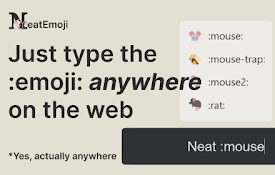
Neat Emoji - Text to emoji with AI
No more copy pasting emojis, just type :emoji: and

Sauce Lens
Influencer evaluation with instant data access on