
Inspect Chrome 插件, crx 扩展下载
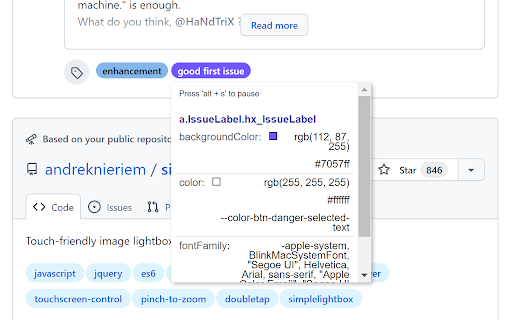
Inspect elements with css variables
Inspect extension for getting potencial css variables and easily copy them to clipboard. ???
This extension mimics and enhances the built-in devtools inspector by adding the explored css variables to the inspector box too. It allowes developers to easily extract any css variables used for styling the inspected element.
How to use it?
1. Activate the extension by clicking on it.
2. Inspect the document as if you were inspecting it with devtools' inspector.
3. Toggle 'inspect mode' and 'paused' mode by pressing 'alt + s' on your keyboard. ⌨️
4 . Copy the desired property's value by clicking on it ?️.
5. Remove inspector extension by clicking on it if you are done.
| 分类 | 💻开发者工具 |
| 插件标识 | mfgcajjmbmalmniplbocamfkppkcnhdh |
| 平台 | Chrome |
| 评分 |
★★★★★
5
|
| 评分人数 | 6 |
| 插件主页 | https://chromewebstore.google.com/detail/inspect/mfgcajjmbmalmniplbocamfkppkcnhdh |
| 版本号 | 1.0 |
| 大小 | 14.77KiB |
| 官网下载次数 | 87 |
| 下载地址 | |
| 更新时间 | 2022-03-02 00:00:00 |
CRX扩展文件安装方法
第1步: 打开Chrome浏览器的扩展程序
第2步:
在地址栏输入: chrome://extensions/
第3步: 开启右上角的【开发者模式】
第4步: 重启Chrome浏览器 (重要操作)
第5步: 重新打开扩展程序管理界面
第6步: 将下载的crx文件直接拖入页面完成安装
注意:请确保使用最新版本的Chrome浏览器
同类插件推荐

Zendesk Garden Inspect
Inspect web pages for Zendesk Garden design system

CSS Variable Sandbox
Playground for css variablesExtract css variables

Style inspect
Check all unique style been used in this pageExtra

Pause & Inspect
Pauses Javascript execution then inspects the elem

Save Inspect
Extension for Save Inspection and easy code-less e

Inspect CSS
The easiest way to inspect and edit CSSFeatures:
Inspect
Inspect elements with css variablesInspect extensi

Inspect Element
Inspect element for content, and margin.Inspect El
Quick Inspect Element
Quickly inspect HTML elements with a simple mouse

No-Inspect Web Editor - text & Images
Replace the need of using inspect element. Perfect

sourceditor
A simple and minimal extension that enables you to

Permanent Inspect Element
Save the changes you make to a page with Inspect E