
Mailtastic Chrome 插件, crx 扩展下载


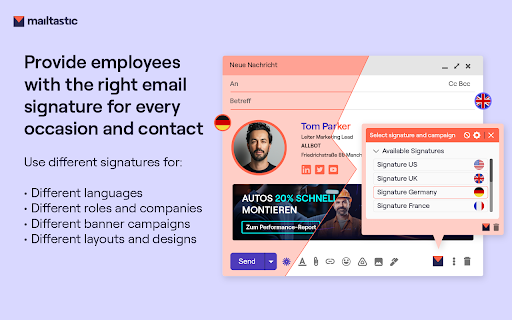

Mailtastic, for more through your email signatures
Overview
If your company uses Google Workspace, the Mailtastic Chrome extension is a game changer for your Gmail signatures.
With Mailtastic's signature management software and this extension, every employee can have a professional and consistent email signature without any manual setup by IT or employees.
************************************************************************
Benefits of Mailtastic + Chrome Extension for Gmail:
• Multiple Email Signatures and Banners
Employees can choose from various signatures, such as different languages, internal vs. external use, or representing different roles.
• Easy Installation
The Mailtastic Chrome Extension can be easily installed by any employee or centrally by IT on all workstations.
• Instant Automatic Synchronization
When the admin makes changes to signatures in Mailtastic, the latest signatures are immediately available to the Gmail user.
• Google Workspace Integration
Mailtastic syncs with your Google Workspace account, automatically pushing the correct signatures to each employee's Gmail.
************************************************************************
Why Use Mailtastic Signature Management Software?
• Set Up Professional Signatures
Create branded email signatures in minutes using the signature editor or templates. Include photos, logos, social media icons, and more.
• Organize Signatures by Department
Import employees from Google Workspace and organize them by department. Assign appropriate signatures to each department.
• Manage Signatures with Minimal Effort
Easily update and push signature changes to all employees. The signatures update automatically.
**************************************************************************
Learn more: www.mailtastic.com
| 分类 | 📝工作流程与规划 |
| 插件标识 | mnmdoenafmegociachigocoeonmknghl |
| 平台 | Chrome |
| 评分 |
★★★★☆
4.6
|
| 评分人数 | 19 |
| 插件主页 | https://chromewebstore.google.com/detail/mailtastic/mnmdoenafmegociachigocoeonmknghl |
| 版本号 | 1.0.1.22 |
| 大小 | 463KiB |
| 官网下载次数 | 4000 |
| 下载地址 | |
| 更新时间 | 2025-02-12 00:00:00 |
CRX扩展文件安装方法
第1步: 打开Chrome浏览器的扩展程序
第2步:
在地址栏输入: chrome://extensions/
第3步: 开启右上角的【开发者模式】
第4步: 重启Chrome浏览器 (重要操作)
第5步: 重新打开扩展程序管理界面
第6步: 将下载的crx文件直接拖入页面完成安装
注意:请确保使用最新版本的Chrome浏览器
同类插件推荐
Email Meter — Custom Signature
Add a signature to your emails based on personaliz

Paperflite Extension for Chrome
Start attaching content within Gmail, track how us

OneT&E
OneT&EGoogle Chrome extension for easy access

Gmail Signature
Load Gmail signatures via an external SSL folderWH

Personizer
Record your daily work and break times with the ha

Securden
The most secure, web-based password management for
Mailtastic
Mailtastic, for more through your email signatures

Free Gmail Signature - Light Pink
Free Gmail HTML email signature themed in Light Pi

RelayKit - Stunning emails made easy
Send Reports, Newsletters, Invitations & other

Cirrus Insight
Cirrus Insight brings professional email tools to

Showpad for Gmail
Personalize your interactions in Gmail by adding S
Email Signature Generator by cloudHQ
cloudHQ 提供的免费电子邮件签名生成器和签名模板Are you looking for an

Salesforce
Work with Salesforce records directly in your brow