
Optimizely Inspector Chrome 插件, crx 扩展下载
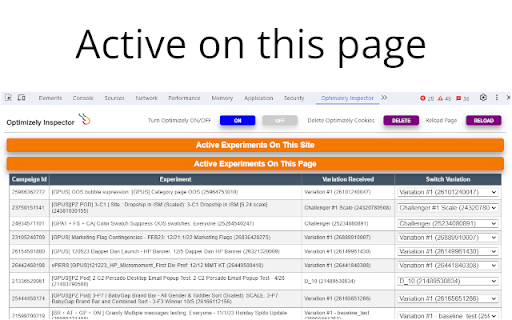
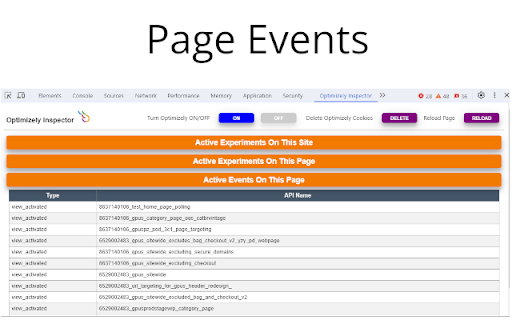
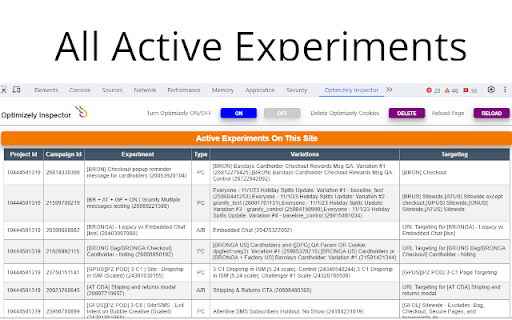
See all active Experiments on the site as well as the current page. Turn Optimizely Off, Delete Cookies and Change Variations.
Easy to use DevTools website debugger for Optimizely experiments.
*No signup required*
*Does not track your personal usage*
Will detect if Optimizely is running on the website and provide the following details:
• All currently running experiments on the entire site
• Page specific experiment details including which variation you are currently viewing
• Events that are triggered on the current page
• Ability to completely disable Optimizely (if a standard implementation has been used)
• Ability to delete all Optimizely cookies
• Ability to switch Variations
Getting started:
Optimizely Inspector adds a new tab in Chrome DevTools. The panel must be open for the debugger to work (reload the page if necessary).
To open the Chrome DevTools
• On Windows and Linux, press (Control-Shift-I)
• On Mac, press ⌘⌥I (Command-Option-I)
Select Optimizely Inspector
*UPDATE 07/22/2024*
• Bug fixes
*UPDATE 07/19/2024*
• Bug fixes
*UPDATE 12/22/2023*
• New UI with collapsible tables
• Reload button added
• Removed Google Universal Analytics Custom Dimension Number
• Bug fixes
*UPDATE 04/12/2022*
• Now provides ability to switch Variations
| 分类 | 💻开发者工具 |
| 插件标识 | nmbanhpecdbgelnpbjcdkjffjomcpmfl |
| 平台 | Chrome |
| 评分 |
★★★☆☆
3.3
|
| 评分人数 | 29 |
| 插件主页 | https://chromewebstore.google.com/detail/optimizely-inspector/nmbanhpecdbgelnpbjcdkjffjomcpmfl |
| 版本号 | 3.1 |
| 大小 | 573KiB |
| 官网下载次数 | 367 |
| 下载地址 | |
| 更新时间 | 2024-07-23 00:00:00 |
CRX扩展文件安装方法
第1步: 打开Chrome浏览器的扩展程序
第2步:
在地址栏输入: chrome://extensions/
第3步: 开启右上角的【开发者模式】
第4步: 重启Chrome浏览器 (重要操作)
第5步: 重新打开扩展程序管理界面
第6步: 将下载的crx文件直接拖入页面完成安装
注意:请确保使用最新版本的Chrome浏览器
同类插件推荐

MOPPI - my Optimizely Power Inspector
Get all runtime information to boost your quality

Toggle Experiment
A browser extension to inject the LocalStorage of

A/B Experiment Variant Switcher
Switch between A/B experiment variants for Convert

Optimizely Inspector
See all active Experiments on the site as well as

Conversion.com's Optimizely Chrome Extension
This extension allows you to learn information abo
A/B Pre-test Calculator by Speero
Speero's A/B Pre-test Calculator helps you ans

Optimizely Assistant
Debug your Optimizely experiments with useful Java

Adobe Experience Platform Debugger
Debug Adobe Experience Platform and Adobe Experien

Omnibug
Omnibug is a browser extension to decode and displ

Debugger for Google Analytics 4 (GA4)
Browser DevTools extension for debugging Google An

Adswerve - dataLayer Inspector+
DataLayer Tools for Digital AnalystsThe Adswerve d

Amplitude Event Explorer
Explore and debug your Amplitude JavaScript SDK in

Analytics Debugger
Your Single Source of Truth (SSOT) for debugging a